

File:Continuity check along a net (diagram).png

Summary
[edit | edit source].png&veaction=edit§ion=1)
.png&action=edit§ion=1)
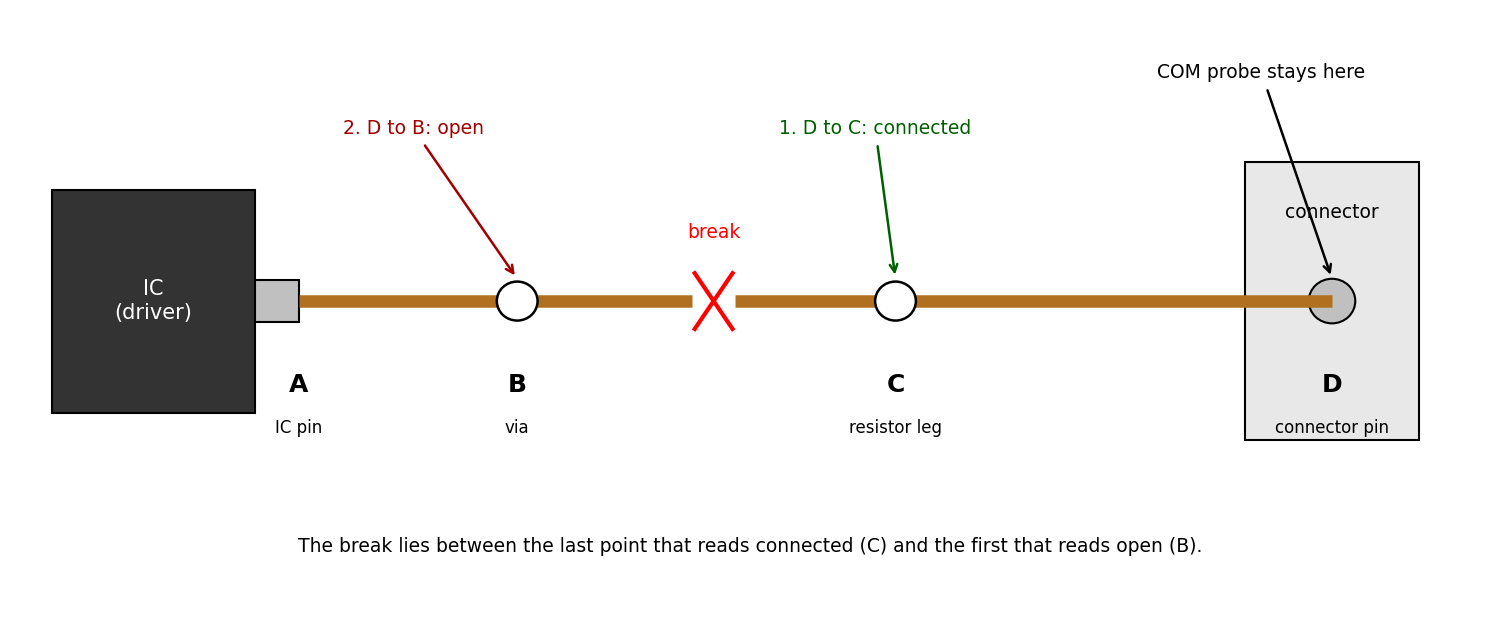
Diagram of finding an open track: one meter probe stays on the connector pin (D) while the other is moved back along the net through test points C and B towards the chip pin (A). D to C reads connected and D to B reads open, so the break lies between C and B. Used on Continuity Testing and Signal Tracing.
Source
[edit | edit source].png&veaction=edit§ion=2)
.png&action=edit§ion=2)
Drawn for this wiki. The method follows SparkFun's "How to Use a Multimeter" (follow the route of the copper until the break is found) and the continuity checks in Sinclair QL RGB Port Repair. No values are shown.
Author
[edit | edit source].png&veaction=edit§ion=3)
.png&action=edit§ion=3)
RetroTechCollection wiki.
Licence
[edit | edit source].png&veaction=edit§ion=4)
.png&action=edit§ion=4)
Released under CC BY-SA 4.0 (https://creativecommons.org/licenses/by-sa/4.0/).
File history
Click on a date/time to view the file as it appeared at that time.
| Date/Time | Thumbnail | Dimensions | User | Comment | |
|---|---|---|---|---|---|
| current | 14:47, 25 October 2026 | | 1,500 × 630 (55 KB) | Josh (talk | contribs) | Upload for repair-technique page |
You cannot overwrite this file.
File usage
The following page uses this file:
.png&oldid=30895)