

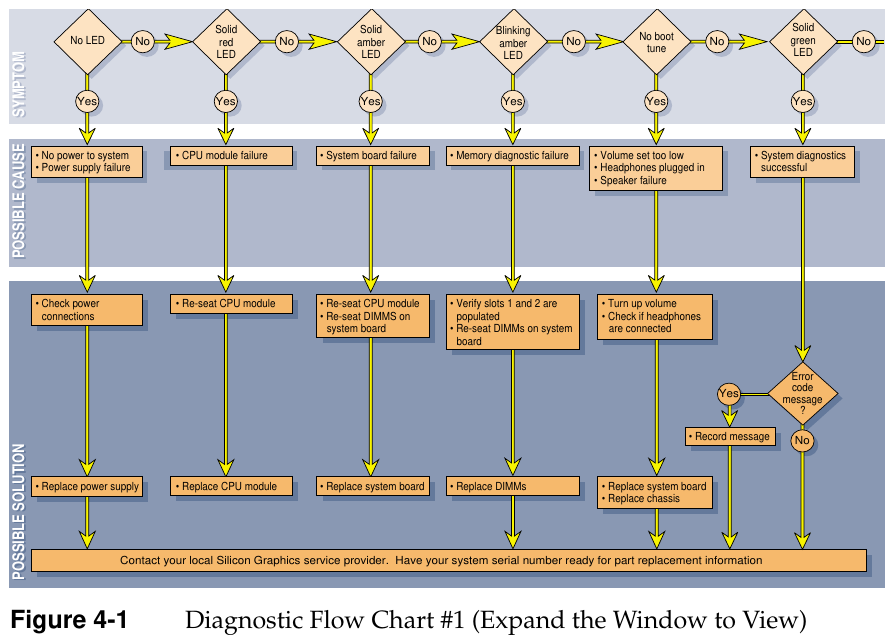
File:SGI O2 diagnostic flow chart (Hardware Reference Figure 4-1).png
Size of this preview: 800 × 568 pixels. Other resolution: 895 × 635 pixels.

Original file (895 × 635 pixels, file size: 99 KB, MIME type: image/png)
Summary
[edit | edit source].png&veaction=edit§ion=1)
.png&action=edit§ion=1)
Figure 4-1, "Diagnostic Flow Chart #1", from Silicon Graphics' O2 Workstation Hardware Reference Guide (007-3275-002), page 98, rendered from the PDF at 200 dpi and cropped. It maps each front-panel LED symptom (no LED, solid red, solid amber, blinking amber, no boot tune, solid green) to its possible cause and SGI's recommended solution.
Source
[edit | edit source].png&veaction=edit§ion=2)
.png&action=edit§ion=2)
File:SGI O2 Workstation Hardware Reference Guide (007-3275-002).pdf, page 98.
Author
[edit | edit source].png&veaction=edit§ion=3)
.png&action=edit§ion=3)
Silicon Graphics, Inc.
Licence
[edit | edit source].png&veaction=edit§ion=4)
.png&action=edit§ion=4)
Copyright Silicon Graphics, Inc. Reproduced from the manufacturer's manual for repair reference, with the source cited.
File history
Click on a date/time to view the file as it appeared at that time.
| Date/Time | Thumbnail | Dimensions | User | Comment | |
|---|---|---|---|---|---|
| current | 23:36, 21 October 2026 | | 895 × 635 (99 KB) | Josh (talk | contribs) | Upload for SGI O2 pages |
You cannot overwrite this file.
File usage
The following page uses this file:
.png&oldid=29413)