

File:TRS-80 PC-3 battery replacement (owner's manual 26-3590).png

Summary
[edit | edit source].png&veaction=edit§ion=1)
.png&action=edit§ion=1)
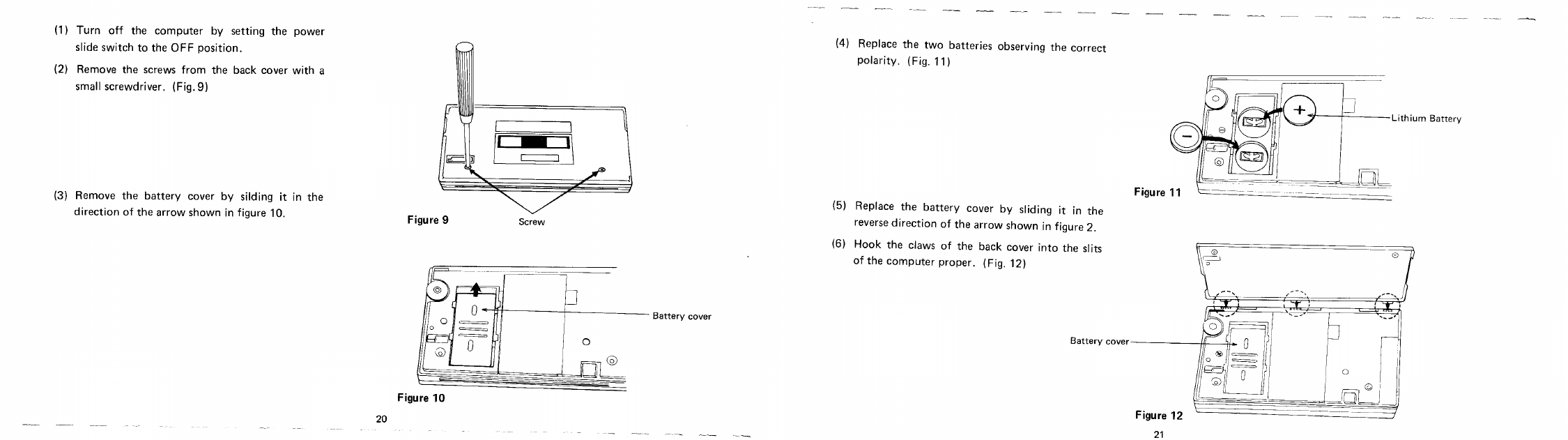
Steps 1 to 6 of "Installing the batteries" from Radio Shack's TRS-80 PC-3 Owner's Manual (catalogue number 26-3590), printed pages 20 and 21, side by side: removing the back cover screws, sliding off the battery cover, fitting the two CR-2032 lithium cells, and refitting the covers (Figures 9 to 12). Rendered at 130 dpi from the archive.org scan and converted to greyscale.
Source
[edit | edit source].png&veaction=edit§ion=2)
.png&action=edit§ion=2)
https://archive.org/details/PC-3_Owners_Manual_19xx_Tandy (retrieved 2026-10-21). The full manual is hosted here as File:Radio Shack TRS-80 PC-3 Owner's Manual (26-3590).pdf.
Author
[edit | edit source].png&veaction=edit§ion=3)
.png&action=edit§ion=3)
Radio Shack, a division of Tandy Corporation.
Licence
[edit | edit source].png&veaction=edit§ion=4)
.png&action=edit§ion=4)
Copyright Tandy Corporation. Hosted for preservation and repair reference, with the source cited.
File history
Click on a date/time to view the file as it appeared at that time.
| Date/Time | Thumbnail | Dimensions | User | Comment | |
|---|---|---|---|---|---|
| current | 21:20, 21 October 2026 | | 2,250 × 631 (59 KB) | Josh (talk | contribs) | PC-3 battery replacement steps from the Radio Shack owner's manual (pp. 20-21) |
You cannot overwrite this file.
File usage
The following page uses this file:
.png&oldid=29018)