

Nintendo Wii
.jpg) | |
| Nintendo Wii (RVL-001) on its stand, with a Wii Remote | |
| Specifications | |
|---|---|
| Manufacturer | Nintendo |
| Type | Home video game console |
| Released | 19 November 2006 (North America) 2 December 2006 (Japan) 8 December 2006 (United Kingdom) |
| Discontinued | October 2013 |
| Intro price | US$249.99, ¥25,000, £179.99 (launch) |
| Units sold | 101.63 million (to 31 March 2016) |
| CPU | IBM PowerPC "Broadway", 729 MHz |
| Memory | 24 MB 1T-SRAM and 64 MB GDDR3 (88 MB) |
| Storage | 512 MB NAND flash; SD card slot; 12 cm Wii and 8 cm GameCube discs |
| Display | AV Multi Out (composite, S-Video, RGB or component with the matching cable) |
| Sound | Macronix DSP, 121.5 MHz |
| Graphics | ATI "Hollywood", 243 MHz, 3 MB embedded memory |
| Power | External AC adapter RVL-002, 12 V DC 3.7 A; 45 W maximum consumption |
| Dimensions | 44 mm (W) × 157 mm (H) × 215.4 mm (D) |
| Weight | About 1.2 kg |
| OS / Firmware | Wii Menu |
| Predecessor | Nintendo GameCube |
| Successor | Wii U |
| Codename | Revolution |
| Model no. | RVL-001; RVL-101 (2011 revision); RVL-201 (Wii mini) |
The Nintendo Wii is Nintendo's seventh-generation home console. It went on sale in North America on 19 November 2006 at US$249.99, in Japan on 2 December 2006 at ¥25,000 and in the United Kingdom on 8 December 2006 at £179.99. It was developed under the codename Revolution, which gives its parts and accessories the model prefix RVL. Nintendo reported lifetime sales of 101.63 million consoles to 31 March 2016.[1]
The console reads 12 cm Wii discs and, on the original model, 8 cm GameCube discs, through a slot-loading drive. The original model (RVL-001) also has four GameCube controller ports and two GameCube memory card slots under a flap on the top.[1][2] Nintendo has stopped taking service requests for the RVL-001, RVL-101 and RVL-201.[3] Nintendo published no service manual or schematic. The repair pages here rely on Nintendo's owner's manuals and support articles, the WiiBrew wiki, iFixit's guides and repairs reported on the BitBuilt forum:
- Nintendo Wii Maintenance Guide
- Nintendo Wii Troubleshooting Guide
- Nintendo Wii Capacitor Replacement Guide
Models and board revisions
[edit | edit source]| Model | Released | Differences |
|---|---|---|
| RVL-001 | November 2006 | Original model. GameCube disc support, four GameCube controller ports and two memory card slots. Sold in white, then black from 2009 and 2010, and red in 2010 bundles[1] |
| RVL-101 | October 2011 (North America), November 2011 (Europe) | No GameCube controller ports or memory card slots, and its drive does not read GameCube discs. Designed to lie flat, with no stand[1][4] |
| RVL-201 (Wii mini) | December 2012 (Canada), March 2013 (Europe), November 2013 (United States) | Smaller redesign with a top-loading drive. No Wi-Fi, SD card slot, GameCube support or component video[1] |
WiiBrew notes that the missing GameCube ports can be added back to an RVL-101 board with some soldering.[4] The maintenance, troubleshooting and capacitor guides describe the RVL-001. The Wii mini is a different design with a top-loading drive.
The mainboard revision is printed on the board: the launch board in iFixit's teardown is marked C/RVL-CPU-01.[5] The RVL-CPU-01 is a six-layer board.[6] WiiBrew records two later revisions in detail. RVL-CPU-20 has simpler power circuitry; Nintendo updated every IOS to suit it, and many older IOS builds do not run on it. RVL-CPU-30, from early 2009, differs from it only in a smaller Broadway processor.[7] Later boards, including those in the RVL-101, have four layers.[4]
Hardware
[edit | edit source]Nintendo's specification
[edit | edit source]Nintendo's Japanese setup manual prints the console's specification:[2]
| Item | Nintendo's figure |
|---|---|
| Power input | DC 12 V 3.7 A |
| Maximum power consumption | 45 W |
| Wireless | 2.4 GHz band; 802.11b/g and Bluetooth 2.0; about 50 mW (Wi-Fi) and 1 mW (Bluetooth) |
| Front | SD card slot |
| Top | Four GameCube controller ports, two GameCube memory card slots |
| Rear | Two USB ports, Sensor Bar socket, AV Multi Out connector, AC adapter socket |
| Operating temperature | 10-40 °C |
| Operating humidity | 20-80 % |
| Dimensions | 44 mm (W) × 157 mm (H) × 215.4 mm (D) |
| Weight | About 1.2 kg |
| Laser | Semiconductor laser, 662 nm (typical), 0.9 mW maximum from a resin objective lens of NA 0.6 |
The North American manual gives the same laser figures and the wavelength range 647-687 nm, and describes the Wii as a Class I laser product.[8]
Main chips
[edit | edit source]The processor is IBM's Broadway, a PowerPC chip built on a 90 nm process and clocked at 729 MHz. ATI's Hollywood package holds the graphics processor at 243 MHz with 3 MB of embedded memory, the audio and input/output logic, and Starlet, an ARM coprocessor that handles input/output and security. Hollywood also carries 24 MB of 1T-SRAM, and 64 MB of GDDR3 sits on the mainboard, for 88 MB in total.[1][9] System software, channels and save data live in 512 MB of NAND flash.[9]
A Macronix MX23L4005 chip holds the GameCube font set, the real-time clock, a small SRAM for GameCube-mode settings, and power management; WiiBrew traces its pin 1 to the POWER button.[10] A CR2032 lithium coin cell behind a cover on the underside of the console keeps that clock running; removing it resets the system time.[2][8][11]
Wi-Fi is a Mitsumi DWM-W004 module on the mainboard, with two antenna leads; Bluetooth for the Wii Remotes is on a separate small board.[9][5][12]
Disc drive
[edit | edit source]The slot-loading drive reads Wii and GameCube discs but not DVD-Video or CDs. It is controlled by a Matsushita MN102-family chip and connects to the mainboard with a 32-way ribbon cable and a 12-pin power connector carrying 3.3 V, 5 V and 12 V.[13] The drive slot lights blue and blinks when a disc goes in, and blinks when WiiConnect24 receives a message.[8]
Power
[edit | edit source]The Wii runs from an external AC adapter, model RVL-002, rated 12 V 3.7 A on the output. The Japanese RVL-002(JPN) takes 100 V at 50/60 Hz, measures 136 × 55 × 43 mm and weighs about 400 g.[2] Nintendo describes a circuit breaker in the adapter that an accessory fault or a mains surge can trip, and a two-minute reset that clears it.[3][14]
The Power LED shows green when the console is on, orange in standby with WiiConnect24 on and red in standby with WiiConnect24 off; it does not go out when the console is switched off.[8][2] The LED holds two dies. WiiBrew traces green to power on Hollywood and red to Broadway's DC-DC converter being off, so orange means Hollywood is powered while Broadway is not.[15]
Ports
[edit | edit source]The rear has two USB ports, the Sensor Bar socket, the AV Multi Out connector and the DC input. The SD card slot and the SYNC button are behind the front flap, beside the POWER, RESET and EJECT buttons.[8][2] The AV Multi Out connector gives composite video on every console, S-Video on NTSC consoles and RGB on PAL consoles with the matching cable, and component video up to 480p or 576p with the component cable.[16]
Common faults
[edit | edit source]The Nintendo Wii Troubleshooting Guide covers these in detail.
- No power or no Power LED. Nintendo's first step is the two-minute AC adapter reset.[14]
- Disc read errors on several discs. Nintendo's answer was a replacement console;[17] repairers clean the lens, then check the drive board fuses and the laser.[13][18]
- A dark picture that brightens as the console warms up. BitBuilt members trace it to the surface-mount electrolytic capacitors in the video output filter. See the Nintendo Wii Capacitor Replacement Guide.[19]
- Overheating and sudden shutdowns from blocked vents or a failed fan.[20][2]
History
[edit | edit source]Nintendo began work on the console soon after the GameCube went on sale, and showed it as "Revolution" at E3 in May 2005. Black consoles went on sale in Japan in August 2009, in Europe in November 2009 and in North America in May 2010; red bundles followed in 2010. The RVL-101 replaced the original model in Europe and the United States in 2011, and the Wii mini followed in December 2012. Nintendo ended production of the Wii in October 2013 and kept making the Wii mini for some time after.[1] The Wii U, released in 2012, plays Wii discs.[1]
Documentation
[edit | edit source]The Nintendo Wii Documentation page describes the manuals hosted here:
- Wii Operations Manual: System Setup (USA): components, setup, cautions and troubleshooting.
- Wii Operations Manual: Channels and Settings (USA): settings, data management and troubleshooting.
- Wii取扱説明書 準備編 (Japan): the only one of the three with a specification table.
Gallery
[edit | edit source]-
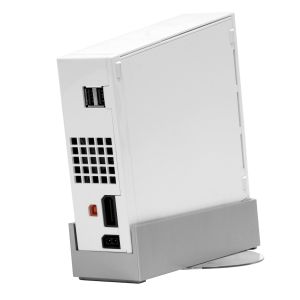 Rear panel: USB ports, exhaust vent, Sensor Bar socket, AV Multi Out and DC input
 -
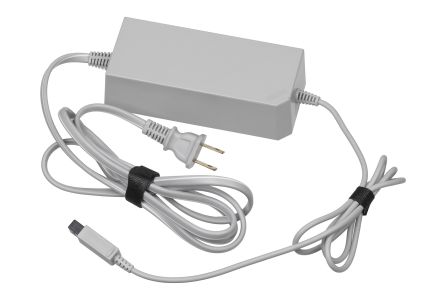 AC adapter RVL-002, North American version
 -
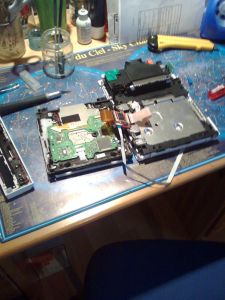 An opened Wii with the disc drive turned over to show its board (photo: Antoine Turmel, CC BY 2.0)


Related pages
[edit | edit source]- Nintendo Wii Maintenance Guide
- Nintendo Wii Troubleshooting Guide
- Nintendo Wii Capacitor Replacement Guide
- Nintendo Wii Documentation
- Nintendo GameCube
- Capacitor Failure Symptoms
References
[edit | edit source]- ↑ 1.0 1.1 1.2 1.3 1.4 1.5 1.6 1.7 "Wii", Wikipedia, retrieved 20 October 2026. Used for release dates, launch prices, sales, the codename and model prefix, the black and red console editions, the RVL-101 and Wii mini release dates, and the end of production in October 2013.
- ↑ 2.0 2.1 2.2 2.3 2.4 2.5 2.6 Nintendo Co., Ltd., Wii取扱説明書 準備編 (Wii Operations Manual, setup volume), RVL-001(JPN), form MAA-RVL-S-JPN-C2, p. 16 (care of the air vents), pp. 26-27 (parts and functions, Power LED colours, CR2032 battery cover) and p. 68 (specifications of the console and of the RVL-002(JPN) AC adapter). Hosted as File:Nintendo Wii Operations Manual Setup (Japan, MAA-RVL-S-JPN-C2).pdf.
- ↑ 3.0 3.1 Nintendo of America, "Wii Will Not Turn On and Has No Power Light", Nintendo Support, retrieved 20 October 2026. Symptoms covered, the AC adapter circuit breaker, and the end of Wii service requests for RVL-001, RVL-101 and RVL-201.
- ↑ 4.0 4.1 4.2 WiiBrew, "Wii Family Edition". Community wiki. RVL-101: no GameCube controller ports or memory card slots (they can be added back with some soldering), drive cannot read GameCube discs, four-layer boards.
- ↑ 5.0 5.1 Sterling Hirsh, "Nintendo Wii Teardown", iFixit. Community teardown of an RVL-001 to the mainboard. Board photographs (steps 19-21) show the silkscreen "C/RVL-CPU-01", the Mitsumi DWM-W004 Wi-Fi module and the electrolytic capacitors of the DC-DC converter section.
- ↑ BitBuilt forum, "Wii audio repair", thread started by deafwii, July 2022. Community repair report on a six-layer C/RVL-CPU-01: dark picture at power-up, electrolytics replaced, C90 on the 12 V line next to diode D4 and the audio amplifier.
- ↑ WiiBrew, "RVL-CPU-20" and "RVL-CPU-30". Community wiki: simpler power circuitry on RVL-CPU-20, every IOS updated for it, many older IOS builds no longer working; RVL-CPU-30 released early 2009 with a smaller Broadway.
- ↑ 8.0 8.1 8.2 8.3 8.4 Nintendo of America, Wii Operations Manual: System Setup (61914J), 2009, p. 3 (laser specification), pp. 4-5 (components, Power LED colours, battery cover), p. 10 (usage precautions and ventilation) and pp. 36-37 (troubleshooting). Hosted as File:Nintendo Wii Operations Manual System Setup (USA, 61914J).pdf.
- ↑ 9.0 9.1 9.2 WiiBrew, "Hardware". Community wiki: processor and memory summary, Macronix DSP at 121.5 MHz, 512 MB NAND, Mitsumi DWM-W004 Wi-Fi module, Bluetooth, two USB 2.0 ports, SD/SDHC.
- ↑ WiiBrew, "Hardware/MX23L4005". Community wiki: RTC, SRAM, GameCube fonts and power management in one chip; observed pin functions.
- ↑ Andrew Bookholt, "Nintendo Wii Heat Sink Replacement", iFixit. Community guide for the RVL-001: screw types and lengths, battery door with captive screw (removing it resets the system time), drive shield with sharp edges, four 9 mm drive screws, fan, antennas, EMI fingers, mainboard cover with a thermal pad for the wireless chip on some models, and fragile thermal pads under the heat sink.
- ↑ iFixit, "Nintendo Wii Troubleshooting". Community wiki: AC adapter reset, Bluetooth and Wi-Fi boards that stop the console booting if faulty or loose, overheating shutdowns, heat in WiiConnect24 standby with the fan off, drive cable and fuse faults, fan noise.
- ↑ 13.0 13.1 WiiBrew, "Hardware/Disc Drive". Community wiki: MN102 drive controller, lens cleaning, power connector and data cable pinouts.
- ↑ 14.0 14.1 Nintendo of America, "How to Reset a Wii AC Adapter", Nintendo Support, retrieved 20 October 2026. Two minutes unplugged at both ends; check for the "Wii" and RVL-002 (USA) moulding and for damage; plug straight into a wall socket.
- ↑ WiiBrew, "Hardware/Power LED". Community wiki: green and red LED dies, their triggers, and the red, yellow and green states.
- ↑ WiiBrew, "Video output". Community wiki: video modes and cables by region.
- ↑ Nintendo of America, "Wii Disc Read Errors (Multiple Discs)", Nintendo Support, retrieved 20 October 2026.
- ↑ bushing, "Nintendo Wii Drive Board Fuse Replacement", iFixit. Community guide: a drive that will not spin up, will not eject or "eats" discs may have one or two blown fuses on the drive board; test with a continuity meter and replace with 0603 fuses.
- ↑ BitBuilt forum, "Trying to find good replacements for Wii SMD electrolytic capacitors", December 2022 to November 2024. Community thread: very dark picture that lightens over time; five SMD electrolytics, the one nearest the AV out on the 12 V line needing 16 V; a 10 V capacitor by the USB ports; 220 µF 10 V parts of 6.3 × 7.7 mm fitted and the repair confirmed.
- ↑ Nintendo of America, Wii Operations Manual: Channels and Settings (62994L), pp. 72-73 (troubleshooting: "The power shuts off suddenly"). Hosted as File:Nintendo Wii Operations Manual Channels and Settings (USA, 62994L).pdf.