

Osborne Executive
 | |
| Osborne Executive with the keyboard lowered | |
| Specifications | |
|---|---|
| Manufacturer | Osborne Computer Corporation |
| Type | Portable computer |
| Released | 1983 |
| Intro price | US$2,495 |
| CPU | Zilog Z80A at 4 MHz |
| Memory | 124 KB bank-switched RAM on a separate memory board; 8 KB EPROM |
| Storage | Two half-height 5.25-inch double-density drives (ALPS), 200 KB per diskette in Osborne format |
| Display | 7-inch amber CRT (Zenith), 80 × 24 characters |
| Sound | Audio transducer |
| Ports / interface | Two RS-232C (Z80A SIO/2), IEEE-488 configurable as Centronics (6821), composite video |
| Power | 110/220 V AC, 50/60 Hz, 55 W maximum |
| Dimensions | 20.5 × 9 × 13 in (closed) |
| Weight | 28.5 lb |
| OS / Firmware | CP/M Plus (CP/M 3.0); UCSD p-System |
| Predecessor | Osborne 1 |
| Successor | Osborne Vixen |
| Codename | OCC-2 |
The Osborne Executive (OCC-2) is the second portable computer from Osborne Computer Corporation, a larger and better-equipped successor to the Osborne 1. It has an 80-column amber screen, a separate memory board with 124K of bank-switched RAM, two serial ports, a cooling fan and a power-on self-test, and runs CP/M Plus. BYTE previewed it in May 1983 at $2,495, alongside the Executive II, which added an 8088 coprocessor board for IBM PC software, at $3,195.[1]
Specifications
[edit | edit source]Osborne's Executive Reference Guide gives the published figures:[2]
| Item | Osborne's figure |
|---|---|
| CPU | Z80A, 8-bit data word, 4 MHz primary clock |
| Memory | 124K RAM (bank-switched); 4K video RAM and 4K video-attribute RAM; 8K EPROM; 4K character-font RAM; 2K scratchpad RAM; RAM cycle time 200 ns, ROM cycle time 300 ns |
| Serial ports | Z80A SIO/2, two female DB-25 connectors, 50 to 9600 baud selected in software |
| Parallel port | Motorola 6821 PIA, IEEE-488, configurable as a Centronics-type port |
| Display | 7-inch amber screen, 24 lines of 80 characters, 8 × 10 dot cell; 12-bit display memory (7-bit ASCII plus reverse video, blink, full/half intensity, underscore and alternate character set) |
| Keyboard and controls | 69-key detachable keyboard with 12-key numeric pad; power switch, RESET button, brightness and contrast on the front panel |
| Drives | Two half-height drives, double-density soft-sectored 5.25-inch media; 20 ms track to track; rotation 200 ms ±2 % |
| Diskette capacity | Osborne single density 100K (92K for CP/M); Osborne double density 200K (185K); Xerox single density 90K; IBM double density 160K; DEC double density 180K |
| Size and weight | 20.5 × 9 × 13 inches closed; 28.5 lb (shipping weight 37 lb) |
| Power | 110/220 V AC, 50/60 Hz, 55 W maximum |
| Environment | 32 to 95 °F operating, 95 % relative humidity non-condensing |
BYTE's preview quotes 128K bytes of RAM and 204K per disk; Osborne's own documents give 124K and 200K.[1][2] The preview also notes that the drives are single-sided.[1]
Architecture and memory
[edit | edit source]The electronics are split across a logic board and a memory board, which Osborne's diagnostics treat as separate field-replaceable units.[3] The memory board carries bank 0 of 64K and bank 1 of 60K. On the logic board, the diagnostics test bank 6 (the ROM's RAM), bank 7 (video and attribute RAM) and bank 8 (the ROM, by checksum), and a bank-uniqueness test checks that a write to one bank does not appear in another.[3] The Reference Guide describes nine banks: 0, 7 and 8 reserved for the system, bank 1 for user programs, and banks 2 to 6 not implemented.[2]
Osborne's schematic for the main logic board, drawing 1K00035, carries a power and ground table that locates the main devices:[4]
| Device | Position |
|---|---|
| Z80A CPU | UD22 |
| Z80A SIO (serial ports) | UD4 |
| 6821 PIA (two) | UD8, UD12 |
| 1793 floppy disk controller | UB17 |
| 9216 data separator | UA14 |
| 2764 ROM | UD18 |
| 8253 counter/timer | UD1 |
| 6116 static RAM | UA11, UB12, UD15; UA3, UA4, UC3, UC6 (200 ns) |
| 23.9616 MHz oscillator | X1 |
The Reference Guide names the disk controller as a 1797.[2] Check the part fitted to your board.
Power supply
[edit | edit source]The supply is internal, mounted on the monitor shield, and the machine has a cooling fan. The mains input is selected for 115 V or 220 V. There are two fuses, and they are different parts:[5]
- AC power panel fuse, in a slide-out compartment: 2 A 125 V fast-blow for 115 V operation, 1 A 250 V fast-blow for 220 V.
- Power supply fuse: 1 A 250 V. If all the DC voltages are missing, this is the fuse Osborne says to replace.
The Reference Guide lists the safety features as a cooling fan, a three-wire earthed plug, three primary-circuit protection points, a switchable fuse on the AC panel, a thermal cut-off that opens above 150 °F inside the case, and a supply that shuts off under overload.[2]
Expected measurements
[edit | edit source]Osborne's limits at the DC connector. Pin 4 is −12 V on the Executive; on the Osborne 1 the same pin is 0 V.[5]
| Pins | Output | Minimum | Maximum | Ripple |
|---|---|---|---|---|
| 1 and 7 | +12 V | +11.40 V | +12.60 V | 150 mV p-p |
| 2 and 6 | +5 V | +4.75 V | +5.25 V | 50 mV p-p |
| 3 and 5 | Common | |||
| 4 | −12 V | −11.40 V | −12.60 V | 150 mV p-p |
Measure pins 1 and 7, pins 2 and 6, and pin 4, each against pins 3 and 5. Osborne adds: check the supply with and without a load applied; a large difference may indicate a short circuit in one of the modules.[5] The logic board's DC input P7 has the same pinout, with C10 (47 µF 10 V) on +5 V, C11 (22 µF 16 V) on +12 V and C39 (22 µF 16 V) on −12 V.[4]
Disk drives
[edit | edit source]The drives are ALPS half-height units with their own alignment procedure in section 8.3.0 of the Field Service Manual. Drive A is jumpered HM and DS1 and carries the terminator resistor in socket R21; drive B is jumpered HM and DS2 with no terminator. Osborne limits a head-cleaning diskette to no more than three seconds of use.[5]
Main logic board jumpers
[edit | edit source]Osborne's normal configuration, from section 9.5.0 of the Field Service Manual. Check it before condemning either board.[5]
| Jumper | Normal setting | Function |
|---|---|---|
| J1 | Pins 1 and 2 | Z80 jumper placement |
| J2 | Pins 3 and 4 | Z80 jumper placement |
| J3 | Pins 1 and 2 | Z80 jumper placement |
| J4 | Pins 2 and 3 | Write enable input |
| J5 | Pins 1 and 2 | Z80 jumper placement |
| J6, J9, J10 | Open | |
| J8 | Open | Z80 jumper placement |
| J11 | Pins 1 and 2 | SIO +12 V input |
| J12 | Pins 1 and 2 | Modem ground |
| J13 | Pins 1 and 2 | Serial ground, pin 1 to the right |
The schematic shows that J1, J3, J5 and J8 select the ROM type (2732, 2764 or 27128) for the two ROM sockets.[4]
Power-on self-test
[edit | edit source]The ROM runs a self-test at power-up and reports it on screen. Its five messages are PERFORMING SELF-TEST; COMPUTER NOT WORKING PROPERLY, PLEASE CONTACT AN OSBORNE DEALER, PROCEED AT YOUR OWN RISK!; LOADING SYSTEM; DISK IS NOT A VALID SYSTEM DISKETTE; and BOOT ERROR. The failure message does not say which part of the test failed.[6] The meanings and the follow-up checks are on the Osborne Executive Troubleshooting Guide.
Things that are not faults
[edit | edit source]- Osborne states that the Executive needs no scheduled preventive maintenance. It recommends cleaning the drive heads as conditions require and the case with mild soap and water.[5]
- The Executive runs CP/M Plus, not CP/M 2.2, so software written for CP/M 2.2 may misbehave on a working machine.[6]
- A flashing sign-on message is a keyboard fault, not a vertical hold fault.[5]
Documentation
[edit | edit source]| Main logic board | Documents |
|---|---|
 |
Osborne Executive OCC2 Schematic: the 15 schematic sheets Osborne Field Service Manual (Revision 2.0): the Field Service Manual, chapters 8 and 9 Osborne 1 / Executive Diagnostic Procedures Jan84: the diagnostic diskette Osborne Executive Error Message Listing Feb84: ROM, BIOS and application messages Osborne Executive Reference Guide 1983: system specifications Guide volume 0, volume 2, volume 4 |
Osborne published no parts list for the Executive in any of these documents; component values are printed on the schematic sheets. The capacitors are listed on the Osborne Executive Capacitor Replacement Guide.
Gallery
[edit | edit source]-
 Osborne Executive, open
 -
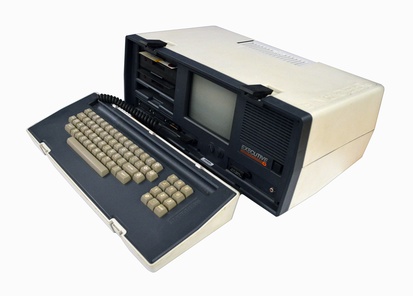 Osborne Executive with the keyboard detached
 -
 Sign-on screen on the 7-inch amber CRT
 -
 Main logic board


Related pages
[edit | edit source]- Osborne Executive Maintenance Guide
- Osborne Executive Troubleshooting Guide
- Osborne Executive Capacitor Replacement Guide
- Osborne 1
- Osborne Vixen
References
[edit | edit source]- ↑ 1.0 1.1 1.2 Jerry Pournelle, "The Osborne Executive and the Executive II", BYTE, vol. 8 no. 5, May 1983, pp. 38 to 43. https://archive.org/details/byte-magazine-1983-05
- ↑ 2.0 2.1 2.2 2.3 2.4 Osborne Computer Corporation, Osborne Executive Reference Guide, part no. 3F00186-00, 1983, hosted at Osborne Executive Reference Guide 1983. System specifications, pp. 423 to 428 (PDF pages 433 to 436).
- ↑ 3.0 3.1 Osborne Computer Corporation, OCC-1/Executive Computer Diagnostic Procedures, SBXNED010, prepared by Xerox Corporation, January 1984, hosted at Osborne 1 / Executive Diagnostic Procedures Jan84. Executive diagnostic diskette: logic board tests, p. 31; memory board tests, p. 32.
- ↑ 4.0 4.1 4.2 Osborne Computer Corporation, Schematic, OCC2 Main Logic PC Board, drawing 1K00035, 15 sheets, dated March 1983, hosted at Osborne Executive OCC2 Schematic. Sheet 1, power supply section and power and ground table; sheet 2, oscillator; sheet 11, video and sync output.
- ↑ 5.0 5.1 5.2 5.3 5.4 5.5 5.6 Osborne Computer Corporation, Osborne Field Service Manual, Revision 2.0, part no. 2F00040-00, 1983, hosted at Osborne Field Service Manual (Revision 2.0). Chapter 8 (Executive disassembly, fuse replacement 8.1.8, ALPS drive alignments 8.3.0, Zenith 7-inch monitor adjustments 8.4.0); chapter 9 (troubleshooting), with the DC connector table in 9.1.1.6 (PDF page 223), the drive jumper and terminator table (9.2.2.3), the main logic board jumper table (9.5.0) and preventive maintenance (9.7.0).
- ↑ 6.0 6.1 Osborne Computer Corporation, Executive Error Message Listing, SBXNES040, prepared by Xerox Corporation, February 1984, hosted at Osborne Executive Error Message Listing Feb84. Executive ROM informational and error messages.