Nintendo Entertainment System 72-Pin Connector Replacement
From RetroTechCollection
A PAL NES-001 taken apart: lower case with the controller and switch leads (top left), upper case, upper shield, game pak mech with its spring (bottom left), cartridge door, screws, and the mainboard with the black 72-pin connector and the RF modulator still fitted (photo: PantheraLeo1359531, CC BY 4.0)
The 72-pin game pak connector is the part of the front-loading NES-001 Nintendo Entertainment System that Nintendo's service centres replaced most often. Nintendo's Authorized Service Center Manual says that the majority of service needs for the original Control Deck involve this connector, that contamination such as dirt, carpet fibres and sugar-based substances makes the unit show a flashing screen and power LED, and that every original Control Deck serviced must have its 72-pin connector replaced and the customer's game paks cleaned, or the fault returns.[1]
The connector is not soldered to the NES-001 mainboard. It slides onto the board's gold edge contacts, which Nintendo calls the PCB lands, and the game pak plugs into its other side. Nintendo's reconditioning procedure removes it, cleans the lands and fits a new connector.[1] The second cause of failure is mechanical: pressing games down into the carrier bends the connector's spring contacts out of position over the years, so they stop pressing firmly on the cartridge.[2]
The top-loading NES-101 is a different design: its 72-pin connector is a friction-type part soldered into the board, and Nintendo classed that console as non-repairable.[3]
The screen flashes or stays blank and the power LED blinks with a game inserted. Nintendo's consumer leaflet gives the causes as a game pak not pushed fully in and dirty connectors.[4]
Games start only after several insertions instead of first time.[2]
Solid colour or blank screens and scrambled pictures, which Nintendo's leaflet also puts down to dirty connectors.[4] Nintendo's service manual notes that the symptoms vary with how badly the connector is contaminated.[1]
Nintendo's technician fault table puts a continually resetting display down to the CIC, the 7404, the 4 MHz oscillator, the power/reset switch assembly or the board's soldering, so work through the Nintendo Entertainment System Troubleshooting Guide if a clean connector does not cure it.[5]
Clean the game you are testing with first. Nintendo's manual warns that dirty game paks damage a new connector.[6]
Nintendo warns that the metal shields are very sharp and recommends wearing gloves when handling them.[1]
Nintendo's procedure calls for a ground strap when handling a game pak board, to prevent electrostatic discharge.[6] Use the same precaution with the console's mainboard.
The boil method below uses boiling water. Handle the connector with tongs.[7]
Nintendo part 22, "Connector, 72P Game Pak".[1] Aftermarket connectors are sold; Dave Farquhar and ConsoleMods both found a cleaned original connector more reliable than a replacement, and refurbished original connectors are also sold.[7][2]
Isopropyl alcohol, 91 % or stronger, a microfibre cloth and an old credit card
Nintendo used a "special flat" bit or an "LH" bit, depending on the screw.[6] Dave Farquhar lists slotted screws on early cartridges and 3.8 mm security screws on later ones.[7]
Towel and Nintendo's cleaning solution
Water and pumice, 20 parts water to 1 part pumice, for the game pak contacts.[6]
Removing the six base screws (Nintendo ASC manual, p. 26)
Unplug the AC adapter, the controllers and the video leads.
Turn the console upside down and remove the six Phillips screws from the base. Turn it the right way up and lift off the upper housing.[1][9]
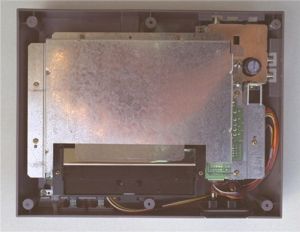
The upper shield, with the RF modulator at top right (Nintendo ASC manual, p. 26) Remove the nine Phillips screws holding the upper shield and the RF modulator: seven in the shield and two at the modulator, one to the left of the RF jack and one in front of the A/V jacks.[1][9]
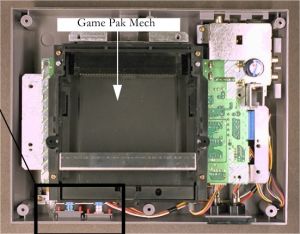
The game pak mech (cartridge carrier) after the upper shield is off (Nintendo ASC manual, p. 27) Remove the six screws from the game pak mech. Two of them, the middle pair, are longer and silver; note their holes for reassembly.[1][9][7]
Slide the game pak mech forwards, away from the connector, and lift it off the board.[9][8]
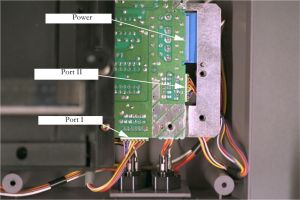
The power, port II and port I leads to unplug (Nintendo ASC manual, p. 27) Lift the PCB far enough to reach its leads and unplug the port I, port II and power switch connectors. Take care with the shields' edges.[1]
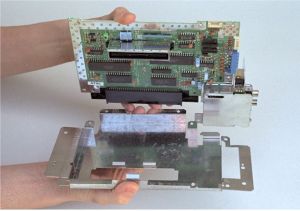
Separating the PCB from the lower shield (Nintendo ASC manual, p. 28) Lift the PCB out of the lower housing and separate it from the lower shield.[1]
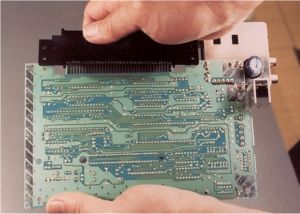
Solder side of the PCB with the 72-pin connector on its front edge (Nintendo ASC manual, p. 28) Pull the 72-pin connector off the front edge of the PCB.[1][7]
Inspect the PCB lands for dirt and damage, and clean them. Nintendo's procedure requires this but does not name a cleaner.[1]
Do not use metal polish, sandpaper or a magic eraser on gold contacts. ConsoleMods warns that they can remove the plating and permanently damage the contacts.[2]
Skip this section if you are fitting a new connector. ConsoleMods gives two ways of bending the spring contacts back up, which can be used together.[2]
Put the connector in a pot of water, front side down, with enough water to cover it. The plastic does not melt.
Bring the water to the boil and boil for 30 minutes.
Take the pot off the heat and let it cool.
Rinse the connector with isopropyl alcohol and let it dry completely. ConsoleMods suggests leaving it for 24 hours.
For a stubborn connector, let it cool and boil it again.
Dave Farquhar's version boils the connector in water with detergent for about 10 minutes, plugs a cartridge in and out of it a few dozen times, then boils it for another 10 minutes in clean water and lets it dry thoroughly before reassembly.[7]
Slide a large safety pin, needle or narrow tweezers under one contact and lever it gently upwards. Do not lift it far enough to touch the top of the connector, and do not pull it so far that it pops out and breaks off.
Repeat for every contact, lifting each to the same height.
Check that all the contacts sit at the same height; ConsoleMods stresses that a consistent level matters for the connector to work.
Nintendo's manual says every game pak that goes into a reconditioned console must be cleaned, tested and inspected, because dirty game paks damage the new connector.[6]
Remove the security screws from the back of the game pak with the bit that fits them exactly, so the heads are not damaged.[6]
Separate the housings and lift out the PCB, wearing a ground strap.[6]
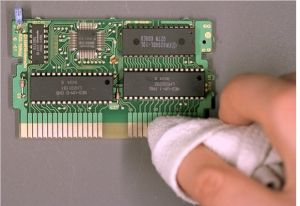
Scrubbing a game pak's contacts with a towel and Nintendo's water and pumice solution (Nintendo ASC manual, p. 32) Apply the water and pumice solution to the gold contacts and scrub side to side with a towel until the dirt is gone. Nintendo warns that excessive scrubbing removes the plating.[6]
Wipe the contacts with a dry part of the towel to remove the residue.[6]
Clean the inside of the housings, especially round the edge connector opening.[6]
Reassemble the game pak and test it. Nintendo's servicers referred a game that still failed to its manufacturer.[6]
The caution label on the back of Nintendo's game paks says not to clean them with benzene, thinner, alcohol or similar solvents; the label is legible in Nintendo's own photograph of the procedure.[6] Dave Farquhar cleans cartridge contacts with a pencil eraser and 91 % isopropyl alcohol, and also mentions metal polish, which ConsoleMods advises against.[7][2]
Push the new or restored connector fully onto the front edge of the PCB.[1]
Refit the lower shield, put the PCB back in the lower housing and reconnect the port I, port II and power switch leads. Do not pinch or damage the wire harnesses.[1]
Slide the game pak mech back into place. The lip at its front tip must go under the PCB, not on top of it.[1][9] iFixit notes that if the lip ends up on top, the carrier bows and the cartridge spring mechanism binds.[8]
Refit the six game pak mech screws, with the two long silver screws in the middle holes.[1][9]
Refit the upper shield with its seven screws and the two RF modulator screws, then the upper housing and the six base screws.[1][9]
Insert a cleaned game and switch on. ConsoleMods reports that a correctly restored connector boots clean games at the first attempt.[2]
If a cleaned game still makes the screen flash and the power light blink, clean it again and check the alignment. After that, Nintendo's fault table points at the CIC, the 7404, the 4 MHz oscillator and the power/reset switch assembly.[4][5]
Nintendo's servicers tested each repaired Control Deck with a port test fixture and test cartridge, then Super Mario Bros. and Duck Hunt, and checked the video and RF outputs on channels 3 and 4.[10]
↑ 2.002.012.022.032.042.052.062.072.082.092.102.112.12ConsoleMods Wiki, "NES:72 Pin Connector Refurbishment", revision of 12 April 2024 (CC BY 4.0). Corrosion and dirt on the pins, pins bent down by pushing games into the console, the boil method, the manual re-bending method, the credit-card cleaning method, and the warning against Brasso, sandpaper and magic erasers.
↑Nintendo of America, Authorized Service Center Manual, revision June 2002, chapter 4, "NES Control Deck (New Design)", p. 34.
↑ 6.006.016.026.036.046.056.066.076.086.096.106.11Nintendo of America, Authorized Service Center Manual, revision June 2002, chapter 4, "Game Pak Cleaning", pp. 31-33: equipment, the water and pumice solution (footnote 1), removing the security screws, separating the housings, scrubbing the contacts, cleaning the housings and testing.
↑ 7.07.17.27.37.47.57.67.77.8Dave Farquhar, "Stop blowing into your Nintendo NES cartridges", The Silicon Underground, updated 20 January 2025. Cartridge screws (3 to 5, slotted on early cartridges, 3.8 mm security screws later); removing the 15 screws that hold the board, with the two middle connector screws longer; boiling the connector in water with detergent for about 10 minutes and again in clean water; DeoxIT D5 as an alternative; his experience that a cleaned original outlasted a replacement connector.
↑ 8.08.18.2iFixit, "Nintendo Entertainment System 72-PIN Connector Replacement" (guide 3822, with its prerequisite guides for the cartridge tray and motherboard), by nicholasweiser. Phillips #2 driver; the cartridge tray's two longer silver screws; the lip under the tray that must go below the motherboard and shielding, and the binding it causes if it does not. Text and images not reproduced here (CC BY-NC-SA).
↑ 9.09.19.29.39.49.59.69.7Mark Knibbs, Disabling the NES "Lockout Chip", rev. 0.4, 22 September 1997 (copy hosted by heinpragt.nl). Steps 1 to 7: six base screws, seven screws on the upper shield, two at the modulator (one left of the RF jack, one in front of the A/V jacks), six cartridge tray screws with the longer silver middle pair, lifting out the board, the leads and the lower shield, sliding the tray forwards; step 13: the tray's lip goes below the PCB.
↑Nintendo of America, NOA Independent Servicer Technical Training Workbook, Rev. 11/90, "Control Deck testing procedure", pp. 53-54. Hosted as File:NES WCS HQ.pdf.


.jpg)
.jpg)
.jpg)
.jpg)
.jpg)
.jpg)
.jpg)
.jpg)