Nintendo Entertainment System Power and Reset Switch Replacement
From RetroTechCollection
The power and reset switch board (NES-SW-02) at the front of the lower case, with the LED light pipe on the left (Nintendo ASC manual, p. 27)
The power and reset switches of the front-loading NES-001 Nintendo Entertainment System sit on a small switch board at the front of the lower case, with the power LED, and connect to the mainboard through a five-way lead.[1][2] Nintendo's Service Department Bulletin 90354 told its servicers to inspect this switch on every NES Control Deck repair. Switches of the type it calls type A wear in normal use and can reset the console during play, which can also lose saved data in games such as The Legend of Zelda. Nintendo's fix was to replace a type A switch with type B, C or D.[3] Nintendo's part number for the replacement is 25, which its 2002 manual calls the power/reset assembly.[1]
The console resets during play without the reset button being pressed, or a battery-saved game loses its data.[3]
The console does not power up, does not reset, keeps resetting, or the power light stays off. Nintendo's technician fault table lists a defective power/reset switch assembly among the probable causes of each of these.[4]
Unplug the AC adapter before opening the console. The power switch carries the unregulated supply from the RF modulator, about 10.65 V DC when the console is on.[2][5]
The metal shields are very sharp; Nintendo recommends gloves.[1]
Nintendo's P6 voltages and the P/R switch board circuit (NOA workbook, Appendix B)
Nintendo's schematic shows the switch board on mainboard connector P6.[2]
P6 on the NES-001 (Nintendo schematic)
P6 pin
Switch board connection
Voltage, console on
1
Power switch
about 10.65 V DC
2
Power switch
about 10.65 V DC
3
Common to the reset switch and the power LED
about 5 V DC
4
Reset switch
about 0 V DC
5
Power LED
about 3.2 V DC
The power switch joins pins 1 and 2. In a redrawn NES-001 schematic these are PWR_SW_IN and PWR_SW_OUT, wired across the mainboard to pins 5 and 4 of the RF modulator connector, and pin 3 is +5 V, pin 4 the reset button line and pin 5 the LED feed.[6] Inside Nintendo's Alps RF modulator, the PS1 line leaves the bridge rectifier D5 and reservoir capacitor C21 and the PS2 line feeds the regulator, so the switch breaks the supply between the rectifier and the 5 V regulator.[5]
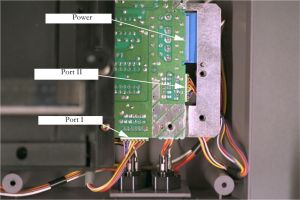
The power lead is the upper one of the three to unplug (Nintendo ASC manual, p. 27) Lift the PCB far enough to reach its leads and unplug the power switch lead from the PCB, along with the port I and port II leads.[1]
Lift the PCB and lower shield out of the lower housing so that the front of the case is clear.[1]
Remove the screws holding the switch assembly's metal bracket to the front of the lower housing and lift the assembly out with its lead. The bracket and one of its screws are visible at the left of Nintendo's photograph at the top of the page.[1]
With the console on, measure the P6 voltages against the table above: about 10.65 V on pins 1 and 2, about 5 V on pin 3, about 0 V on pin 4 and about 3.2 V on pin 5.[2]
Nintendo's test procedure ends with a check for faulty operation of the power/reset switch.[4] Switch on, start a game, press reset and check that the game restarts and the power light stays lit.
Nintendo ran repaired Control Decks for at least four hours on a burn-in cart before returning them.[7] Play for a long session and check that the console does not reset by itself.
↑ 4.04.14.24.3Nintendo of America, NOA Independent Servicer Technical Training Workbook, Rev. 11/90, "Control Deck testing procedure", step 10 (p. 54), and "Malfunctions and Probable Causes", pp. 54-55: power/reset switch assembly listed under "No Control Deck operation", "No reset/display normal", "Continually reseting display" and "No power light". Hosted as File:NES WCS HQ.pdf.
↑ 5.05.1Nintendo of America, NOA Independent Servicer Technical Training Workbook, Rev. 11/90, p. 52 (PDF page 58), "RF Modulator (Alps)" schematic: AC IN, bridge D5, C19 to C25, REG, and the PS1, PS2 and Vcc connections. Hosted as File:NES WCS HQ.pdf.
↑N. Schenk (Schenktronics), NES Schematics, file Original_NES.sch, rev. 1.0, 2020-06-05, "Power/Reset Connector" block: P6 pin 1 PWR_SW_IN, pin 2 PWR_SW_OUT, pin 3 +5 V, pin 4 RST_PB, pin 5 PWR_LED; RF_MOD1 pin 4 PWR_SW_OUT, pin 5 PWR_SW_IN; 0.01 µF capacitors C11, C14, C12 and C15 on the switch lines. Hosted as File:NES-001.pdf; see NES-001 Schematic.
↑Nintendo of America, NOA Independent Servicer Technical Training Workbook, Rev. 11/90, "Burn-In Station", p. 75 (PDF page 81). Hosted as File:NES WCS HQ.pdf.


.jpg)
.png)
.jpg)
