Capacitor Replacement Procedure
.jpg)
Capacitor replacement is the bench work of taking old electrolytic capacitors off a board and fitting new ones of suitable rating, the right way round. Most of the risk is to the board. The pads under a capacitor tear easily if the part is levered or pulled before its solder has melted,[1] and leaked electrolyte may already have attacked the joints and tracks around it.[2] Nichicon's advice for removing any soldered capacitor is to melt the solder enough that no stress is applied to the leads.[3]
How to tell that a capacitor has failed, and why particular ratings matter, is covered in Capacitor Failure Symptoms. The values for individual machines are in the guides in Category:Capacitor Replacement Guides.
When to use it
[edit | edit source]- A capacitor has been shown to be faulty; see Capacitor Failure Symptoms.
- A machine has capacitors of a type known to leak. On the MSX HIC-1 video board, sd_snatcher advises replacing C10, C14 and C22 even in machines kept in storage, because the damage is done when they leak.[4]
- Electrolyte has already leaked onto the board. Take the failed parts off first and then clean the board; see Battery Explosion, Capacitor or Corrosion Damage.
- A tantalum capacitor has gone short-circuit across a supply rail. Minuszerodegrees finds the tantalum on the +12 V line the usual cause of a short on that line on IBM 5150 and 5160 motherboards.[5]
Safety
[edit | edit source]- Unplug the machine. Discharge each capacitor before removing it; Nichicon says to discharge it through a 1 kΩ resistor, and that a voltage can reappear between the terminals of a capacitor that has been in use.[3] On a machine with a picture tube, follow the CRT Discharge Procedure first.
- A capacitor whose vent opens releases hydrogen and vaporised electrolyte at over 100 °C. Keep your face away from a capacitor that is venting, and switch off. Wash electrolyte off skin with soap and water, and flush eyes with water.[3]
- An electrolytic fitted the wrong way round can pop, swell or burst and then act as a short circuit,[6] and a reversed solid tantalum can be permanently damaged or destroyed.[7]
- For the heat, fume and lead hazards of desoldering, see Through-Hole Desoldering.
Tools and materials
[edit | edit source]- A soldering iron and desoldering tools; see Through-Hole Desoldering.
- For surface-mount parts, hot tweezers, a second iron, a hot-air station or low-melt removal alloy; see Surface-Mount Rework.[8]
- Flush or side cutters, for cutting off old parts and trimming new leads.[9][2]
- A sharp craft knife.[1]
- A 1 kΩ resistor with insulated leads, for discharging.[3]
- Isopropyl alcohol, swabs and a brush. Nichicon lists isopropyl alcohol among the cleaning agents that are safe near aluminium electrolytics, and warns against halogenated cleaners.[3]
- The replacement capacitors, chosen as below.
Choosing replacements
[edit | edit source]| Property | What to check |
|---|---|
| Capacitance | The value in the machine's parts list or capacitor guide. Nichicon asks for the ratings to be confirmed before a capacitor is fitted.[3] |
| Voltage | At least the rating of the part removed; see Capacitor Failure Symptoms. Nichicon also requires the DC voltage plus the ripple peak to stay below the rated voltage.[3] |
| Temperature and life | A 105 °C part outlasts an 85 °C part of the same endurance at the same temperature; see Capacitor Failure Symptoms. |
| ESR | niga2 recommends low-ESR electrolytics for the switching supply of the Panasonic FS-A1F.[2] Next to a linear regulator, check the regulator's data sheet first. Older low-dropout regulators need an output capacitor whose ESR lies within a range: TI's TPS76050 rang repeatedly after a load step with a 2.2 µF ceramic capacitor, a sign of instability, and settled once 1 Ω was added in series.[10] |
| Size and lead spacing | The new part has to fit the space, and its lead spacing has to match the hole spacing. Where it does not, bend the leads before soldering, without straining the capacitor.[3] Nichicon asks for at least 2 mm of clearance above the vent of a can 6.3 to 16 mm across, and 3 mm for 18 to 35 mm.[3] |
| Type | Small electrolytics can sometimes be replaced by ceramic or tantalum parts. For the HIC-1 board, sd_snatcher gives 3216 (1206) ceramics for the 10 µF positions and a 4532 (1812) ceramic or 6032 tantalum for 100 µF, all rated 16 V or more.[4] Check the ESR point above before changing type near a regulator. |
Polarity marks
[edit | edit source]

- An aluminium electrolytic marks its negative lead with a minus sign or a coloured stripe along the can, and a new radial part may have a longer positive lead.[6]
- On a surface-mount aluminium electrolytic, a dark segment printed on the top of the can marks the negative side, as in the photograph at the top.
- A solid tantalum capacitor marks its positive terminal with a stripe, and sometimes with a bevelled edge as well.[7] The stripe therefore means the opposite on a tantalum chip to what it means on an aluminium can.
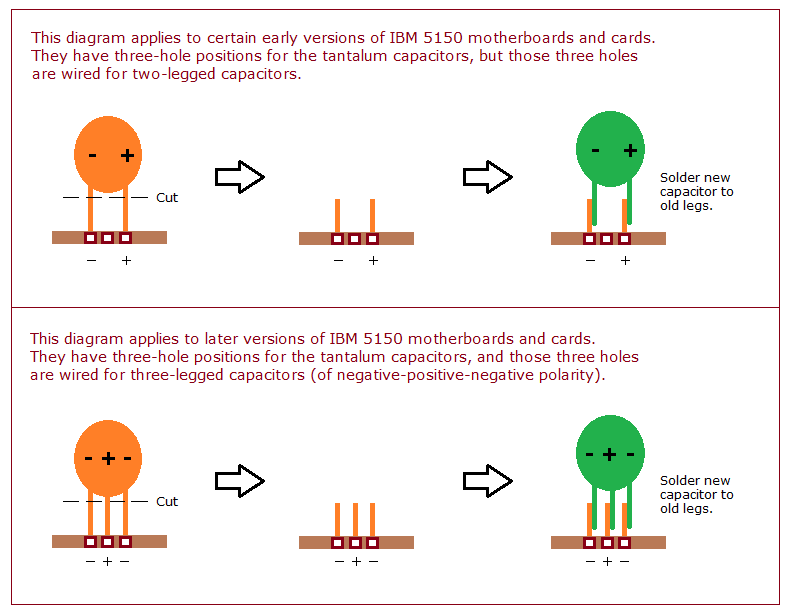
- Boards often mark the positive pad or hole with a + on the silkscreen, as in the photograph at the top. Do not assume a layout is the same on every revision of a board: minuszerodegrees found that the three-hole tantalum positions on IBM 51xx motherboards and cards are wired in two different ways.[11]
Procedure
[edit | edit source]Prepare the board
[edit | edit source]- Take the board out and note the value, voltage and orientation of each capacitor before removing it.[3]
- Discharge each capacitor through a 1 kΩ resistor.[3]
- Keep the iron off the bodies of capacitors that are staying on the board.[3]
Remove a through-hole capacitor
[edit | edit source]- Add fresh solder to the old joints if they are dull or hard to melt.[12]
- Desolder both leads with a sucker, braid or desoldering station; see Through-Hole Desoldering.
- Melt the solder fully before pulling. Nichicon's rule is to melt it enough that no stress reaches the leads.[3]
- Lift the capacitor out once both leads are free.[3]
Where the board does not take repeated heating well, minuszerodegrees suggests a method for IBM 5150 boards, whose power and ground lines are hard to solder:[5][13]
- Cut the old capacitor off above the board, leaving its legs standing in the holes.[13]
- Solder the new capacitor's legs to the old legs, with the same polarity.[13]
Minuszerodegrees also removes a non-essential failed tantalum from the later 5150 motherboard by simply cutting it off with side cutters.[5]
Remove a surface-mount electrolytic
[edit | edit source]Surface-mount electrolytics sit on pads that lift easily, and the sources differ on the safest method.
- Heat both joints at once, with hot tweezers or with two irons, one on each end.[8][1]
- Lift the capacitor away while both joints are molten.[1]
- Without two irons, cut the capacitor's legs carefully with a craft knife and then unsolder each stub on its own.[1]
Other methods:
- Hot air or low-melt removal alloy; see Surface-Mount Rework. On the PowerBook Duo, Fizzbinn melted Chip Quik with plenty of flux into each joint and lifted the can off with a single iron (see the worked examples).
- RetroTechie cuts through the solder itself with a sharp knife, not the track beneath, until the part can be pulled away; the board is not heated until the new part goes on.[8]
- niga2 twists the can off. He grips the waist of the can with side cutters, cutting parallel to the line of the two terminals, which in his experience lifts fewer pads, and wrenches the top off. He then removes the rest of the can and the seal, cuts the legs, and lifts away the plastic base.[2]
The twist-off method is the one the sources disagree about. niga2 notes that pads still lift sometimes,[2] Frank Gründel warns that removing a surface-mount capacitor any way other than with two irons or by cutting its legs can easily rip the pads off the board,[1] and Nichicon's general rule is that a capacitor's leads should not be stressed during removal.[3]
Clean the board
[edit | edit source]- Clean off the leaked electrolyte with isopropyl alcohol, keeping to Nichicon's limits on time and temperature; see Cleaning up after a leak.[3]
- Check the joints around each old capacitor. niga2 found that joints which had turned dull, or smelt of electrolyte when heated, had been attacked.[2]
- Scrape corroded tracks back to bright copper with a craft knife and resolder them; niga2 found the copper under the corrosion was often still sound.[2]
- Test the tracks and plated-through holes around each position for continuity before fitting anything; see Continuity Testing and Signal Tracing.[14]
- Repair broken tracks, pads or vias; see PCB Trace Repair, PCB Pad Repair and Via and Through-Hole Repair.
- Clear the old solder from the holes or pads; see Through-Hole Desoldering and Surface-Mount Rework.
Fit a through-hole capacitor
[edit | edit source]- Check the new part's ratings against the list.[3]
- Check its polarity against the board.[3]
- If the lead spacing does not match the holes, bend the leads before fitting, without straining the capacitor.[3]
- Insert the capacitor with its negative stripe on the negative side.[6]
- Solder both leads, keeping the iron off the body; see Through-Hole Soldering.[3]
- Trim the leads with flush cutters.[9]
- Do not tilt, lay down or twist the capacitor once it is soldered.[3]
- Clean off the flux. Nichicon warns that fluxes containing non-ionic halides can get into a capacitor and corrode it.[3]
Fit a surface-mount capacitor
[edit | edit source]- Check the ratings and polarity, as above.[3]
- Tin one pad.[15]
- Hold the capacitor in place with tweezers, the right way round, and reheat the tinned pad to fix that end.[15]
- Solder the other end.[15]
- Do not let the capacitor move once it is soldered; niga2 found the pads on the FS-A1F's HIC board lift very easily.[2]
- Clean off the flux, as above.[3]
niga2 fitted ordinary leaded capacitors on the HIC board's surface-mount pads, and soldered one straight to an IC pin where its pad was too badly corroded.[2] For the soldering methods, see Surface-Mount Rework.
Checking the repair
[edit | edit source]- Check every new capacitor against the list for value, voltage and orientation.[3]
- Inspect each joint; see Through-Hole Soldering and Surface-Mount Rework.
- Measure across each supply rail for a short before applying power; a shorted tantalum shows up as a short on its rail.[5] See Finding Short Circuits.
- Power up with the board in view, and switch off at once if a capacitor smokes or vents.[3]
Common mistakes
[edit | edit source]- Fitting an electrolytic the wrong way round.[6]
- Reading a tantalum's stripe as negative. On a tantalum it marks the positive terminal.[7]
- Pulling or levering a capacitor before its solder has melted, which tears pads and tracks.[3][1]
- Leaving leaked electrolyte on the board. Nichicon notes that electrolyte is conductive and can cause smoking or fire where it lies on a board.[3]
- Cleaning with halogenated solvents, or leaving flux residue that contains halides.[3]
- Bending or twisting a new capacitor after it has been soldered.[3]
- Blowing hot air over electrolytics that are staying on the board. Nichicon warns that their sleeves can shrink, bulge or crack after more than two minutes at 150 °C, or under hot gas.[3]
- Changing to a much lower-ESR capacitor at the output of an older low-dropout regulator without checking its data sheet.[10]
- Reusing a capacitor taken from a board that has been powered. Nichicon advises against it, because a voltage can reappear between the terminals.[3]
Worked examples on this wiki
[edit | edit source]- IBM PC (5150) Capacitor Replacement Guide: tantalums on the +12 V line, three-hole positions wired two ways on different board revisions, and the cut-off-and-graft method for the board's hard-to-solder power lines.
- Panasonic FS-A1F Capacitor Replacement Guide: niga2's twist-off method for the surface-mount electrolytics on the HIC-1 board, pads that lift very easily, and low-ESR parts for the switching supply.
- Macintosh Centris 610 Capacitor Replacement Guide: hot air or low-melt solder for surface-mount electrolytics, with a warning not to twist them off.
- PowerBook Duo Capacitor Replacement Guide: Chip Quik and flux to lift each can with one iron where the cans are packed too tightly to twist, and a via eaten through by electrolyte.
- Apple Newton MessagePad Capacitor Replacement Guide: two irons, or cut legs and separate stubs, for C1 on the Original MessagePad.
- Atari ST Book LCD Board Repair: the old capacitors removed by cutting their leads, Kapton tape round the work, and resistors damaged by leaked electrolyte.
Related pages
[edit | edit source]- Capacitor Failure Symptoms
- Battery Explosion, Capacitor or Corrosion Damage
- Category:Capacitor Replacement Guides
- Through-Hole Desoldering
- Through-Hole Soldering
- Surface-Mount Rework
- PCB Pad Repair
- PCB Trace Repair
- Via and Through-Hole Repair
- Finding Short Circuits
- CRT Discharge Procedure
- Nichicon Application Guidelines for Aluminium Electrolytic Capacitors
- Recommended Tools
References
[edit | edit source]- ↑ 1.0 1.1 1.2 1.3 1.4 1.5 1.6 Frank Gründel, "How to fix hardware-related sound volume problems on OMPs and MP100s", NewtonTalk mailing list, 2 February 2015, MARC archive: clean the area round the capacitor after removing it; the easiest way to remove it is with two small-tipped irons; otherwise cut the legs carefully with a cutter knife and unsolder what is left separately; any other method can easily rip the pads off the board. Retrieved 2026-10-25.
- ↑ 2.0 2.1 2.2 2.3 2.4 2.5 2.6 2.7 2.8 niga2, "FS-A1Fの改造 前編" (Modifying the FS-A1F, part 1), にがMSX, in Japanese: the HIC board's surface-mount electrolytics removed by gripping the waist of the can with side cutters and wrenching the top off, cutting parallel to the line of the terminals, which in his experience lifts fewer pads though pads still lift sometimes; the rest of the can and seal removed, the legs cut and the base lifted away; leaded capacitors used as replacements; the pads lift very easily, so the new parts must not be moved; one capacitor soldered directly to a pin of the CXA1245 where the pad was corroded; dull joints that smell of electrolyte when heated; corroded tracks often resolderable after scraping with a craft knife; low-ESR electrolytics recommended for the switching supply. Retrieved 2026-10-25.
- ↑ 3.00 3.01 3.02 3.03 3.04 3.05 3.06 3.07 3.08 3.09 3.10 3.11 3.12 3.13 3.14 3.15 3.16 3.17 3.18 3.19 3.20 3.21 3.22 3.23 3.24 3.25 3.26 3.27 3.28 3.29 3.30 3.31 Nichicon Corporation, Application Guidelines for Aluminum Electrolytic Capacitors, Technical Notes CAT.8101H, sections 2-1-1 (6) (DC voltage plus ripple peak not to exceed the rated voltage), 2-1-1 (10) (hole spacing to match lead spacing; clearance above the pressure relief vent of 2 mm or more for 6.3 to 16 mm diameter and 3 mm or more for 18 to 35 mm), 2-1-1 (11) (electrolyte is conductive and combustible and can cause smoking or fire on a board), 2-1-2 (1) and (2) (do not reuse a capacitor that has been on a powered board, since a restriking voltage may exist; discharge through a 1 kΩ resistor), 2-1-2 (4), (5) and (8) (confirm ratings and polarity before installing; lead spacing to match hole spacing), 2-1-2 (12) (hand soldering: form leads before soldering without stressing the capacitor; when removing a part, melt the solder enough that no stress is applied to the lead; the iron must not touch the capacitor body), 2-1-2 (15) and (16) (fluxes with non-ionic halides; sleeve shrinkage, bulging or cracking after more than 2 minutes at 150 °C or under hot gas), 2-1-2 (17) (do not tilt, lay down or twist the capacitor after soldering), 2-1-5 (vent gas of hydrogen and vaporised electrolyte above 100 °C; switch off; flush eyes with water; wash skin with soap and water), 2-1-7 (2) (discharge before removing from the board) and 2-10 (halogenated cleaning agents; isopropyl alcohol among the recommended cleaning agents). Hosted as Nichicon Application Guidelines for Aluminium Electrolytic Capacitors (PDF).
- ↑ 4.0 4.1 sd_snatcher and others, "Urgent alert to MSX2/2+ owners: suicide capacitors on HIC-1 daughterboard", MSX Resource Center forum, July 2015: replace C10 (10 µF 16 V), C14 (10 µF 16 V) and C22 (100 µF 16 V), even in machines in storage; electrolytic, tantalum or ceramic replacements, with 3216 (1206) ceramics for 10 µF, a 4532 (1812) ceramic or 6032 tantalum for 100 µF, all rated 16 V or more. Retrieved 2026-10-25.
- ↑ 5.0 5.1 5.2 5.3 Minuszerodegrees.net, "Short-circuit on the +12 volt line of an IBM 5150/5155/5160 motherboard": the tantalum capacitor on the +12 V line is very likely the short-circuited part; insert replacements with the positive leg in the positive hole; on the later 5150 board the +12 V tantalum is not critical and can be removed by desoldering or cut off with side cutters; soldering the 5150 board's ground and power lines is problematic, so the cut-and-graft technique is suggested. Retrieved 2026-10-25.
- ↑ 6.0 6.1 6.2 6.3 SparkFun Electronics, "Polarity", section "Electrolytic Capacitors": the negative pin is usually marked with a "-" and/or a coloured strip along the can, and the positive leg may be longer; reverse voltage for an extended period makes the capacitor pop, swell or burst, after which it acts like a short circuit. Retrieved 2026-10-25.
- ↑ 7.0 7.1 7.2 KEMET, T491 Industrial Grade MnO2 tantalum surface-mount capacitor datasheet, section "Reverse Voltage": solid tantalum capacitors are polar and may be permanently damaged or destroyed if connected with the wrong polarity; the positive terminal is identified by a stripe, and in some cases a bevelled edge. Retrieved 2026-10-25.
- ↑ 8.0 8.1 8.2 RetroTechie, reply of 19 July 2015 in "Urgent alert to MSX2/2+ owners: suicide capacitors on HIC-1 daughterboard", MSX Resource Center forum: a tweezer-style iron that grips and heats both ends; alternatively cut through the solder itself with a sharp knife, not the track, so that the board is not heated; or use two soldering irons. Retrieved 2026-10-25.
- ↑ 9.0 9.1 SparkFun Electronics, "How to Solder: Through-Hole Soldering": flush cutters for trimming leads after soldering. Retrieved 2026-10-25.
- ↑ 10.0 10.1 Bruce Falin and Jason Cummings, ESR, Stability, and the LDO Regulator, Texas Instruments SLVA115A, May 2002, revised February 2020, PDF: PMOS and PNP low-dropout regulators need an output capacitor whose ESR is high enough and low enough for stability; older data sheets, written when tantalum and other high-ESR capacitors were common, give an allowed ESR range (0.1 to 20 Ω for the TPS760 with 2.2 µF); a TPS76050 load transient shows repeated ringing (instability) with a 2.2 µF ceramic and a stable response with 1 Ω added; newer regulators such as the TPS7A25 are stable with ceramic capacitors. Retrieved 2026-10-25.
- ↑ Minuszerodegrees.net, "Tantalum capacitors on IBM 51xx motherboards/cards": IBM 5150, 5155 and 5160 motherboards and cards have three holes for each tantalum capacitor, but some are wired for two-legged capacitors and others for three-legged ones. Retrieved 2026-10-25.
- ↑ Ray Carlsen, "Replacing IC chips in Commodore equipment", updated 19 December 2012: add fresh solder to a joint that will not clear, then desolder again. Retrieved 2026-10-25.
- ↑ 13.0 13.1 13.2 Minuszerodegrees.net, SNCTOL diagram for IBM 5150 motherboards and cards: cut the old tantalum above the board and solder the new capacitor to the old legs, for both two-legged and three-legged (negative, positive, negative) positions. Retrieved 2026-10-25.
- ↑ 1024MAK, post of 9 November 2019 in "Two faulty 4A Spectrums", Spectrum Computing forum: after desoldering, test all the PCB tracks and plated-through holes, since it is far too easy to damage them when desoldering. Retrieved 2026-10-25.
- ↑ 15.0 15.1 15.2 Anne Barela, "LCARS-inspired Circuit Board Panel: Soldering", Adafruit Learning System, 18 October 2023: tin one pad, place the part with tweezers, heat to fix it, then solder the other end. Retrieved 2026-10-25.