

Through-Hole Soldering

Through-hole soldering joins a component lead to the pad and plated hole it passes through. On a vintage board it is used to fit a replacement part or a socket, to remake a joint that has cracked, and to finish most other repairs. A good joint is made by heating the lead and the pad together until both are hot enough to melt the solder, then feeding solder into the joint so that it flows over both and fills the hole. A joint where the solder has wetted only one of the two surfaces is unreliable, and so is a blob of solder that hides whether it has wetted either.[1][2]
The acceptance pictures below come from NASA's soldering standard NASA-STD-8739.3, a United States Government work. It was cancelled in 2011, when NASA adopted the industry standard IPC J-STD-001ES,[3] and its pictures are used here because they are in the public domain.
When to use it
[edit | edit source]- Fitting a new part or a socket in place of an old one; see Through-Hole Desoldering for getting the old part out and the holes clear.
- Remaking joints that have cracked, gone dull or come loose; see Reflowing an old joint.
- Fitting a wire to a pad or a component lead, as in Jumper Wire Repair and PCB Trace Repair.
It is not the right method for surface-mount parts, which are covered in Surface-Mount Rework, and electrolytic capacitors have their own checks in Capacitor Replacement Procedure.
Safety
[edit | edit source]- A soldering iron element can reach 400 °C. Keep the iron in its stand when not in use, and switch it off and unplug it when finished.[4]
- Wear eye protection: solder can spit when it is heated. Clipped leads can fly too.[4][2]
- Lead in solder enters the body mainly by mouth, from unwashed hands. Wash with soap and water after soldering and before eating.[4]
- Rosin (colophony) flux fume can irritate the eyes, throat and lungs and cause asthma with repeated exposure. Use fume extraction.[4]
- Work on a board that is out of the machine and unplugged. On a machine with a picture tube, follow the CRT Discharge Procedure first.
Tools and materials
[edit | edit source]- A temperature-controlled soldering iron. NASA required irons that hold the set temperature within ±5.5 °C and banned soldering guns.[3] Adafruit rates a temperature-controlled iron of 50 W or more as the best choice, because the extra power lets the tip recover its temperature quickly between joints.[1]
- Tips to suit the joint: SparkFun shows chisel, bevel (hoof) and conical tips, and recommends a larger tip for joints on ground planes.[2]
- Solder. NASA specified Sn60 or Sn63 tin-lead alloy with rosin (R or RMA) flux in the core.[3] Kester gives Sn63Pb37 a melting point of 183 °C, Sn60Pb40 a melting range of 183 to 190 °C, and the lead-free alloy Sn96.5Ag3Cu0.5 (SAC305) 217 to 220 °C.[5] Lead-free solder needs more heat and often more flux.[2][1]
- Flux, as a pen, gel or liquid. Water-soluble flux must be washed off afterwards; no-clean flux can be left, or removed with isopropyl alcohol.[2]
- A damp sponge or brass wool for cleaning the tip, and tip tinner for a badly oxidised tip.[1][2]
- Flush cutters for trimming leads.[2]
- A thermal shunt (a clip-on heat sink) for leads of heat-sensitive parts. NASA required one wherever soldering heat could damage the part or a joint already made.[3]
- A magnifier and a light that gives shadowless illumination for inspection.[3]
- Isopropyl alcohol and a brush for cleaning off flux.[2][3]
Iron temperature recommendations differ. SparkFun suggests a medium heat of 325 to 375 °C, turning it down if the solder smokes.[2] Adafruit suggests 370 °C for 60/40 solder and 400 °C for lead-free.[1] For joints on large copper areas SparkFun suggests going up to about 380 °C (720 °F), with more flux and a longer dwell.[2]
Procedure
[edit | edit source]Prepare the part and the board
[edit | edit source]- Check that the holes are clear of old solder and that the pads and tracks are intact; see Through-Hole Desoldering.
- Make sure the lead and the pad are clean. Dirt and oxide stop the solder from wetting them.[1]
- If the leads have to be bent to fit the holes, bend them before fitting the part. NASA required each bend to start at least two lead diameters from the body or seal, with a bend radius no smaller than the lead diameter, and the leads to be supported on the body side while being bent.[3] Do not bend or cut tempered (stiff) leads, and do not cut leads 1.27 mm or more thick with diagonal cutters, which send a shock into the part.[3]
- Fit the part the right way round. Mount it so that its polarity mark is visible, and then, if possible, its value and type.[3][6]
- Push the part down so that it sits flat on the board. NASA's pictorial standard wants parts parallel to the board and in contact with it, and parts that dissipate 1 W or more raised off the board far enough not to scorch the laminate.[7]
- Put only one lead or wire in each hole.[3]
- Hold the part in place for soldering. Either bend each lead outwards by up to 30° from the axis of the hole, or clinch it flat against the pad, as below. Tape or sticky tack also holds a part or a row of header pins against the board.[3][2]
Straight-through and clinched leads
[edit | edit source]

Most factory boards use straight-through leads, cut so that a short length shows through the pad. NASA set that length at 0.5 mm minimum and 2.29 mm maximum.[3]
A clinched lead is bent over flat against the pad before soldering. NASA's rules for clinching were:[3]
- the bent-over part is at least half the largest dimension of the pad, or 0.78 mm, whichever is greater;
- it is bent along the longest dimension of the pad, or along the track if the pad is too small;
- it never points towards a conductor it is not connected to, and does not overhang the pad so far that it breaks the required spacing;
- a fully clinched lead is bent between 75° and 90° from the vertical.
Clinched leads make the part harder to remove later; IPC-7711 has separate removal methods for them.[8]
Make the joint
[edit | edit source]These steps follow Adafruit's and SparkFun's guides.[1][2]
- Clean the hot tip on the sponge or brass wool and tin it with a little fresh solder, so that it has a thin, shiny coat.[1]
- Place the tip so that it touches both the pad and the lead, and heat them together. Use the side of the tip, not its point.[2]
- Touch the solder to the joint, where the lead meets the pad, not to the tip. The tip carries heat; the solder should melt on the hot lead and pad and flow over both. If it does not flow, heat the joint for another second or two and try again.[1][2]
- Feed in enough solder to fill the hole and form a fillet on the pad. In a plated-through hole, apply solder from one side only and let it flow through to the other.[1][3]
- Take the solder away first, then the iron.[2]
- Let the joint cool without moving the board or the lead, and without blowing on it. NASA allowed no movement during solidification and no cooling with compressed air.[1][3]
- Trim the lead with flush cutters, leaving 0.5 to 2.29 mm showing beyond the pad.[1][3]
- Clean off the flux. NASA's standard called for residues to be removed within half an hour, and SparkFun notes that some flux residues corrode the board and leave leakage paths between pins.[3][2]
- When you have finished, tin the tip before switching the iron off.[2]
Joints on ground planes and large pins
[edit | edit source]A pin connected to a large area of copper, or a large plated hole, needs more heat. Solder that seems to stick there may only be blobbing up on the surface.[2]
- Fit a larger tip.[2]
- Add flux to the joint.[2]
- Raise the temperature if needed; SparkFun suggests about 380 °C (720 °F).[2]
- Hold the iron on the joint a little longer, or use a second iron on the same joint.[2]
NASA noted that plated-through holes joined to large ground planes may need special procedures, and cautioned that heat on multilayer boards can damage the plated hole and its joins to the inner layers.[3]
Reflowing an old joint
[edit | edit source].jpg)
NASA describes a cracked or fractured joint as a sign of mechanical or thermal shock, or of a mismatch in thermal expansion.[7] Joints that look dull and grainy may be cold joints or disturbed joints, which Adafruit describes as unreliable.[1]
- Clean off any old or burnt flux with isopropyl alcohol and a brush.[1]
- Heat the joint with a clean, tinned tip touching the lead and the pad until all the old solder flows.[1]
- If the joint is short of solder, add a little fresh flux-cored solder while it is molten.[1]
- Draw off excess solder with the tip, or with braid or a sucker, if the joint has too much.[1]
- Let it cool undisturbed, then inspect it as below.[1]
If the solder will not flow the way it should, Adafruit's advice is to stop and let the joint cool, clean and tin the iron, clean off any burnt flux, let the iron recover its temperature, and try again.[1]
Checking the repair
[edit | edit source]
NASA's acceptance criteria for a soldered joint were:[3]
- the surface of the solder is smooth, non-porous and undisturbed, with a finish from satin to bright depending on the solder;
- the solder wets every part of the connection and forms a fillet round the whole joint;
- the fillet is concave, and the outline of the lead can still be seen;
- in a plated-through hole, the side where the solder was applied meets all the criteria and the other side at least shows that the solder flowed through and bonded the lead to the pad. A slight dip of the solder into the hole on that side is acceptable.
NASA's pictorial workmanship standard gives 100 per cent vertical fill of the plated hole as the preferred result.[7] Industry summaries of IPC-A-610, the commercial acceptance standard, give a minimum barrel fill of 50 per cent for Class 2 work and 75 per cent for Class 3 (high-reliability) work.[9]
Then check electrically: test continuity from the joint to the next point on its track, and check that it is not shorted to its neighbours; see Continuity Testing and Signal Tracing. Adafruit warns that pressing a meter probe on a marginal joint can make it read good while the probe is there.[1]
| Fault | What it looks like | Cause | Fix |
|---|---|---|---|
| Cold joint | Rough or lumpy surface[1] | The solder did not melt completely; not enough heat[1][7] | Reheat until the solder flows; draw off any excess[1] |
| Disturbed joint | Frosted, crystalline or rough surface[1] | Movement while the solder was solidifying[1][7] | Reheat and let it cool without moving[1] |
| Overheated joint | Dull, grey, frosty or crystallised solder, burnt flux[7][1] | Too much heat for too long[7] | Clean off the burnt flux, then reheat[1] |
| Poor wetting of the pad | Solder on the lead but not bonded to the pad[1] | Dirty board, or only the lead was heated[1] | Heat the base of the joint until the solder covers the pad[1] |
| Poor wetting of the lead | Solder on the pad, the lead not wetted[1] | Only the pad was heated, or the solder was not given time to flow[1] | Reheat with the tip on both, and add solder[1] |
| Nonwetting | Solder sits as a ball or bead; convex fillet with no feathered edge[7] | Poor solderability, wrong flux or contamination[7] | Clean the surfaces, then reheat and add solder[1] |
| Too much solder | A blob that hides the lead; convex instead of concave[1] | Too much solder fed in[1] | Draw off the excess with the tip, a sucker or braid[1] |
| Too little solder | Thin joint that does not fill the pad[1] | Too little solder fed in[1] | Reheat and add solder[1] |
| Bridge | Solder joining two neighbouring joints[1] | Too much solder[1] | Drag the hot tip between the joints, or use a sucker or braid[1] |
| Spatter | Loose balls of solder stuck to the board by flux[1] | Moisture or poor process control[7] | Remove them with a knife tip or tweezers[1] |
| Lifted pad | Pad separated from the board[1] | Usually desoldering, or overworking a joint[1] | See PCB Pad Repair |
-
 Unacceptable: a cold connection on a terminal (Figure 5) and an overheated connection on a round lead (Figure 6)
 -
 Unacceptable: a fractured or disturbed connection (Figure 7) and poor wetting (Figure 8)
 -
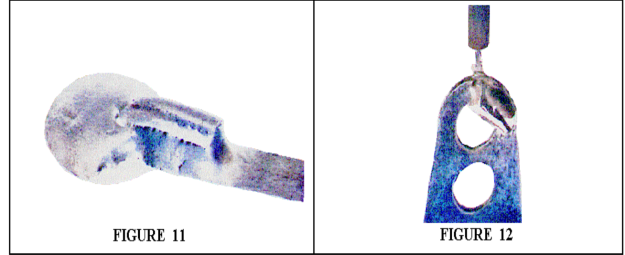 Unacceptable: dewetting on a lapped lead (Figure 11) and nonwetting on a terminal (Figure 12)


Common mistakes
[edit | edit source]- Melting solder on the tip and carrying it to the joint. SparkFun points out that the tip transfers heat, not solder; the solder has to melt on the joint itself.[2]
- Heating only the lead or only the pad, so that the solder wets one and not the other.[1]
- Moving the part or the board while the solder sets.[1][3]
- Running the iron so hot that the solder smokes.[2] NASA lists charring of parts and of the board as a sign of too much heat.[7]
- Using a soldering gun, which NASA did not allow for this work.[3]
- Bending a lead right at the body of the part, or bending tempered pins at all, which can damage the seals and internal connections.[3]
- Clinching a lead towards a track it is not meant to touch.[3]
- Leaving leads untrimmed, where they can be bent over onto a neighbouring track.[1]
- Leaving water-soluble flux on the board.[2]
- Letting a part body touch a soldered joint.[3]
Worked examples on this wiki
[edit | edit source]- Macintosh Plus Horizontal Sweep Repair: cracked joints at the yoke connector J1, the most common fault on the board according to one technician, with a photograph from Larry Pina's book.
- Sinclair QL RGB Port Repair: reflowing the joints of the J7 monitor socket with fresh leaded solder and flux.
- Atari 2600 Power Supply Circuit Repair: reflowing dull or cracked joints, including those of the power jack.
- Coleco Mini-Arcade VFD Repair: missing lines on a display cured by reflowing its joints.
- Sega Master System II Video Output Repair: reflowing cracked joints along the video path, as Sega's own fault list suggests.
- Commodore 64 PLA Replacement: soldering in a 28-pin socket after the PLA was desoldered.
Related pages
[edit | edit source]- Through-Hole Desoldering
- IC Removal and Socketing
- Surface-Mount Rework
- Capacitor Replacement Procedure
- Jumper Wire Repair
- PCB Pad Repair
- Continuity Testing and Signal Tracing
- Recommended Tools
References
[edit | edit source]- ↑ 1.00 1.01 1.02 1.03 1.04 1.05 1.06 1.07 1.08 1.09 1.10 1.11 1.12 1.13 1.14 1.15 1.16 1.17 1.18 1.19 1.20 1.21 1.22 1.23 1.24 1.25 1.26 1.27 1.28 1.29 1.30 1.31 1.32 1.33 1.34 1.35 1.36 1.37 1.38 1.39 1.40 1.41 1.42 1.43 1.44 1.45 1.46 1.47 1.48 1.49 1.50 Bill Earl, Adafruit Guide To Excellent Soldering, Adafruit Learning System: pages "Tools" (temperature-controlled irons of 50 W or more; lead-free solder needs more heat and flux), "Preparation" (iron at 370 °C for 60/40 and 400 °C for lead-free; cleaning and tinning the tip; clean joints; immobilising the joint), "Making a good solder joint" (heat the joint; apply solder to the pad and lead; let it flow and fill the hole; let it cool undisturbed; trim the lead) and "Common Soldering Problems" (disturbed, cold, overheated, poorly wetted, starved, excess, untrimmed, bridged, lifted and spattered joints, with repair and prevention for each), "Soldering FAQ" (a probe pressing on a marginal joint can make it read good). Retrieved 2026-10-25.
- ↑ 2.00 2.01 2.02 2.03 2.04 2.05 2.06 2.07 2.08 2.09 2.10 2.11 2.12 2.13 2.14 2.15 2.16 2.17 2.18 2.19 2.20 2.21 2.22 2.23 2.24 SparkFun Electronics, "How to Solder: Through-Hole Soldering", CC BY-SA 4.0: lead-free solder needs more heat and flux; tip types; the tip transfers heat, not solder; brass sponge and tip tinner; flush cutters; safety glasses against clipped leads and solder; iron at 325 to 375 °C and turned down if the solder smokes; tin the tip; use the side of the tip; heat pad and part together; remove the solder, then the iron; tape or sticky tack to hold parts; ground planes and large holes need a larger tip, about 720 °F, flux, a longer dwell or two irons; flux residue cleaning, corrosion and leakage between pins. Retrieved 2026-10-25.
- ↑ 3.00 3.01 3.02 3.03 3.04 3.05 3.06 3.07 3.08 3.09 3.10 3.11 3.12 3.13 3.14 3.15 3.16 3.17 3.18 3.19 3.20 3.21 3.22 3.23 NASA, NASA-STD-8739.3 Soldered Electrical Connections, with Change 4, copy at EverySpec: sections 6.5.1 (soldering guns prohibited), 6.5.3 (temperature-controlled irons within ±5.5 °C), 6.7 (thermal shunts), 6.8 (magnification and shadowless lighting), 6.11 and 6.12 (Sn60 or Sn63 solder; R or RMA flux), 6.13 (isopropyl alcohol among approved solvents), 8.1.3 (part markings visible, polarity first), 8.1.6 (bends at least two lead diameters from the body, radius at least one lead diameter, leads supported while bent; tempered leads not bent; tempered leads or leads 1.27 mm or more thick not cut with diagonal cutters), 8.1.9 (part bodies not in contact with soldered terminations), 8.5.1 (one lead per hole), 8.5.2 and Figures 8-16 and 8-17 (clinched leads), 8.5.3 and Figures 8-18 and 8-19 (straight-through leads 0.5 to 2.29 mm; bent up to 30° for retention), 10.4 (residues removed within half an hour), 11.1.1 and 11.1.7 (no movement during solidification; no cooling with pressurised air), 11.2.3 and 11.2.4 (solder from one side of a plated-through hole; flow-through on the other; large ground planes; heat damage on multilayer boards), 13.6.1 (acceptance criteria) and Appendix A (pictures of acceptable and unacceptable connections). Cancelled in 2011, when NASA adopted IPC J-STD-001ES. Retrieved 2026-10-25.
- ↑ 4.0 4.1 4.2 4.3 University of Sussex Health and Safety, Soldering Safety Guidance, document HS G077, version 1.0, September 2024, PDF, sections 4.2 to 4.4. Retrieved 2026-10-25.
- ↑ Kester, "Alloy Temperature Chart": Sn63Pb37 183 °C; Sn60Pb40 183 to 190 °C; Sn96.5Ag3Cu0.5 217 to 220 °C. Retrieved 2026-10-25.
- ↑ SparkFun Electronics, "Polarity", CC BY-SA 4.0: polarised parts and how each marks its polarity. Retrieved 2026-10-25.
- ↑ 7.00 7.01 7.02 7.03 7.04 7.05 7.06 7.07 7.08 7.09 7.10 NASA Workmanship Standards, Book 6, section 6.01, "Through-Hole Soldering: General Requirements", released 27 June 2002: parts parallel to and in contact with the board; parts dissipating 1 W or more mounted with standoff; 100 % vertical fill preferred; charring a sign of excessive heat; cold joints from inadequate heat; disturbed joints from movement during solidification; overheated solder dull, grey, frosty or crystallised; nonwetting as a ball or bead with a convex fillet; poor wetting from poor solderability, wrong flux or contamination; solder splatter from moisture contamination; fractured joints from mechanical or thermal shock. Retrieved 2026-10-25.
- ↑ IPC, IPC-7711C/7721C Rework, Modification and Repair of Electronic Assemblies, January 2017, table of contents in the ANSI webstore preview: methods 3.1.2 to 3.1.5 for partly and fully clinched leads. Retrieved 2026-10-25.
- ↑ ACDi, "Class 2 v. Class 3, Part 2": under IPC-A-610, Class 2 requires 50 % barrel fill of a plated-through hole and Class 3 requires 75 %. A contract manufacturer's summary of the paywalled standard; other published summaries give 75 % for Class 2 as well. Retrieved 2026-10-25.