Mattel Football Capacitor Replacement Guide

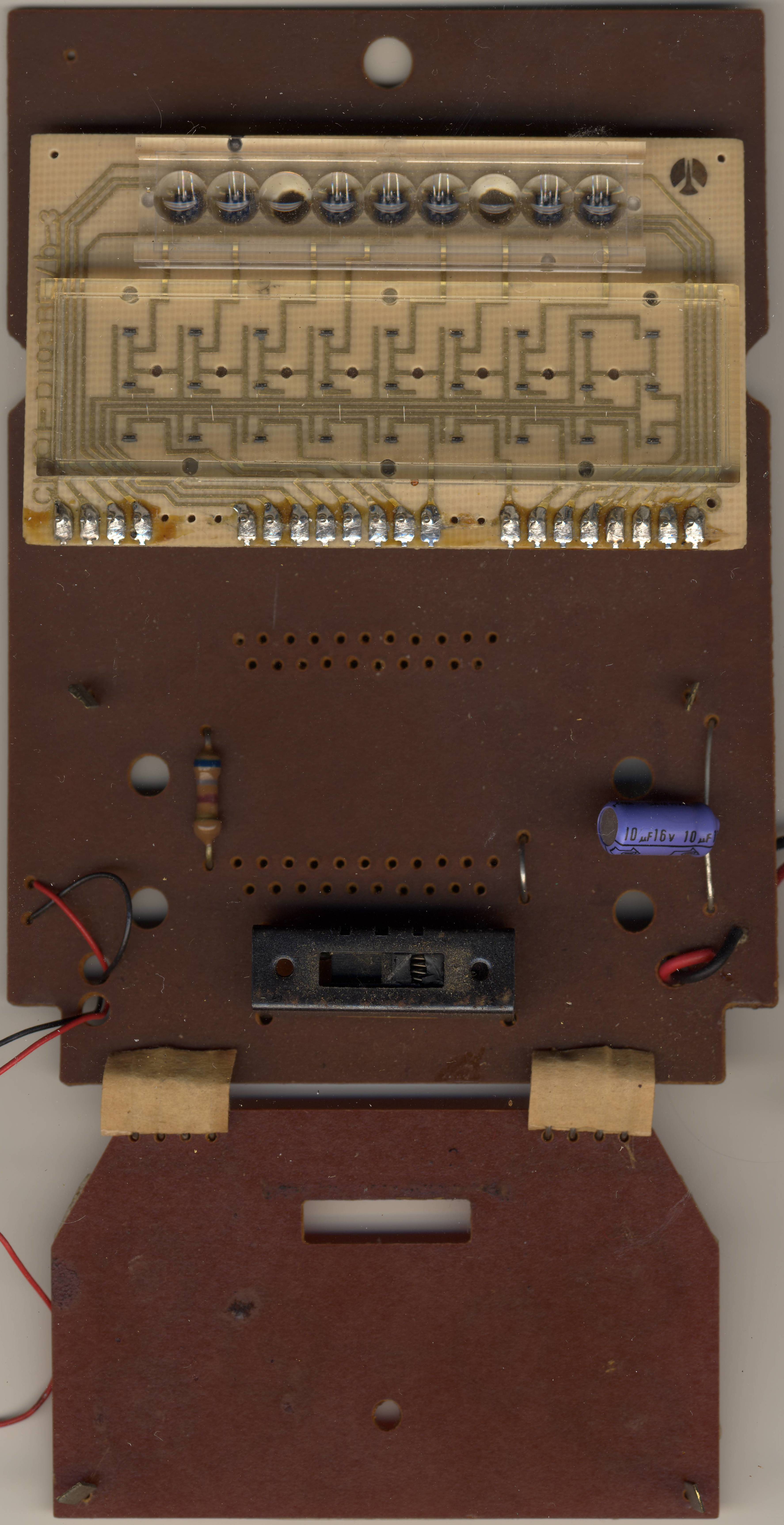
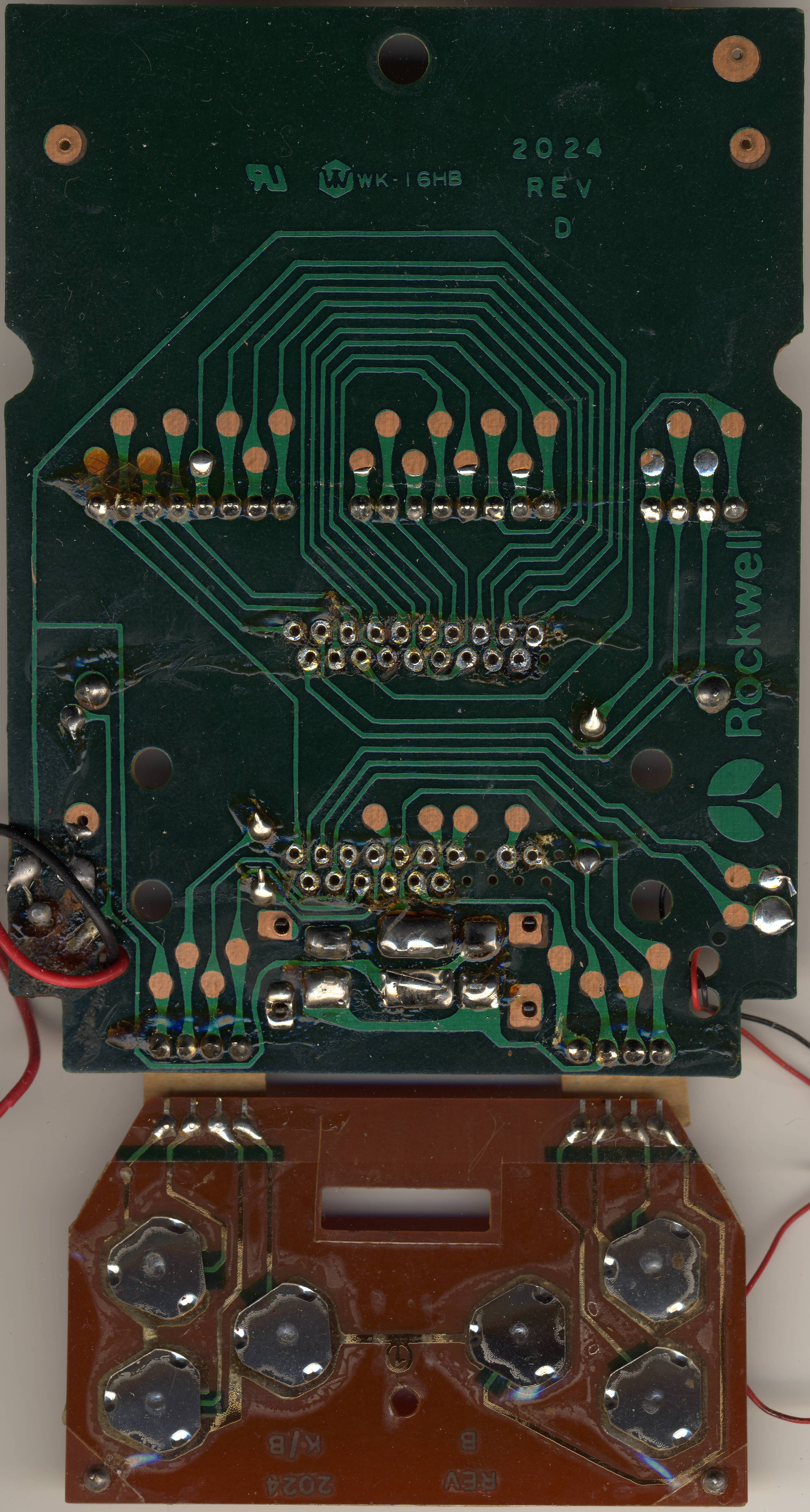
Capacitors on the main board of the Mattel Football handheld LED game (model 2024, 1977). Mattel published no parts list, schematic or board layout for the game. Creative Computing's 1978 review quotes Mattel's schematics, so a circuit diagram existed, but it has not appeared.[1] The values below are read from Sean Riddle's scans of one Football board set, whose main board is silkscreened 2024 REV D; it carries a single electrolytic capacitor.[2] The board seen through the Handheld Museum's clear-cased Football is REV C, so check your own board against the table before ordering parts.[3]
There is no published report of a Football fault caused by a capacitor. Replace a capacitor when it is visibly leaking or bulging, or when a measurement points to it, and not as a cure for every fault. See Capacitor Failure Symptoms.
Capacitor list
[edit | edit source]| Part | Type | Value as printed | Position | Source |
|---|---|---|---|---|
| Electrolytic | Axial, blue-violet sleeve | 10 µF 16 V | Right-hand side of the main board, below the display board | [2] |
No other electrolytic capacitor is visible on the component side of the main board, the display board (CM01-D103) or the key board (2024 K/B REV B) in Riddle's scans. The board has no capacitor designators printed beside the part, so the table describes it by position.[2]
What is known about the circuit
[edit | edit source]| Item | Detail | Source |
|---|---|---|
| Supply | One 9-volt battery on a snap lead; early games also have an AC adapter jack. No adapter rating is published | [4][5] |
| Main board | Marked 2024 REV C (clear-cased demonstration game) and 2024 REV D (Riddle's scan), with the Rockwell logo | [3][2] |
| Game chip | Rockwell B6100 (B6100EB/-15), a modified calculator chip that drives the display and the sound | [6][1] |
| Display | Red LED segments: a field of three rows of nine, and seven 7-segment digits | [1][6] |
| Sound | Piezo-ceramic transducer, about an inch across | [1] |
The patent behind the game shows the logic only as a block diagram, with no component values.[7]
Recording your board
[edit | edit source]- Take the battery out and open the case as described on Mattel Football General Maintenance.
- Photograph both sides of the board before touching anything.
- Note the revision letter silkscreened on the solder side of the main board (2024 REV C, REV D and so on).[2][3]
- Read the value, voltage rating and polarity printed on the electrolytic, and look for any other electrolytic that your revision may carry.
- Look for brown residue on the board around each one, a swollen top, or a part that leans on its leads.
- Keep the notes and photographs with the game. If your board differs from the table, the notes are the record of its parts.
Replacement
[edit | edit source]- Fit a 10 µF capacitor rated 16 V or higher, 105 °C. The original is axial; a small radial part fits if its leads are bent to reach the two holes and it lies flat enough for the case to close over the board.
- On an early game with an AC adapter jack, an unregulated adapter can deliver more than its label, so 25 V is a sensible rating there.
- Observe polarity: note which end of the old part is marked negative before removing it. The 9-volt snap leads are red (positive) and black.[3]
- Clean off flux with isopropyl alcohol and check the joints before refitting the board.
After the work
[edit | edit source]- Switch to PRO 1: the game should come up ready to play, home team first and ten on its own 20.[4]
- Press ST and SC and check that every digit and every field segment lights in play.
- If the display or play misbehaves on a fresh battery, see Mattel Football Troubleshooting Guide.
Related pages
[edit | edit source]- Mattel Football
- Mattel Football General Maintenance
- Mattel Football Troubleshooting Guide
- Mattel Football II Capacitor Replacement Guide: the 1978 sequel
- Capacitor Failure Symptoms
References
[edit | edit source]- ↑ 1.0 1.1 1.2 1.3 Stephen B. Gray, "Profile of Three Smart Electronic Games: Auto Race, Missile Attack, Football", Creative Computing vol. 4 no. 1, January/February 1978, pp. 26-29; Internet Archive item creativecomputing-1978-01 (retrieved 2026-10-19): Football uses the Rockwell B6100; a nine-volt battery and a jack for an AC adapter; three rows of nine LED segments; all three games contain what "the schematics refer to as a 'piezo-ceramic speaker'", about an inch in diameter.
- ↑ 2.0 2.1 2.2 2.3 2.4 Sean Riddle, "The First Mattel LED games" (retrieved 2026-10-19), Football board scans front and back; the front hosted as File:Mattel Football circuit board, component side.jpg and in detail as File:Mattel Football main board, capacitor and power switch.jpg. Main board silkscreened 2024 REV D with the Rockwell logo; one axial electrolytic printed "10µF 16V"; display board CM01-D103; key board 2024 K/B REV B. The B6100's 42-pin position is empty in the scan; the same page shows the B6100 package and die photographed separately.
- ↑ 3.0 3.1 3.2 3.3 Handheld Museum, "Mattel Football (Clear prototype)" (retrieved 2026-10-19): the board seen through a clear case, marked "2024 REV C" with the Rockwell logo; red and black leads from the battery compartment to the board.
- ↑ 4.0 4.1 Mattel, Inc., Mattel Electronics Football Game Instructions (1977), File:Mattel Football Instructions (1977).pdf: p. 1, one 9-volt battery attached to the connector; p. 4, at switch-on the home team has the ball, first and ten on its own 20-yard line. No adapter rating is given.
- ↑ Handheld Museum, "Mattel Football I" (retrieved 2026-10-19): model 2024, 9 volt; early models had an AC adapter jack, removed on later models.
- ↑ 6.0 6.1 MAME source, hh_rw5000.cpp (retrieved 2026-10-19): Mattel Football (model 2024), B6100 MCU labelled B6100EB/-15, 7-digit 7-segment display, 27 other LEDs, 1-bit sound.
- ↑ US Patent 4,162,792, "Obstacle game" (Mattel, Inc., filed 12 January 1977), Google Patents (retrieved 2026-10-19): figure 5 is "a block diagram schematic of the electronic logic"; the text gives no component values.