

PsionLX
| PsionLX | |
|---|---|
 |
|
.jpg) |
|
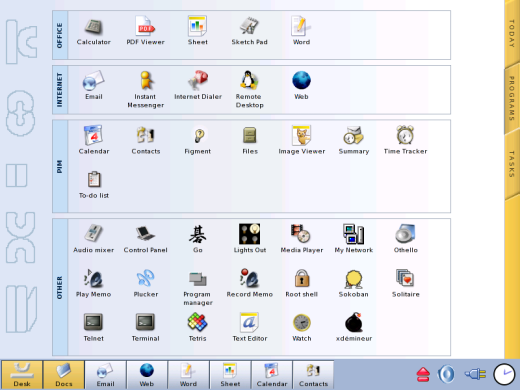
| The PROGRAMS screen of PsionLX on a netBook Pro development machine (photograph: Pulster) | |
| Developer(s) | Psion Teklogix |
| Initial release | Unreleased |
| Type | Linux distribution (OpenEmbedded build of the GPE Palmtop Environment) |
| Platform | Psion netBook Pro (Intel XScale PXA255, 400 MHz) |
| Status | Beta. Builds of November 2004 and January 2005 survive |
PsionLX is a Linux operating system that Psion Teklogix built for the Psion netBook Pro in 2004 and never released. Psion's own files call it Netbook LX and Psion LX, and its boot screen reads "PSION LX" with "BETA" underneath. It is an OpenEmbedded build of the GPE Palmtop Environment with a Psion theme, a Psion launcher, a Psion button bar and a set of office, internet and organiser applications patched by Psion for the machine. It runs on the same Intel XScale hardware that Psion Teklogix sold with Windows CE .NET 4.2.[1][2][3]
Psion Teklogix never sold PsionLX as a product. It survives on a small number of development machines with 256 MB of RAM and 64 MB of flash, and as Psion's finished root filesystem image of 4 January 2005, which was shared on the HPC:Factor forum from November 2007. The forum's download links died, and for eleven years no public copy was known. On 2 October 2026 RetroTechCollection obtained the image, with the help of fss_88 and of Christoph Pulster himself, and it was published in Pulster's download archive in a copy dated 30 May 2007.[4][5][6][7] Psion's own OpenEmbedded build tree also survives, and was recovered from the Internet Archive in September 2026. Between them, the image and the tree record the system almost completely.[8][9]
This page covers the original system and its history, every surviving file and where each one came from, and the RetroTechCollection release of 2026, which boots PsionLX from a CompactFlash card on a standard netBook Pro. Its first edition, of 30 September 2026, was a reconstruction built from the build tree before Psion's image was found. The edition of 4 October 2026 is built on Psion's image itself, and offers it in the three forms described under The three images. RetroTechCollection has also finished Psion's "Find new software" task, which installs programs from PsionLX Software, a library in the same archive.
Names
[edit | edit source]| Name | Where it appears |
|---|---|
| Netbook LX | Psion's package manifest (meta-psion.oe: "Meta-packages for Psion Netbook LX"), the help index title "Using your Netbook LX", the initial ramdisk ("Netbook LX initial ramdisk boot script") and the BooSt script name "netBook LX BooSt script"[1][10][11]
|
| Psion LX | The boot splash and the Firefox start-page logo; the sync server recipe ("Synchonization Service for the Psion LX", Psion's spelling); a comment in the initial ramdisk ("Psion LX *inird* cardmanager config")[2][9][10] |
| PsionLX | The auditeon.com wiki section "PsionLX Project for the Netbook Pro", and most forum posts from 2007 onwards[12][13] |
| soho-image | The OpenEmbedded image recipe that builds the root filesystem. It sets IMAGE_BASENAME = "soho-image", which is where the file name soho-image-netbook-pro-20050104074212.rootfs.tar.bz2 comes from[1]
|
| LX, NBpro LX | Forum shorthand for the system, and also for the 256 MB development machines that carried it[14] |
Background
[edit | edit source]Psion Teklogix announced the netBook Pro in October 2003 as the successor to the Psion netBook. It kept the clamshell shape but moved from EPOC on a StrongARM to Windows CE .NET 4.2 on a 400 MHz Intel PXA255, with 128 MB of RAM and an 800 × 600 TFT display. The Register reported that Psion "looked at a variety OS options, including Linux, before settling on CE", quoting product manager Harvey Roberts.[3][15]
In February 2004 Psion issued a statement reporting "positive results from a viability study of Netbook with Linux for professional users with specialist applications". Psion founder David Potter told the same reporter: "We see Linux as being very interesting, not only in terms of technology, but also in market dynamics."[16]
On 4 April 2004 the netBook Pro was registered in the ARM Linux machine database as machine type 503, MACH_TYPE_NETBOOKPRO, "Psion Netbook Pro, PXA 255 based sub-notebook", with Peter Naulls as contact. It was never merged into the mainline kernel.[17]
Wikipedia's article on Psion Teklogix states that the only outcome of Psion's Linux interest was "Linux as the operating system on a limited number of custom NetBook Pros designed for a hospital setting", citing a report in The Business of 23 May 2004 headed "NHS deal with Psion heralds move away from Windows". That report could not be checked for this page.[18]
Development
[edit | edit source]Build system
[edit | edit source]PsionLX was built with OpenEmbedded. The tree's README describes the procedure: install Python, Psyco, ccache and GCC, check out oe-netbook from cvs.psiondev.com, point setup.sh at the central snapshots under /var/home/autobuild/oe/, then run oemake soho-image.[1]
The image recipe pulls in four package groups and then adds the default user:
export IMAGE_BASENAME = "soho-image"
DEPENDS = "task-bootstrap meta-gpe meta-psion ttf-bitstream-vera"

add_netbook_tweaks() {
	# add lx user, group and homedir, and add it to sys group for printer admin
	echo "lx::1000:1000:LX Default User:/home/lx:/bin/sh" >>${IMAGE_ROOTFS}/etc/passwd
	...
	# point /lib/modules to the initrd, and have i2c and i2ckbd loaded
	ln -s ../initrd/lib/modules ${IMAGE_ROOTFS}/lib/modules
}
The desktop runs as user lx with an empty password, which is why PsionLX starts straight into the desktop with no login.[1][9]
The tree holds 263 recipes in 144 directories. Five recipes fetch their source from Psion's own CVS server through the ${PDCVS} variable (cvs://${PDUSER}@cvs.psiondev.com/var/lib/cvs): the launcher gpe-appmgr, the button bar gpe-buttonbox, the help viewer gpe-helpviewer, the infoprint utility and the 2.4.26 kernel headers. Another twenty-two fetch from other CVS servers, mostly handhelds.org and freedesktop.org. The rest carry their payload in the tree or fetch a released tarball.[9]
People named in the files
[edit | edit source]The files name several people. None of this establishes who employed whom, and the list below records only what the files say.
- The tree's CVS metadata names the account
[email protected], and every file in the archive that carried the tree is owned by a user calledpeter.[9] setup.shcarries the line "customised for netbook project by Robert McQueen <[email protected]>".[1]- The AbiWord recipes name Alex Loveday at a
psion.comaddress as maintainer. The rdesktop, grdesktop, LinNeighborhood, Gaby and VNC recipes name Peter Naulls. Many GPE recipes keep the maintainer names of the upstream OpenEmbedded recipes they were copied from, such as Phil Blundell and Florian Boor.[9] - The NAND installer script
NBLXLoad-cook.shcarries the CVS identifier$Id: NBLXLoad-cook.sh,v 1.8 2004/09/24 10:16:42 wookey Exp $.[19] - The netBook-specific drivers in Psion's own kernel image announce themselves as "(c) 2004 Simtec Electronics": the battery monitor, keyboard driver, power manager, SPI driver, NAND driver, Epson S1D13XXX framebuffer driver and Ricoh RTC driver. The later machine support file
arch/arm/mach-pxa/netbookpro.cnames Ben Dooks of Simtec Electronics as author.[20][21] - The kernel image that matches the lost root filesystem was built by
autobuild@nexus.[20]
In July 2006 a forum member wrote that "Psion contracted out development of a Linux distro, but decided not to release it", without giving a source.[22]
The developers' wiki
[edit | edit source]Psion's developers kept a wiki. In December 2007 and April 2008 two forum members who held the developer archive, Acid Snoop and w_m0zart, wrote that they were preparing a public version of it with personal details removed, and that it had to be approved before release.[23][24]
The site auditeon.com later carried a section titled "PsionLX Project for the Netbook Pro", last modified on 14 May 2008. Its index lists Action Status (ToDo List), Beta Changelog, Beta Release Notes, Beta Testing, Daily Build Status, Loading from CompactFlash, Project Communication Details, Recent Changes ("recent changes made by the PsionLX developers"), Xios Projects ("website doesn't exist anymore"), Cross Building, ScratchBox ("Cross compiling environment") and Using the PsionLX SDK ("if someone got it, let me know"). The site has since gone offline. Only the index page could be read for this article.[12]
The tree itself includes an SDK recipe, meta-sdk.oe, which packages a cross toolchain (binutils, GCC and GDB) and the target C library for armv5te.[1]
Build dates
[edit | edit source]The surviving files give a timeline. The dates come from version strings inside the kernel images, archive metadata and forum posts that quote the machines' own version screens.
| Date | Evidence | Source |
|---|---|---|
| 24 September 2004 | Revision 1.8 of the NAND installer script NBLXLoad-cook.sh |
Script header, posted on HPC:Factor[19] |
| 15 November 2004 | Kernel "Build 15 nov 02:10:25 GMT 2004" and system stamp "2004-11-15 02:13" on a 256 MB development board with PsionLX in its internal flash | Owner's report[25] |
| 17 November 2004 | Date of most files in the oe-netbook CVS checkout (the earliest is 28 October 2004) |
CVS Entries files[9]
|
| 19-23 November 2004 | Cross-built gnome-games 2.6.2 and LinNeighborhood 0.6.5 .ipk packages |
Archive file dates[9] |
| 30 December 2004 | Checkout of the 2.6.9 kernel source | Archive file dates[9] |
| 4 January 2005, 02:27 GMT | Psion's kernel image: Linux version 2.6.9-rc1-bk18-nb1 (autobuild@nexus) (gcc version 3.4.0) #1 Tue Jan 4 02:27:32 GMT 2005 |
Version string in nBkProOs.img[20]
|
| 4 January 2005, 02:31 | Root filesystem soho-image-netbook-pro-20050104074212.rootfs.tar.bz2. Its /etc/version reads 200501040231, four minutes after the kernel above, and its file name records that the archive was assembled at 07:42:12 the same morning. A CF card carrying it reports "2005-01-04 02:31" |
The image itself; owner's report[8][25] |
| 26 April 2006 | netbook-linux-sources.tgz packed |
gzip header[9] |
The owner of the development board first described its two builds as "build 2.13 dated nov 2004" and "2.31 2005". A later post from the same owner shows those figures are the times in the two date stamps, 02:13 and 02:31, rather than version numbers.[26][25]
The development machines
[edit | edit source]PsionLX was developed on netBook Pros with a larger main board than the retail machine. Several owners describe it independently:
- "The Linux based Netbook Pros seem to have 64 MB of flash versus the normal NB Pro's 32" (July 2006).[22]
- "Psion Lx motherboard ie 256mb ram and 64mb flash running Psion Lx beta" (October 2010), and "My netBook pro came with it installed. It has the 256mb/64mb motherboard which was used for Psion Lx development."[27]
- "it is written for the special Netbook Pro version with 256mb RAM but its also working on normal ones" (January 2010).[5]
- Pulster's sales listing: "Psion Netbook PRO with rare 256 MB RAM mainboard. Running Linux."[28]
The standard machine has 128 MB of RAM and 32 MB of flash.[3][29]
The LX BooSt script partitions the internal NAND differently from Windows CE. netbook-booting.txt, recovered with the LX installer, gives the commands for the LX prototype and warns that a standard machine needs a different value:[11]
nand -ignore erase 18 ee8
nand partition e8

For a normal NBP the correct value should be 7e8 instead of e8.
A forum member who used the e8 script on a standard machine in 2009 found that Windows CE would no longer install into the smaller partition until the script was remade with 7e8.[30] A 2007 guide to the BooSt supervisor mode gives the full-erase commands as nand -ignore erase 18 7e8 for a 32 MB machine and nand -ignore erase 18 fe8 for a 64 MB one, and warns that erasing below block 18 erases BooSt itself and leaves the machine unbootable.[29]
RetroTechCollection's own restore of Windows CE in September 2026 did not bear out 7e8 as a partition value. On its standard machine a nand dump reads 0x800 blocks of 0x4000 bytes, 32 MB. There, nand partition 7e8 gave the whole chip to the operating-system partition and left Windows CE with no Flash Disk, so it reached its splash screen and stopped. nand partition 540 worked, leaving 10.6 MB of Flash Disk.[31]
LX machines appeared for sale from time to time. Expansys asked "over a thousand dollars" for one earlier in 2008, a prototype appeared on eBay in June 2008 without source, and in February 2010 a forum member offered his 256 MB machine, bought from Pulster two years earlier, for €400, with the LX system "swapped for GPE".[32][33][14] In September 2026 Pulster listed a "Psion Netbook PRO Linux - PsionLX" at €1,900.[28]
Why it was not released
[edit | edit source]No official reason has been found. What exists is second-hand:
- In October 2007 a forum member who had asked Psion Teklogix support about the machine reported that they "claim they have no info on any 'in-house' linux version ever being pursued". Their final reply to his questions was "We are not aware of any undocumented features, and unfortunately we are unable to support your other requests."[34]
- In November 2007 w_m0zart, who had an LX machine on loan from Pulster and held the developer sources, wrote: "From one of the developers I heard that the only reason why the LX project was not continued, was just a lack of performance of the NBP hardware."[35]
- In February 2019 Acid Snoop reported that Zebra Technologies' EMEA support team had rejected his request for permission to publish the sources, telling him "the NBP ist end of life".[36] Motorola Solutions bought Psion in 2012, and Zebra bought Motorola's enterprise business, including the former Psion assets, in October 2014.[18]
How PsionLX reached the public
[edit | edit source]| Date | Event |
|---|---|
| July 2006 | A forum member reports seeing "a few Netbook Pros sold on eBay with this distro preloaded"[22] |
| 30 May 2007 | The date on the copies of the root filesystem and the developer archive that later appeared in Christoph Pulster's download archive, five months before the image was first posted publicly[7] |
| October 2007 | The HPC:Factor thread "Netbook Pro I've found a working linux distro!" starts from community GPE images at linuxtogo.org. Members find the LX prototype partitioning values in netbook-booting.txt. Screenshots of Linux running on a netBook Pro prompt one member to suggest that someone "is in possession of one of the limited number of actual Linux netBook Pros"; they turn out to show Koen Kooi's OpenZaurus build, not Psion's[37]
|
| 30 October 2007 | w_m0zart, who signs his posts "Marc", writes that he has "a netbook pro LX (on loan from www.pulster.de)" and "the original LX linux (sources)". He found it "based around GPE", slow ("Starting firefox took much more than 30 seconds") and unable to see some files on CF cards[38] |
| 6 November 2007 | Acid Snoop boots the image on his own netBook Pro from a 1 GB CF card, thanking "Marc for distributing me with the PsionLX image". His first complaint is that settings do not survive a restart[13] |
| 7 November 2007 | Acid Snoop posts RapidShare links to nBkProOs.img and soho-image-netbook-pro-20050104074212.rootfs.tar.bz2: "Marc gave me the OK to upload the PsionLX files".[4] The same evening he posts the links with German instructions on the Linux on tour forum. He is answering an offer made that morning by the dealer Christoph Pulster: goods worth €100 from his shop for whoever writes a guide to installing Linux that still allows a return to Windows CE. His instructions put nBkProOs.img on a 10 MB FAT16 partition and the extracted image on an ext2 partition of at least 140 MB, on a CF card (he used 1 GB), and leave the internal flash untouched[39]
|
| 10 November 2007 | Acid Snoop uploads netbook-linux-sources.tgz, plus a password-protected folder of "the original PsionLX sources the Teklogix developer used to build the PsionLX Linux OS", adding that "some of these files are still confidential"[40]
|
| December 2007 - May 2008 | Acid Snoop and w_m0zart work on releasing a cleaned version of the developers' wiki. The auditeon.com PsionLX index is last modified on 14 May 2008[23][24][12] |
| May-July 2009 | bobbyshane posts a CF install guide that relinks the RapidShare image, and the Psion Linux blog repeats it, calling it "The official Psion Beta version which was never released (but is apparently more stable)"[41][42] |
| 20 January 2010 | scops uploads a package containing the soho-image, nBkProOs.img, netbook-linux-sources.tgz, the kernel patch, netbook-booting.txt and mk-nBkProOsImg.c: "this is the hole package for Linux (Psion LX! not GPE!)"[5]
|
| 31 March 2015 | RapidShare shuts down[43] |
| June 2017 | psifi reports running LX from a CF card on his netBook Pro[44] |
| February 2019 | Acid Snoop still has "the binary of the working boost Image and a userspace archive of the last available build" and offers to upload them. HPC:Factor offers hosting[36] |
| July-August 2026 | fss-hacks asks on three HPC:Factor threads for anyone with PsionLX files, and photographs of a running PsionLX beta are published by fss_88[44][45][46] |
| September 2026 | RetroTechCollection recovers Psion's build tree from the Internet Archive, and on 30 September publishes a reconstruction built from it[47] |
| 2 October 2026 | RetroTechCollection obtains the root filesystem with the help of fss_88 and Christoph Pulster. It is published in Pulster's download archive, in a folder titled "Psion LX - Linux prototype", beside a copy of the developer archive that is byte-identical to the one recovered from auditeon.com. It is the first public copy since the file-host links died[6][7][8] |
| 4 October 2026 | RetroTechCollection publishes a new edition of its release, built on Psion's image[48] |
What users reported
[edit | edit source]The forum record is the only account of how PsionLX behaved in use.
- Booting from CF took about two minutes. Acid Snoop's account: a black screen, a red cursor, the PsionLX logo, then "a minute or something" before the pointer and the interface appeared. His German instructions give the stages: 20 to 30 seconds to "Please wait, booting..." under the red cursor, about 30 seconds more to the PsionLX logo, then about a minute while the interface loads, ending with GPE's cross-shaped pointer in the middle of a black screen.[13][39]
- Firefox was slow to start: "much more than 30 seconds" by one account in 2007 and about 15 seconds by Acid Snoop's, and "a minute or so" in 2009, though once open it "loads pages way faster and better than ie in wince".[38][39][49]
- The touchscreen came pre-calibrated, and the battery monitor sat on the taskbar.[49]
- Wi-Fi worked on PsionLX in 2009 where the community GPE image of the time would not load pages.[50] In 2007 Acid Snoop's Orinoco Gold card was recognised straight away and connected to his access point.[39]
- The card had to stay in the slot. The root filesystem was just under 150 MB, too large for the 32 MB internal flash, of which about 29 MB is left after BooSt, because it included large programs such as Mozilla.[39]
- One user got "permission denied" messages during boot. After making the whole filesystem writable with
chmod -R 777he had to restore the setuid bit on/bin/tinyloginbeforesu,mountandumountworked again. He could not set the date and time, and found the built-in help "sehr mager" (very thin).[39] - Suspend worked the same way as under Windows CE, by closing the lid or pressing Fn+Off.[27]
- The e-mail application could corrupt the system: "On both version the email app will corrupt the O/S and make it unuseable."[25]
- The community GPE image was described as faster: "even better (faster) than Psion LX. Psion LX has more apps", and "less of a load than the lx stuff that psion produced".[51][52]
- "psion-lx one is a customised GPE as well."[53]
What PsionLX contained
[edit | edit source]Everything in this section is taken from Psion's own root filesystem, build tree and kernel image, except where another source is cited. It describes Psion's system as Psion built it, not RetroTechCollection's images.
The root filesystem
[edit | edit source]Psion's finished system is soho-image-netbook-pro-20050104074212.rootfs.tar.bz2, 36,911,573 bytes. It holds 6,221 entries: 4,815 files, 506 symbolic links, 841 directories and 59 device nodes. Its base is Familiar Linux 0.8.0-pre1, and its package database lists 315 installed packages, among them every package in Psion's manifest meta-psion.oe.[8]
Several things show that it is Psion's own build:[8]
- Its launcher,
gpe-appmgr-psion56-r0, records its source ascvs://[email protected]/var/lib/cvs;module=gpe/gpe-appmgr;tag=GPE_APPMGR_56: Psion's private CVS server, and the tag Psion's build tree names. Its button bar,gpe-buttonbox-psion51-r0, comes from the same server with the tagGPE_BUTTONBOX_51. /etc/versionreads200501040231, 02:31 on 4 January 2005, four minutes afterautobuild@nexusbuilt Psion's kernel image. The image does not record its own build host./home/lxbelongs to uid and gid 1000, as Psion's image recipe sets it.- It is intact and self-consistent: the bzip2 stream verifies end to end, and every one of its 315 programs links against the image's own libraries with no unresolved symbols.
The image holds Psion's built copies of four programs whose source lived only on Psion's CVS server and is still lost: the launcher, the button bar, the help viewer gpe-helpviewer and infoprint. For four packages it carries newer versions than any recipe in the November 2004 build tree: AbiWord 2.0.14, which checks spelling through enchant, Gaim 1.0.3, gnome-cups-manager 0.27, and GStreamer 0.8.7 with plugins 0.8.5. Psion went on changing its recipes after that checkout.[8][9]
Boot sequence
[edit | edit source]
gpe-bootsplash recipe in Psion's tree
The netBook Pro's firmware bootloader, BooSt, loads an operating system image named nBkProOs.img from internal NAND or from a CompactFlash card. BooSt reports itself as "Psion Teklogix netBook2 BooSt".[29] For Linux the image is a kernel and initial ramdisk wrapped in a 256-byte BooSt header. netbook-booting.txt documents the header: platform ID 0x326B426E, load offset 0x408000, and image flags 0x10003 for a CF image (maximum 8,388,608 bytes) or 0x10013 for a NAND image (maximum 3,702,784 bytes). Bit 16 marks the payload as zlib-compressed and bit 4 copies it to the OS partition.[11] A 2007 analysis found extra start-up code in Psion's boot images, which sets up the hardware and moves the kernel and ramdisk into place, and for which no source has been found.[54]
The kernel is 2.6.9-rc1-bk18-nb1. The same forum analysis found the kernel source in Psion's archive identical to 2.6.9-rc1-bk18 with linux-2.6.9-pre1-bk18-nbp1.patch, published in Koen Kooi's directory at linuxtogo.org, applied.[54] Psion's image also carries module paths for 2.4.26-vrs1-pxa1-nb1, and the tree has a 2.4.26 kernel recipe, so a 2.4 kernel was built for the machine as well.[20][9]
The initial ramdisk script, "Netbook LX initial ramdisk boot script", handles both kernel series. Under 2.4 it loads the i2c and i2ckbd keyboard modules; under 2.6 it prints "Running Linux 2.6 System". It then:[10]
- mounts the first CF partition read-only and, if it holds an executable
NBLXLoad.sh, runs it (this is how a new system was written to the internal flash); - tries to mount the internal NAND as JFFS2 (
/dev/mtdblock/0) as the root filesystem; - if that fails, tries the second CF partition (
/dev/hda2); - pivots into the root filesystem, leaving the ramdisk at
/initrd, and starts/sbin/init.
The community CF boot image of March 2005 changed this script in one way: it tries the card before the internal flash. Its ramdisk keeps Psion's original beside the new script, byte for byte, as linuxrc~.[31]
The ramdisk stays mounted at /initrd because it holds the kernel modules. The image recipe points /lib/modules at ../initrd/lib/modules for that reason.[1]
The root filesystem was built to live in the internal flash. Its /etc/fstab has no line for the root filesystem, and mounts NAND partition 1, /dev/mtdblock1, as a JFFS2 /home. Psion's image recipe calls the /home/lx inside the image the "emergency" home directory, "normally overwritten by /home mount". On the first boot 22 packages are still waiting to be configured, and a start-up script runs ipkg-cl configure on them and then deletes itself, which takes a few minutes.[8][1]
On the root filesystem, gpe-bootsplash draws Psion's splash, and gpe-dm starts Xepson, the kdrive X server for the netBook Pro's Epson display controller, and runs the scripts in /etc/X11/Xinit.d. The last of them, Psion's 99psion-session, hands the display to user lx:[8][9]
chown lx /dev/dsp /dev/mixer
if ! grep -q '^lx::' /etc/passwd; then
  exec gpe-login
else
  ln -s /var/tmp/xsession-errors.lx /home/lx/.xsession-errors
  exec su lx -c /etc/X11/Xsession >> /home/lx/.xsession-errors 2>&1
fi
The session then runs Psion's 95psion-apps, which copies Psion's button bar layout into the user's home directory ("this also neatly avoids the annoying welcome screen and timezone setter", in the script's own comment), and starts Matchbox with Psion's session file:[9]
gpe-soundserver &
gpe-appmgr -d -r &
matchbox-panel --orientation south --size 48 --no-menu &
exec matchbox-window-manager $@
The desktop
[edit | edit source]

The desktop is gpe-appmgr in desktop mode (-d) and row view (-r), built from Psion's own branch of the program (CVS tag GPE_APPMGR_56). Its artwork is in the image, and matches the photographs of running machines:[8][28][46]
- A gold strip down the right-hand edge with three tabs, TODAY, PROGRAMS and TASKS. It is drawn from three images of 26 × 552 pixels, one for each selected tab. At its foot is an orange power button, 20 × 20 pixels, which suspends the machine by running
apm -s. - TODAY shows the date and a summary: whether a Wi-Fi card is present, whether there is an internet connection, unread and outgoing e-mail, today's appointments and the to-do list. The desktop always starts on TODAY. Its "Show this screen at startup" checkbox makes the desktop return to TODAY each time it is shown.
- PROGRAMS shows the applications in four boxed groups, OFFICE, INTERNET, PIM and OTHER, each labelled down its left side with a rotated name drawn from an image. A fifth, hidden group, Settings, is the Control Panel, whose menu entry runs
gpe-appmgr -g Settings. - A pale embossed Psion blockletter watermark,
desktop-background.png, runs down the left of the screen. - A 48-pixel bar along the bottom holds Psion's button bar (
gpe-buttonbox, Psion's CVS tag 51) on the left, and the clock, volume, battery and card-ejector applets on the right. The button bar's layout is built into the program: Desk and Docs, then up to six presets read from/etc/gpe/button-box.apps(Email, Web, Word, Sheet, Calendar and Contacts), then Other, which names the window in front. "Buttonbar Setup" in the Control Panel edits a user's own copy of the list.
The bar itself is Psion's build of matchbox-panel 0.8.1. Psion's panel layout file lists its contents, with a tab character separating the left group from the right:[9][8]
gpe-buttonbox -p

gpe-clock
mb-applet-battery
minimix
psion-card-ejector

The TASKS screen lists eleven tasks in five rows. The launcher builds it from a table of labels, icons and commands inside the program:[8]
| Row | Task | What it runs |
|---|---|---|
| FILES | Back up your information | backup.sh, which in Psion's image copies nothing (see Bugs in Psion's own image)
|
| Synchronise with a PC | lx_sync.sh, which is not in the image
| |
| Set 'My Documents' Location | mydocs.sh, which points ~/My Documents at the RAM disk, a CF or MMC card, or a PC Card
| |
| CONNECT | Connect to the Internet | iconnect.sh, a short wizard that opens the dialler for a modem, or the network settings for a wired or wireless connection
|
| Find new software | Nothing. The entry has no command, and the launcher shows "This task is not yet implemented". RetroTechCollection wrote the program in 2026: see PsionLX Software | |
| Update system software | gpe-package -u, against Psion's package feeds
| |
| SECURITY | Set password | gpe-conf users password
|
| HELP | Get help | The help viewer, opening "Using your Netbook LX" |
| Two-minute tutorial | The help viewer, opening the sixteen-page tutorial | |
| VISUALS | Choose theme | gpe-conf theme
|
| Change wallpaper | gpe-conf task_background
|
Three recipes in the build tree describe themselves as task scripts: iconnect ("Internet connection script for tasks screen"), backup ("Backup script for tasks screen") and mydocs ("Task to specify location of My Documents"). The tree also holds an earlier form of the page. Psion's add-backup.patch of 26 August 2004 edits an HTML file, gpe-appmgr/tasks.html, turning "Back up your information" into a link to launch:backup.sh beside an entry reading "Get help".[9]
Theme, settings and keyboard
[edit | edit source]The psion-theme package has two halves. The GTK half is a gtkrc using the "mist" engine, with a #E2E2E2 base and #a1b6d7 for the clock and button bar. The window manager half is 20 PNG images plus theme.xml and theme.desktop. Psion derived it from the Blondie Matchbox theme and never renamed it: theme.xml still opens <theme name="blondie" author="Matthew Allum - [email protected]", with bgcol and dockcol set to #a1b6d7.[9]
Psion's XSettings defaults set the interface font to Sans 8. Psion's override, four lines, sets the double-click timing, turns Matchbox compositing off and selects the theme. That one setting selects both halves of the theme, so the window manager is started without a theme argument:[9][8]
Net/DoubleClickTime:I:600
Net/DoubleClickDistance:I:7
MATCHBOX/COMPOSITE:S:off
Net/ThemeName:S:psion
The session also sets LANG=en_GB, sets GPE_PRETEND_STYLUS=1, and loads Psion's keyboard map for the machine, xmodmap-netbookpro. In the shipped image the map gives F1 the keycode 0x92; the copy in the November 2004 build tree has 0x08. Psion's Matchbox keyboard bindings are:[9][8]
| Keys | Action |
|---|---|
| Mod3 + D | Show the desktop |
| Mod3 + C | Touchscreen calibration (xtscal)
|
| Mod3 + Left Alt | Internet dialler (gkdial)
|
| Ctrl + Alt + Backspace | reset.sh, which asks "Are you sure you wish to restart the session?"
|
| Alt + Tab, Alt + Shift + Tab | Next and previous window |
| Alt + Escape | Show the desktop |
| Alt + 4 | Close the window |
Help is a set of 102 HTML pages titled "Using your Netbook LX", packaged as nineteen help packages that cover first steps, the internet and each of the main applications, and there is a sixteen-page tutorial.[9][8]
Applications
[edit | edit source]meta-psion.oe ("Meta-packages for Psion Netbook LX", revision r23) groups the applications into psion-apps, psion-net, psion-media, psion-games and psion-debug. Psion's PROGRAMS screen shows 22 of them: the 21 in the photograph of a development machine, plus Database, which the photograph does not show. The names are Psion's, from override files in /usr/share/gpe/overrides. The table gives the version installed in Psion's image beside the newest version in Psion's recipes, and the recipes' patch counts.[1][8][28]
| Launcher name | Group | Package | Version in the image | Newest recipe | Psion's patches |
|---|---|---|---|---|---|
| Calculator | OFFICE | galculator | 1.2.3 | 1.2.3 | 7 |
| Database | OFFICE | Gaby | 2.0.3pre | 2.0.3pre | 3 |
| Sheet | OFFICE | Gnumeric | 1.3.93 | 1.3.93 | 9 (psion.patch alone changes 24 files)
|
| Sketch Pad | OFFICE | gpe-sketchbook | 0.2.8 | 0.2.8 | 3 |
| Word | OFFICE | AbiWord | 2.0.14 | 2.0.12 | 4, including abiword-psion.patch, which sets Thorndale AMT as the default font
|
| INTERNET | Balsa | 2.2.2 | 2.2.2 | 2 (netbook-20041110.patch changes 86 files)
| |
| Instant Messenger | INTERNET | Gaim | 1.0.3 | 1.0.0 | 1 |
| Internet Dialler | INTERNET | gkdial | 1.8.1 | 1.8.1 | 3 |
| Remote Desktop | INTERNET | grdesktop with rdesktop | 0.23 and 1.3.1 | 0.23 and 1.3.1 | desktop-name.patch on grdesktop; 4 on rdesktop
|
| Web | INTERNET | Firefox | 1.0 | 1.0 | 8, including startup-page.patch, which opens Psion's branded start page
|
| Calendar | PIM | gpe-calendar | 0.58 | 0.58 | 5 |
| Contacts | PIM | gpe-contacts | 0.32 | 0.32 | 7 |
| Files | PIM | gpe-filemanager | 0.21 | 0.21 | 6 |
| Image Viewer | PIM | gpe-gallery | 0.95 | 0.95 | 5 |
| To-do list | PIM | gpe-todo | 0.49 | 0.49 | 4 |
| Control Panel | OTHER | gpe-conf | 0.1.21 | 0.1.21 | 8 |
| Media Player | OTHER | Totem | 0.99.15.1 | 0.99.15.1 | 4 |
| My Network | OTHER | LinNeighborhood | 0.6.5 | 0.6.5 | 4 |
| PDF Viewer | OTHER | gpdf | 2.7.90 | 2.7.90 | 2 |
| Solitaire | OTHER | AisleRiot, from gnome-games | 2.6.2 | 2.6.2 | short-name.patch
|
| Terminal | OTHER | gpe-terminal | 1.1 | 1.1 | none |
| Text Editor | OTHER | gpe-edit | 0.28 | 0.28 | 3 |
Psion's override files also name the clock "Alarm clock" and add "My VCard", the owner's own contact card, to the Control Panel, which holds seventeen settings programs.[8]
The same manifest adds the Agfa fonts, the aspell English dictionary, the GNOME CUPS print manager ("Printers", in the Control Panel) and ESP Ghostscript, Zenity, infoprint, Bluetooth and IrDA beaming, the aumix and minimix volume controls, and the debugging tools strace, mtd, xprop, xhost, scap, ldd, gdbserver and catchsegv. A comment beside the games group reads "want minesweeper :P".[1]
Underneath, Psion built its own copies of the base libraries: GTK+ 2.4.13 with 18 patches, GLib 2.4.7, Pango 1.4.1, and Xepson, a kdrive X server from a CVS snapshot of 21 October 2004, with 5 patches.[9][8]
Other Psion components
[edit | edit source]| Package | What it does |
|---|---|
psion-session |
Session start-up scripts, button bar layout, XSettings override, keyboard map, locale, stylus setting and the session-reset script |
psion-theme |
The GTK and Matchbox theme described above |
psion-help, psion-tutorial |
The help pages, "Using your Netbook LX", packaged as nineteen help packages, and the sixteen-page tutorial
|
gpe-helpviewer, infoprint |
Psion's HTML viewer for the help and tutorial, and a small utility, both fetched from Psion's CVS. Their source is lost; Psion's built copies are in the image |
psion-card-ejector |
A panel applet that runs eject.sh as root. The script unmounts any CF and MMC cards, stops the IDE card service on hda and hdc, and then shows "You can now remove your CF or MMC cards safely"
|
psion-sierra |
PCMCIA card definitions for the "Sierra Wireless AC710/AC750 GPRS Network Adapter" and the "Pretec CompactModem or Globetrotter GPRS", both bound to the serial driver |
ppp |
GPRS peer files for Orange, Vodafone, O2 and T-Mobile with their chat scripts |
wpan-tools |
bt_connect.sh and ir_connect.sh, dial-up helpers for Bluetooth and IrDA phones
|
plptools |
Psion's build of the PLP tools with a plp_upgrade script which "Extracts and moves files from previous versions of Psion Product over to the LX": it starts ncpd on the serial port and runs plpbackup against an EPOC Psion
|
sync-serv |
"LX Sync Server", a small C program that answers file, SQL, directory-listing and command requests from a Windows PC over a pipe |
iconnect, backup, mydocs |
The TASKS screen scripts |
agfa-fonts |
Albany AMT, Thorndale AMT, Cumberland AMT and Arial Narrow, sixteen faces in all. The tree's recipe (r5) installs them, but the package in the shipped image (1.0-r6) is installed and empty, so Psion's image has Bitstream Vera as its only font |
gpe-appmgr-psion, gpe-buttonbox-psion |
The launcher (tag 56) and button bar, fetched from Psion's CVS. The tree's recipe asks for button bar tag 50, and the image carries tag 51. The source of both is lost, but Psion's built programs and their artwork are in the image. The button bar package also installs Psion's override files, 21 menu entries and 28 icons in /usr/share/gpe/overrides
|
psion-kernel |
Headers-only recipe for the 2.4.26 kernel, fetched from Psion's CVS |
Surviving material
[edit | edit source]Recovered files
[edit | edit source]These are every file relating to PsionLX that has been found, with where each came from. Sizes are in bytes. Several were recovered from the Internet Archive after the sites that hosted them closed.[47]
| File | Size | What it is | Where it came from |
|---|---|---|---|
soho-image-netbook-pro-20050104074212.rootfs.tar.bz2 |
36,911,573 | Psion's finished root filesystem of 4 January 2005, 6,221 entries. See The root filesystem | Obtained by RetroTechCollection with the help of fss_88 and Christoph Pulster, and published in Pulster's download archive, folder "Psion LX - Linux prototype", on 2 October 2026 with a file date of 30 May 2007. The copies posted on RapidShare in November 2007 and on ul.to in January 2010 were never archived[6][7][8] |
netbook-linux-sources.tgz |
106,074,940 | Psion's developer archive, packed on 26 April 2006, 347,985,920 bytes and 31,531 entries unpacked. See the table below for its contents. It is the same file name that Acid Snoop uploaded in November 2007 and scops in January 2010 | www.auditeon.com/xyz/psion/, via the Internet Archive. Nothing indexes it. It was found by following every URL posted in five HPC:Factor threads, which led to the linuxtogo wiki page NetbookPro/Installing2Nand, which cites auditeon.com in passing. Pulster's download archive holds a byte-identical copy named psion-netbookpro-linux-sources.tgz[9][47][7]
|
nBkProOs.img (inside the archive) |
3,613,045 | Psion's own CF boot image, kernel built by autobuild@nexus on 4 January 2005, the same day as the lost root filesystem. BooSt flags 0x10003 (CF) |
netbook-linux-sources.tgz[20]
|
nBkProOs.img_cf |
3,659,808 | A CF boot image built outside Psion from the same kernel version: Linux version 2.6.9-rc1-bk18-nb1 (fuchs@gibson) (gcc-Version 3.3.4) #1 Fri Mar 25 18:13:14 CET 2005. BooSt lists it as "NETBOOKPRO Linux26". Forum members used it to boot the PsionLX root filesystem from CF |
linuxtogo.org/~florian/ (offline), via the Internet Archive[20][25][55]
|
gpe-fs-cf.tar.bz2 |
14,227,676 | A community GPE root filesystem for CF, 2,383 entries. /etc/version reads 200503081928 and /etc/issue "Familiar Linux Unofficial Snapshot". Not PsionLX |
linuxtogo.org/~florian/. The archive holds it only under its index.php?download= address, not its direct path[47]
|
gpe-image-3.5.4.1-netbook-pro.rootfs.jffs2 |
15,450,112 | An OpenZaurus 3.5.4.1 GPE image for the internal flash, 1,939 files. /etc/version reads 200608040117, so it is a later build than the CF root filesystem, not a copy of it. Not PsionLX |
linuxtogo.org/~florian/, via the Internet Archive[47][31]
|
nBkPro.img |
300 | A BooSt script named "netBook LX BooSt script" holding the LX prototype NAND commands | linuxtogo.org/~anonymous/ (offline), via the Internet Archive[11]
|
netbook-booting.txt |
3,958 | A description of the LX boot and install process and the BooSt header format | linuxtogo.org/~anonymous/[11]
|
mk-nBkProOsImg.c |
5,496 | Source of the tool that wraps a kernel and ramdisk into a BooSt image | linuxtogo.org/~anonymous/[11]
|
nBkProOs.img |
3,403,850 | A NAND boot image of the same kernel version, built by fuchs@gibson on 8 March 2005. BooSt flags 0x10013 (NAND) |
linuxtogo.org/~anonymous/[20]
|
gpe-image.jffs2 |
22,822,912 | A third GPE build, again for the internal flash: "Familiar Linux v0.8.3-unofficial-unsupported-snapshot-20051104", 2,223 files. It includes AbiWord 2.4 and Gaim. Neither of the two JFFS2 images carries gpe-appmgr or gpe-buttonbox |
linuxtogo.org/~anonymous/[47][31]
|
NBLXLoad.sh |
633 | The script the initial ramdisk runs to write a root filesystem to the internal flash. It takes the first .jff or .jffs2 file in /rootfs, erases the flash with flash_eraseall -j and writes the file with nandwrite --blockalign=2. The copy at linuxtogo.org was never archived: all nine Internet Archive captures are an HTTP 403 page, because the server refused to serve .sh files. Its text was also posted on HPC:Factor on 30 October 2007 |
A copy uploaded on 26 March 2010 to the anetbookpro download area at TuxFamily, still online[56][19][47] |
BooStDongle.pdf |
217,046 | "How to enter the BooSt superuser mode in the Netbook Pro", a one-page guide dated 12 July 2007 by w_m0zart | Kept with the auditeon.com files; its download location was not recorded[29] |
| Three Psion PDFs | various | A different revision of the BooSt dongle sheet, an accessory compatibility list, and an 11-page "BooSt-Super-User-Mode-commands" document. The last is chapter 4 of the hardware development kit manual for the Workabout Pro, a Psion Teklogix machine with the same bootloader, and documents its doc command rather than the netBook Pro's nand |
Pulster's download archive[7][8] |
OpenEmbedded netbook-pro machine files |
small | The later community machine configuration, a 2.6.17 kernel recipe, fstab and touchscreen settings |
The OpenEmbedded classic repository, still online[21] |
linux-2.6.9-pre1-bk18-nbp1.patch |
954,777 | netBook Pro support for the 2.6.9 kernel the device runs, patching 174 files, including the machine file netbookpro.c, the keyboard, NAND, PC Card and display drivers, and a netbookpro_defconfig dated 14 September 2004. The full patched tree in the developer archive supersedes it |
linuxtogo.org/~koen/ (offline), via the Internet Archive[57]
|
| 2.6.17 kernel patches | small | netbook-base-r0 to r3, netbook-pcon-r0, netbook-pcon-i2c-r0 and r1, netbook-pm-r0, a defconfig and the machine file netbookpro.c. The patches and defconfig the recipe uses match its MD5 checksums |
linuxtogo.org/~koen/ (offline), via the Internet Archive[21]
|
| GPE release tarballs | various | Every GPE application release that Psion's recipes pin, plus gpe-appmgr 2.8, gpe-buttonbox 0.5 and minimix 0.6 |
The gpe.linuxtogo.org mirror of the GPE download tree, via the Internet Archive. The original gpe.handhelds.org was never archived[47]
|
jlime-xfce-image-2012.3-netbookpro-20120311.rootfs.tar.bz2 |
88,409,659 | jLime 2012.3 with the XFCE desktop, 28,423 files. The newest Linux release found for the machine. Not PsionLX | HPC:Factor's public repository, which mirrored jLime after jlime.com closed[47] |
nbpswfeb18english04218.zip |
19,505,892 | The Windows CE 4.2 restore image, for returning a machine to its shipped state | vigay.com[47] |
1000999D.ISO |
30,750,720 | Psion's netBook Pro companion CD. The volume is dated 10 November 2004. It holds the Windows side only: ActiveSync, USB setup, Pocket On-Schedule and its guides, and the user manual in English, French, German, Italian and Spanish. Not PsionLX | The Internet Archive item 1000999d_netbook_pro_cd, uploaded in December 2019[58]
|
The developer archive contains:[9]
| Top-level entry | Entries | What it is |
|---|---|---|
oe-netbook/ |
2,807 | Psion's OpenEmbedded tree, with its CVS metadata |
linux-2.6.9/ |
21,464 | The kernel source used on the device, checked out on 30 December 2004 |
kdegames-3.3.1/ |
5,165 | KDE games source |
gnome-games-2.6.2/ |
1,639 | GNOME games source with ARM objects compiled in November 2004. Solitaire (AisleRiot) comes from here |
linneighborhood-0.6.5/ |
300 | LinNeighborhood source ("My Network") |
rdesktop-cvs/ |
152 | rdesktop source |
Three .ipk files |
3 | Psion's LinNeighborhood 0.6.5 packages, releases r7 and r8 and a German locale, built 23 November 2004 |
nBkProOs.img |
1 | Psion's CF boot image of 4 January 2005 |
SHA-256 checksums of the recovered binaries:[47]
| File | SHA-256 |
|---|---|
soho-image-netbook-pro-20050104074212.rootfs.tar.bz2 |
baa176ff06dcda9d58e86e17f76be3f19e63edbf791515cbea9111e22a0ae11d
|
netbook-linux-sources.tgz |
a14b7d2e87217fdc2f5d32752a00ca0959ae5b1f312a6116d1a895d248edf08f
|
nBkProOs.img (Psion, from the archive) |
88dcfa0ab10750b76ed251b919ee66db5395ac2be379ae81abd6ede7b4e4b890
|
nBkProOs.img_cf |
bc640360e58d858b2d260450e20621adc93cb51e0fcccadaf2a97f415099bd1b
|
gpe-fs-cf.tar.bz2 |
532e322fdd9a1275e953818ff575a36a1c0249fea526d9c53315f07b390f1866
|
gpe-image-3.5.4.1-netbook-pro.rootfs.jffs2 |
8094d741422036c13801579aa69e477ed8bca61827e8edcc0a770dda29254738
|
nBkPro.img |
0f56875793d46c36ce725157e99b82ef4f1a64f2c60b99cc16912d3a3b775476
|
nBkProOs.img (linuxtogo, NAND) |
003ef6d5455e4397aaee80e8942bc11d1ab1178220515e1d6aa2f4cf8b15ff7d
|
gpe-image.jffs2 |
1db13b43cfe8055c5b8fea27bdb0a2c510e448f574dbcbad53dddfbd85881e35
|
jlime-xfce-image-2012.3-netbookpro-20120311.rootfs.tar.bz2 |
ce14633797a2d4562ecdfb07db19974b8417df43bc96bed9595e43ac3f9060fc
|
NBLXLoad.sh (TuxFamily) |
583095e51004129de568dfd216d9cf207fec34c09cb9eade41d9e712556f2280
|
linux-2.6.9-pre1-bk18-nbp1.patch |
5fe432d2445e927e65c7859afa34371e0e080626c5887f7815d698972011e0b6
|
1000999D.ISO |
7d646c2841cfbdd1f636814bb0129339ba7cb7e88b7d2e74f8a5c87862d5c967
|
What has not been found
[edit | edit source]| Item | What it was | Status |
|---|---|---|
Psion's CVS server, cvs.psiondev.com |
The source of the launcher (tag GPE_APPMGR_56), the button bar (tag GPE_BUTTONBOX_51 in the image, 50 in the tree), gpe-helpviewer, infoprint and the 2.4.26 kernel |
Offline. The Internet Archive holds one URL from psiondev.com. Psion's built copies of the first four are in the root filesystem, but their source is lost[47][8] |
soho-image-netbook-pro-20040831070503.rootfs.jffs2 |
An earlier soho image, built on 31 August 2004 for the internal flash | Known by name only[57] |
gpe-image-netbook-pro-32-20050810.rootfs.jffs2 and its bootstrap image |
An image of August 2005 for a 32 MB machine, 20.6 MB, and a 2.4 MB bootstrap image | Known from an archived directory listing, which gives their sizes[57] |
gkdial-1.8.1.tar.gz |
The upstream release Psion's dialler recipe pins | Not in the Internet Archive, SourceForge or the Debian archives. 1.8.0 survives, and Psion's built 1.8.1 is in the root filesystem[47][8] |
xtscal-0.6.2.tar.bz2 |
The touchscreen calibrator Psion patched (xtscal-nbp.patch) to keep calibration in the netBook Pro's NVRAM |
The upstream release is not archived under any mirror path used by the recipe or the GPE tree. Psion's patched build is in the root filesystem[31][8] |
| The password-protected source folder | "the original PsionLX sources the Teklogix developer used", uploaded by Acid Snoop in November 2007, which he later said contained "Developer names, comments, Roadmaps" | Never published[40][36] |
| The developers' wiki | Beta release notes, changelog, daily build status, SDK instructions | Only the auditeon.com index page has been read[12] |
| The PsionLX SDK | The built toolchain from meta-sdk.oe |
Not found. The auditeon index asks "if someone got it, let me know"[12] |
| Psion's binary packages | The .ipk feed the image was assembled from |
The root filesystem holds the installed contents and package records of 315 packages, but not the package files. Only the three LinNeighborhood packages in the developer archive survive as files[9][8] |
Before the root filesystem was found, the searches for it covered the Internet Archive (exact URLs, URL prefixes and domain sweeps of jlime.com, hpcfactor.com, repository.hpcfactor.com, linuxtogo.org, psiondev.com, handhelds.org, familiar.handhelds.org, openembedded.org and psionlinux.blogspot.com), a full enumeration of HPC:Factor's public repository, GitHub code and repository search including the tworaz netBook Pro repositories, archive.org item and full-text search, Software Heritage, the OpenPsion mailing list and the archived blog comment feeds.[47] One trap is worth recording for anyone repeating the work: a Wayback Machine CDX query of the form url=*/filename* returns nothing for files that are archived, because a leading wildcard is not a supported match type. An empty result from that query form proves nothing.[47]
A second search at the end of September 2026 added arquivo.pt's full-text index, Common Crawl, the Internet Archive's complete index of linuxontour.de (which linked to the files but never hosted them), the live directory at kernelconcepts.de/~florian/, the code archives and forges Software Heritage, GitLab, SourceForge, Codeberg, Gitea, git.kernel.org, repo.or.cz, the Google Code Archive, Gitorious, Savannah, BerliOS, Launchpad and Bitbucket, and searches in German, Russian and twelve other languages. Only the German search found anything: the 2007 Linux on tour post. Six sites could not be searched by script, because of blocks, captchas or logins, and have not been checked by hand: 4pda.to, Yandex, Baidu, forum.ixbt.com, mikrocontroller.net and a1k.org.[57] Two more traps: the Wayback Machine's CDX interface fails over plain HTTP where the same query over HTTPS works, and when it is throttled it returns an empty result that looks like "no captures". Every query needs a control that is known to be archived, run in the same batch.[57]
The root filesystem was not online while those searches ran. Pulster's download area began in July 2026, and the folder that holds the image is dated 2 October 2026 in its listing, two days after the second search stopped. Pulster was already on the project's list of leads, for the PsionLX machine he was selling. In the end RetroTechCollection obtained the image with the help of fss_88 and of Pulster himself, and it was published in his separate file archive rather than through his shop.[57][6][7]
The RetroTechCollection release
[edit | edit source]This section documents RetroTechCollection's own work. Its figures come from the project's build files, the built images and measurements made for them, not from published sources, and are cited to the project's records.
RetroTechCollection has published PsionLX as bootable CompactFlash images for a standard 128 MB netBook Pro in two editions. The first, on 30 September 2026, was a reconstruction. With Psion's image lost, it rebuilt the system from Psion's build tree on a community root filesystem, and redrew the launcher, button bar and watermark from photographs. Two days later RetroTechCollection obtained Psion's image (see How PsionLX reached the public), and the edition of 4 October 2026 is built on it. Where the reconstruction guessed, Psion's own files now stand.[31][48]
-
 Psion's own PROGRAMS screen, from the safe image running under emulation on 4 October 2026
 -
 Psion's build on a development machine (photograph: Pulster). The same screen, without Database
 -
 The first edition's reconstruction, captured on 28 September 2026

The three images
[edit | edit source]All three images are built from Psion's root filesystem, and each is a complete 1 GB card: a FAT16 boot partition holding the kernel, and an ext2 root filesystem. Every file keeps the mode and owner that Psion's archive gives it.[48]
| Image | Root filesystem | Kernel | Internal flash | PROGRAMS screen |
|---|---|---|---|---|
psionlx-cf-1gb.img |
Psion's, plus Find new software, applications Psion did not ship, Psion's Agfa fonts, fixes for bugs in Psion's image and the safety changes | Hardened (see below) | Never touched | 37 programs |
psionlx-cf-1gb-soho-safe.img |
Psion's, with three safety changes only | Hardened | Never touched | Psion's 22 |
psionlx-cf-1gb-soho-original-ARCHIVAL.img |
Psion's, unchanged, down to every file's mode, owner and device node | Psion's own, of 4 January 2005, unchanged | Read and mounted at boot. For preservation only | Psion's 22 |
The full image, psionlx-cf-1gb.img, is the one to use. Of the 6,161 entries in Psion's image apart from its device nodes, 6,145 are present and byte-identical. Every difference is listed in the release's PROVENANCE.txt:[47]
- Safety. The NAND
/homeline in/etc/fstabis commented out, the six flash-writing tools (flash_eraseall,flash_lock,flash_unlock,flashcp,nandwriteandnanddump) are removed, andeject.shwill not stop the disk the system is running from. - Fixes for Psion's bugs. "Back up your information" now copies settings, contacts and documents, including the hidden
~/.gpedirectory. "Synchronise with a PC" now says that the program was never finished, instead of failing silently. The idle-sleep daemon's control directory is created at boot. See Bugs in Psion's own image. - Find new software. The TASKS entry Psion left without a command runs RetroTechCollection's catalogue, after a 34-byte change to Psion's launcher; Psion's copy is kept on the card. The programs below are recorded with Psion's package manager, so Find new software lists them as installed and can remove them. A Spotify app is not in the image, but is one install away. See PsionLX Software.
- Applications Psion did not ship, from fifteen packages taken whole from the first edition, each checked to run on Psion's libraries: Jotter (Figment), Time Tracker, Audio mixer, Bombs (xdemineur), Go, Lights Out, Othello, Play and Record (Soundbite), Plucker, Program manager, Sokoban, Telnet, Tetris and Watch, and WLAN Config in the Control Panel. Bombs, Jotter, Play and Record carry the names of the EPOC applications they stand in for.
- Psion's Agfa fonts. The sixteen faces Psion's recipe installs, from the build tree, with a font-matching rule that keeps the desktop's own text in Bitstream Vera, so that Psion's
gtkrcis left untouched. - By request, the Media Player's idle picture is the PsionLX logo rather than GNOME's stock image.
The safe image, psionlx-cf-1gb-soho-safe.img, is Psion's root filesystem with exactly three changes, each marked with a comment in the file it touches: the NAND /home line commented out, the six flash-writing tools removed, and eject.sh made to leave the system disk alone. Everything else, Psion's bugs included, is as Psion left it. Its PROGRAMS screen is Psion's: 22 programs in four groups, which is the screen in the Pulster photograph plus Database.[47][48]
The archival image, psionlx-cf-1gb-soho-original-ARCHIVAL.img, is Psion's root filesystem byte for byte, with Psion's own kernel and initial ramdisk. It exists so that Psion's work survives in a form that can be written to a card, and it behaves as Psion built it to. Its ramdisk runs any NBLXLoad.sh on the card's first partition (the card has none), then looks for the root filesystem in the internal flash before the card, and once the system is running it mounts NAND partition 1 as /home. On a Windows CE machine those mounts are expected to fail harmlessly, because the flash filesystem driver will not erase a partition that holds none of its own data, but this has not been tested. Do not boot the archival image on a machine whose Windows CE you want to keep.[48][31]
The hardened boot image
[edit | edit source]The full and safe images boot the CF kernel image built by fuchs@gibson on 25 March 2005, the kernel that has run PsionLX from cards since 2005, with only its initial ramdisk changed. Its /linuxrc mounts the root filesystem from the card's second partition and nowhere else, and no longer runs NBLXLoad.sh. Psion's NAND-first original of that script, which fuchs's ramdisk kept as /linuxrc~, is removed, and so are the flash_eraseall and nandwrite tools and the JFFS2 module. JFFS2 is a module rather than part of the kernel, and on this machine it is needed only to mount the internal flash, so nothing on the card can mount the flash at all.[31]
The kernel and its start-up code are byte-identical to fuchs's, and fifteen 4 KB pages inside the ramdisk differ. Before the tool that writes the image was trusted, it had to reproduce the stored checksums of all three surviving kernel images and of one of Psion's BooSt scripts. The hardened image is 3,638,067 bytes, MD5 4930a4dc5f9a898a8f1236e0ee583800. On 4 October 2026 it booted the full image on a real netBook Pro to Psion's desktop, with Psion's Xepson X server running under fuchs's kernel. If a card does not start, copying fuchs's unmodified image onto the boot partition as nBkProOs.img restores the proven kernel (see Writing and booting the card).[31][48]
Psion's libraries
[edit | edit source]Psion's image runs GTK+ 2.4.13, GLib 2.4.7 and Pango 1.4.1. The first edition ran the community root filesystem's GTK+ 2.6.3, GLib 2.6.3 and Pango 1.8.0, and 46 library families differ in version between the two. A script that models the dynamic linker settled which stack to use. For each program it checks that the program and every library it loads, taken together, define every symbol any of them needs:[31]
| Tree | Programs | With unresolved symbols |
|---|---|---|
| Psion's image | 315 | 0 |
| The first edition | 309 | 11 |
| The full image, on Psion's libraries | 327 | 0 |
The first edition's eleven were real faults. Database (Gaby) could never start, because its GTK 1.2 needs X input-method functions that the community X library lacks, and Printers could never start, because its libgnomecups came from a later Debian release and needs a GLib 2.16 function. Both run on Psion's libraries. The full image therefore uses Psion's whole library stack, and every program added to it was checked against that stack.[31]
What Psion's image corrected
[edit | edit source]Psion's image showed where the first edition had been wrong:[47]
| The first edition had | Psion's image has |
|---|---|
| A red power button, drawn in code | An orange 20 × 20 image, with a second image for its pressed state |
| The tab strip drawn as rotated text | Three images, one for each selected tab |
| A rebuilt watermark, and stand-in icons for Calculator, Contacts and To-do list | Psion's own watermark and icons, with 25 more icons |
A button bar configuration file, /etc/gpe/buttonbox.conf, which was invented |
/etc/gpe/button-box.apps
|
| Gaby named "Data" | "Database". The clock is "Alarm clock" |
The theme forced with -theme psion in the Matchbox session file |
The theme chosen by the XSettings key alone |
| The interface font pinned to Bitstream Vera | Psion's generic Sans, which is safe because Bitstream Vera is the image's only font
|
F1 mapped to keycode 0x08, from the build tree's keyboard map |
F1 mapped to 0x92. F1 did not work on the first edition's card
|
| Psion's module list from the build tree | A longer list that also loads the iptables modules and sl811-hcd, the USB host controller driver
|
A setuid /usr/bin/apm |
A 178-byte wrapper around a setuid apm.orig
|
| The XSettings font quoted as Sans 7, with a blue background setting, both from the community root filesystem | Sans 8, and no background setting |
| Psion's launcher, button bar, watermark, override icons, TODAY and TASKS pages and two GNOME themes listed as lost | All of them, in the image |
Two of the first edition's diagnoses were wrong. It said the power button could not suspend the machine because Linux ignores the setuid bit on scripts. In fact Psion's apm is a wrapper that calls the setuid apm.orig, and the community root filesystem the first edition was built on had lost that bit. It also said that every driver on Psion's module list was built into the kernel, so a missing /etc/modules did not matter. The check behind that claim scanned the kernel and its initial ramdisk together, and found the drivers' names inside the ramdisk's module files. Every one of them is a loadable module, so until the first edition added the list on 30 September, its cards never loaded PPP, Bluetooth, IrDA or SD/MMC support.[47]
Bugs in Psion's own image
[edit | edit source]The archival and safe images keep these as Psion shipped them, except where safety needed a change.[8][47]
| Fault | Effect | In the full image |
|---|---|---|
backup.sh runs cp -a "${HOME}/*" with the wildcard inside the quotes, so it looks for a file named *, fails, and then reports "Backup Complete" |
"Back up your information" copies nothing and reports success. The wildcard would also have missed the hidden settings directory ~/.gpe |
Copies hidden files and My Documents |
lx_sync.sh is missing |
"Synchronise with a PC" does nothing | Shows a message saying it was never finished |
The idle-sleep daemon runs as lx and cannot create /var/run/no-sleep in the root-owned /var/run |
An error line at start-up. Idle sleep still happens after 300 seconds; nothing can hold it off, but nothing in Psion's image tries to | The directory is created at boot |
The session script 90GpeAppMgr has no #! line |
The session cannot run it. This is harmless, and in effect correct: the Matchbox session file starts the launcher anyway, so only one copy runs | Left alone |
eject.sh stops the IDE card service on hda |
On a machine booted from CF, hda is the system disk |
Will not stop the system disk (also in the safe image) |
/home is mounted from the internal flash |
Unsafe on a machine booted from a card | Disabled (also in the safe image) |
| "Find new software" has no command | The task reports "This task is not yet implemented" | Runs Find new software (see PsionLX Software) |
Card image layout
[edit | edit source]| Part | Type | Start sector | Sectors | Size | Contents |
|---|---|---|---|---|---|
| MBR | - | 0 | 1 | 512 bytes | Partition table, signature 0xAA55. CHS fields use 16 heads and 32 sectors per track, the geometry BooSt expects
|
| Partition 1 | 0x06 FAT16, bootable |
2,048 | 143,360 | 70 MB | Label PSIONBOOT. nBkProOs.img, the file name BooSt looks for, a 279-byte nBkPro.img (see below) and README.TXT
|
| Partition 2 | 0x83 ext2 |
145,408 | 1,856,480 | 906.5 MB | Label PSIONLX. The root filesystem
|
The ext2 filesystem is made with a 1 KB block size and with the resize_inode and dir_index features turned off, because the 2.6.9 kernel predates both and refuses the filesystem otherwise. /home/lx belongs to uid and gid 1000, as Psion's recipe sets it. The desktop runs as lx, and any settings left in that directory override everything in /etc from then on.[31]
Check the boot partition of any image built before 29 September 2026. Until then, partition 1 of both first-edition images also carried nBkPro.img, 300 bytes. That file is the LX BooSt script, and it holds the commands nand -ignore erase 18 ee8 and nand partition e8, which erase the internal NAND and repartition it with the LX prototype layout. When a card holding nBkPro.img is booted, BooSt loads and runs the script, as a 2010 boot log shows ("Loading "/cf0-0/nBkPro.img"... Load BooSt script ... Load completed successfully"). It did exactly that on RetroTechCollection's own netBook Pro, erasing Windows CE, which had to be restored from Psion's restore set. A standard netBook Pro partitioned that way cannot reinstall Windows CE until the NAND is repartitioned (see The development machines for the value). The script was removed and both images rebuilt on 29 September 2026. The community's CF installs of PsionLX put nBkProOs.img alone on the FAT partition.[11][59][30][13][41][47][31]
Current images carry a different nBkPro.img, 279 bytes, whose only command is load nBkProOS.img run. It contains no nand command. BooSt runs a file of that name from an inserted card when the machine starts from cold, so this one makes the machine boot Linux from the card even when Windows CE is in the internal flash. An nBkPro.img of 300 bytes, or any that contains a nand command, is the LX script: delete it before booting. The commands follow a 256-byte header, so tail -c +257 NBKPRO.IMG prints them. On 4 October 2026 the boot partitions were also cleared of the orphaned clusters the deleted script had left behind, and of an inherited README.TXT that told readers a standard machine "needs 7e8".[31][48]
Writing and booting the card
[edit | edit source]Use a CF card of 1 GB or larger, and check the image against its SHA-256 before writing it. On a Mac, find the card with diskutil list external physical, unmount it without ejecting, and write the raw device:
diskutil list external physical          # check the size matches the card
diskutil unmountDisk /dev/diskN
sudo dd if=psionlx-cf-1gb.img of=/dev/rdiskN bs=4m status=progress
diskutil eject /dev/diskN
On Linux:
sudo dd if=psionlx-cf-1gb.img of=/dev/sdX bs=4M status=progress conv=fsync
On Windows, use Rufus, balenaEtcher or Win32DiskImager in "write image" mode with the whole card selected, and decline Windows' offer to format the card afterwards. The image is written raw and overwrites whatever device it is pointed at, so confirm the device name immediately before writing. On a card larger than 1 GB the extra space is unused until partition 2 is grown and resize2fs is run on it.[48]
To boot from the card, the netBook Pro has to be told to load its operating system from CF rather than from the internal flash. Forum members describe doing this by resetting the machine and holding Ctrl+D+Esc, or Ctrl+D with the On key, while it starts; one notes that "pressing the reset button and the ctrl-D-ESC keys in the right timing can be tricky, so don't give up".[60][41][61] The 279-byte nBkPro.img on the card also tells BooSt to load the card's kernel when the machine starts from cold. With the card removed, a standard machine starts Windows CE as normal. BooSt's own supervisor mode, which uses a different key combination and a resistor across two dock connector pins, is described in the Psion netBook Pro Documentation and the 2007 guide cited below.[29]
The first boot is slow. Before the desktop appears, Psion's image finishes configuring 22 of its packages and generates the machine's SSH keys, which takes several minutes with only the splash on the screen. Both happen once. Later boots go straight to the desktop, which opens on the TODAY screen.[48]
If a card written from the full or safe image never gets past the splash on its second boot, or never reaches the splash at all, the hardened kernel can be swapped for the original one: copy 3-PSION-SOURCES/original-images/nBkProOs.img_cf.fuchs-gibson-20050325 from the release onto partition 1 as nBkProOs.img. That kernel's ramdisk also looks for the root filesystem on the card first, but it still carries the flash tools and would run an NBLXLoad.sh if one were on the card. Never put a file of that name on partition 1.[48]
Do not tap the card-ejector applet on the archival image. Psion's eject.sh stops the IDE card service on hda. On Psion's machines, which booted from internal flash, hda was the CF slot. On a card-booted system hda is the disk the system is running from. The full and safe images carry a version that will not stop it.[31][9]
Building it
[edit | edit source]The three images are built from Psion's archive in seconds, without root privileges, by scripts in the release's 4-BUILD-SYSTEM folder. A Mac cannot extract a Linux root filesystem faithfully as an ordinary user: tar drops setuid bits, applies the umask, cannot give files to other users and cannot create device nodes, and mke2fs -d copies whatever the host's tree holds. So a script reads the archive's own listing and writes debugfs commands that create the 59 device nodes and set the mode, owner and group of every other entry, and the image builder applies them last. Seventeen of Psion's entries carry setuid, setgid or sticky bits, among them the apm.orig that the power button depends on.[31]
The first build of both soho images had no /dev at all. Excluding ./dev/* from the extraction also excluded ./dev/ itself, the device script began with cd /dev, and every node landed in /. Neither image would have booted. The emulator caught it, and the builder now refuses a tree without /dev and checks that /dev/console, /dev/null and /dev/fb0 exist in the finished image.[31]
Each image's root filesystem was checked entry by entry against the listing of Psion's archive, for every file's type, size, mode and owner, and every program was put through the link check. The safe and full images were booted under qemu-system-arm and photographed. Psion's X server, Xepson, needs the Epson display controller that QEMU does not have, so the test copy of each image, never the image itself, borrows an Xfbdev X server that links exactly the same libraries. Each tree is fingerprinted, and a fresh copy of the release rebuilt all three trees to the same fingerprints. The card images themselves are not bit-for-bit reproducible, because mke2fs writes timestamps into the filesystem, so a rebuilt image should be checked by its tree's fingerprint rather than by its checksum.[31]
Compiling programs, which only the first edition needed, has to be done natively. The netBook Pro's userspace uses the old ARM ABI (OABI, ELF flags 0x00000002), which no current cross-compiler produces, so the first edition compiled inside a Debian etch arm root filesystem booted under qemu-system-arm -M versatilepb, using GCC 3.4 for C++ because the device carries GCC 3.4's runtime library. That build environment is in the release.[31]
The first edition
[edit | edit source]The first edition, of 30 September 2026, rebuilt PsionLX from Psion's build tree on the community GPE root filesystem of March 2005, the one forum members had booted since 2007. Where Psion's file survived in the tree it was installed unchanged. Where only Psion's recipe and patches survived, the program was rebuilt from the exact upstream release Psion pinned, with Psion's patches applied. The launcher, button bar, watermark and menu icons, all lost until the image was found, were reconstructed and labelled as such inside each file. The first edition's tree is kept in the release, and the full image's added applications come from it.[31]
With Psion's launcher and button bar lost, their layout and shading were measured from the photographs. The only images of PsionLX running were hand-held photographs of a glossy panel, so each row of a photograph was divided by the page white at the same height to remove the lamp's gradient, and the display was rectified onto an 800 × 600 grid and checked against sizes known from the code. The rebuilt launcher used those measurements: a tab strip 26 pixels wide, tabs 101 pixels tall, and group labels in Sans Bold 7 on a #c2def1 band. Psion's artwork, found afterwards, has a strip 26 pixels wide, and the measured geometry was right to within a pixel or two. The colours, the button bar's configuration and the power button were not.[31][48]
Some faults found while building the first edition apply to any system built for this machine. Faults that concern only the first edition's substitute programs are recorded in the release's PROVENANCE.txt.[31][47]
| Symptom | Cause | Fix |
|---|---|---|
| No button bar, default theme and a plain blue desktop, all at once | /home/lx owned by root, so user lx could not create its settings. The ownership script walked the macOS host tree, which carries no target uids |
Set /home/lx to uid and gid 1000 and verify it in the built image
|
| Plain blue desktop | The blue is Matchbox's root window colour #1f00a2, visible only when the launcher has died |
Treat it as a sign the launcher crashed |
| No button bar or launcher; "Fatal: no entropy gathering module detected" | No /dev/random or /dev/urandom device nodes, so libgcrypt aborted |
Create the nodes |
Changes in /etc have no effect |
A leftover settings database in the home directory. gpe-confd reads the /etc defaults only when the user's database is empty |
Ship an empty home directory |
| A PCMCIA network card is detected but no driver binds | /lib/modules, a link into /initrd, had been replaced with a real directory. /initrd is empty in the image but filled at boot, and holds every module the kernel shipped |
Restore Psion's link |
| The power button does nothing | The setuid bit on apm.orig lost when the root filesystem was extracted |
Take modes from the archive's listing, not from an extracted tree |
| Last row of the PROGRAMS screen hidden under the panel, intermittently | With several font families installed and no fontconfig cache, GTK's generic Sans could match a different family from one boot to the next, and rows set in Arial Narrow are 8 pixels taller than rows in Bitstream Vera. Psion's image avoids this by having Bitstream Vera as its only font |
Pin Sans to Bitstream Vera when other fonts are installed, as the full image does
|
Downloads
[edit | edit source]The release is published in the RetroTechCollection Archive at archive.retrotechcollection.com/PsionLX. As published it is about 5.4 GB in 97,080 files, and it holds the three card images, Psion's root filesystem, Psion's recovered sources and boot images, the complete build system, and the reference material. The software library is a separate folder, described under PsionLX Software. Start with README.txt, which carries the warning about the internal flash. WHAT-IS-EVERYTHING.txt describes every part, and PROVENANCE.txt records where each file came from and every difference between the images and Psion's.[48]
Two things are left out of the release on purpose, because they damage other people's machines: an older image whose boot partition carried the LX NAND script, and a Windows CE restore script that repartitions the flash with 7e8, which on a standard 32 MB machine leaves Windows CE unable to start (see The development machines). Only the 540 script ships. The LX script itself is kept, under a name BooSt will not run, and a check run on every build of the release refuses to finish if anything able to write the internal flash is present in a form BooSt could run.[48][31]
| Folder | What it holds | Size |
|---|---|---|
1-IMAGES |
The three card images, how the three differ, and instructions for writing them to a card on macOS, Linux or Windows | 3.07 GB |
2-WINDOWS-CE-RESTORE |
Psion's Windows CE restore set and the BooSt scripts that run a restore. Needed only if the internal flash has been erased. The full and safe images do not touch it | 42 MB |
3-PSION-SOURCES |
Psion's root filesystem exactly as found, Psion's developer archive, the OpenEmbedded build tree and patched 2.6.9 kernel unpacked from it, the boot images and root filesystems listed in Recovered files, upstream source at the versions Psion's recipes pin, and Pulster's netBook Pro documents | 597 MB |
4-BUILD-SYSTEM |
The scripts that build and check the images and the software library, the full image's tree, both boot partitions and the hardened kernel, the analysis of Psion's image, the source of Find new software and the Spotify app, and the first edition's tree with its Debian etch ARM OABI build system | 1.50 GB |
5-REFERENCE |
Screenshots of the images running under emulation, Psion's launcher artwork, the photographs, Psion's companion CD, the BooSt dongle guide and jLime 2012.3 | 123 MB |
6-PARKED-ORIGINALS |
Files the first edition replaced, kept so that every substitution can be checked or reversed, and Psion's six flash-writing tools, removed from the safe and full images | 45 MB |
The main files are listed below with direct links. Check a download against its SHA-256 before writing it to a card, with shasum -a 256 on macOS or sha256sum on Linux. SHA256SUMS.txt at the top of the release lists every archive, image and document in it; source and filesystem trees are covered by the archives that contain them rather than file by file.[48]
| File | What it is | Size (bytes) | SHA-256 |
|---|---|---|---|
psionlx-cf-1gb.img |
The full image: Psion's system with the additions and fixes above. This is the one to write to a card | 1,024,966,656 | dc27e37cf1bff8acaf491a7da8e4e4e838c265d5cb115f8f666c7d7f928379b3
|
psionlx-cf-1gb-soho-safe.img |
Psion's image with the three safety changes only | 1,024,966,656 | 741c463992c76009d839395f83ac4030fa9b559c77f5ddab943d4e5d9d735a65
|
psionlx-cf-1gb-soho-original-ARCHIVAL.img |
Psion's image and kernel, unmodified. It mounts the internal flash: for preservation only | 1,024,966,656 | 82c769ccca75329a72b5620299cb77ea03451f8f0043f0d9e0bffdad1ac34fae
|
soho-image-netbook-pro-20050104074212.rootfs.tar.bz2 |
Psion's root filesystem of 4 January 2005, exactly as found | 36,911,573 | baa176ff06dcda9d58e86e17f76be3f19e63edbf791515cbea9111e22a0ae11d
|
netbook-linux-sources.tgz |
Psion's developer archive, as recovered | 106,074,940 | a14b7d2e87217fdc2f5d32752a00ca0959ae5b1f312a6116d1a895d248edf08f
|
nBkProOs.img.psion-autobuild-nexus-20050104 |
Psion's CF boot image of 4 January 2005, which the archival image boots | 3,613,045 | 88dcfa0ab10750b76ed251b919ee66db5395ac2be379ae81abd6ede7b4e4b890
|
nBkProOs.img_cf.fuchs-gibson-20050325 |
The community CF boot image of 25 March 2005. The full and safe images boot it with a hardened ramdisk, and it is the fallback if that ramdisk fails | 3,659,808 | bc640360e58d858b2d260450e20621adc93cb51e0fcccadaf2a97f415099bd1b
|
nbpce-404-int-20051129.zip |
Psion's Windows CE restore set for the -404 International model, dated 29 November 2005 | 20,991,819 | 461b875c92141668f421caf78ace54bdad8214b66ddb6965f0177972f01710f8
|
1000999D.ISO |
Psion's netBook Pro companion CD of November 2004. Windows software and the user manuals | 30,750,720 | 7d646c2841cfbdd1f636814bb0129339ba7cb7e88b7d2e74f8a5c87862d5c967
|
jlime-xfce-image-2012.3-netbookpro-20120311.rootfs.tar.bz2 |
jLime 2012.3 with XFCE. Not PsionLX | 88,409,659 | ce14633797a2d4562ecdfb07db19974b8417df43bc96bed9595e43ac3f9060fc
|
PsionLX Software
[edit | edit source]This section documents RetroTechCollection's own work, and is cited to its release files and source code.
Psion's TASKS screen listed "Find new software" in 2005 and gave it no command: tapping it showed "This task is not yet implemented" (see Bugs in Psion's own image). In October 2026 RetroTechCollection wrote the program the task was meant to run, and a library of packages for it to install. The library, PsionLX Software, is the PsionLX-Software folder of the RetroTechCollection Archive. It holds everything the full image adds to Psion's, and a Spotify app, as packages for Psion's own package manager, so a netBook Pro running any of the three images can install them. The full image has Find new software on its TASKS screen already, and its added programs on record as installed.[62][63]
The netBook Pro cannot fetch from the archive itself, because its secure-connection support is twenty years out of date. PsionNet, running on a Mac, a Linux PC or a Windows PC on the same network, fetches the files over HTTPS and passes them to the netBook Pro unchanged.[62]
Find new software
[edit | edit source]"Find new software" shows a catalogue of the packages with icons and descriptions, and installs or removes them with Psion's package manager, ipkg. Its icon is Psion's own, drawn for the task in 2005 and taken from Psion's image. It is written for GTK+ 2.4 and GLib 2.4, the versions Psion shipped.[63]
- Running it from TASKS. Psion's launcher has the task in its table with an empty command. Installing Find new software replaces the launcher with a copy that differs by 34 bytes, so the task runs the new program, and only if the launcher on the card is Psion's exact program. Psion's copy is kept in
/usr/lib/psionlx-softwareand put back if Find new software is removed. The full image has the same change built in. - Root access. Installing needs root. PsionLX's root password is empty, so the program runs a helper that does nothing but run
ipkg, through plainsu, with no prompt. Psion's owngpe-sucannot do this, because it waits for a password prompt thatsunever shows when the password is empty, so it is used only if someone has set a root password. After each change the launcher is told to re-read its programs, and new programs appear in PROGRAMS straight away. - Finding PsionNet. At each login a small script,
psionnet-connect, finds PsionNet by a UDP broadcast and writes a proxy auto-configuration file that Firefox follows: the web goes through PsionNet when it is on the network, and straight out when it is not. Creating~/.psionnet/manualstops it changing Firefox's settings.[63][62]
Installing
[edit | edit source]- On a Mac, Linux PC or Windows PC on the same network, start PsionNet with Device set to netBook Pro (PsionLX, network) and note the address it shows.
- On the netBook Pro, open Terminal (PROGRAMS, OTHER) and type
su, then, with that address,wget -O - http://192.168.1.4:8080/lx/install | sh. The installer points Psion's package manager at the archive through PsionNet, installs Find new software and says "Done". The desktop blinks once as the launcher restarts. On a card made from an earlier full image, which has the programs but no record of them, it records them as installed. - Tap TASKS, then Find new software, choose a package and press Install.[62]
Without PsionNet, the games, tools and fonts can still be installed by copying the .ipk files to an SD card or USB stick and running ipkg-cl install on each as root. Find new software and Spotify are no use without PsionNet.[62]
Packages only add files: none replaces one of Psion's, apart from the launcher change described above, and removing a package takes its files away again. The internal flash is never touched.[62]
The packages
[edit | edit source]| Name | Package | Version | Group | What it is |
|---|---|---|---|---|
| Find new software | psionlx-software |
1.0 | System | The catalogue described above, and the login helper that points Firefox at PsionNet |
| Spotify | psionnet-spotify |
1.0 | Sound | Liked Songs, playlists, search and playback through PsionNet (see below) |
| Bombs | xdemineur |
2.1.1 | Games | Minesweeper, named after the game on Psion's EPOC machines |
| Tetris | gpe-tetris |
0.6-2 | Games | The falling-blocks game |
| Othello | gpe-othello |
0.2-1 | Games | The counter-flipping board game |
| Go | gpe-go |
0.05 | Games | A Go board for two players |
| Lights Out | gpe-lights |
0.13 | Games | The light-switching puzzle |
| Sokoban | gsoko |
0.4.2 | Games | The crate-pushing puzzle |
| Jotter | figment |
0.3.5 | Tools | An outliner for notes and lists, named after the EPOC program |
| Plucker | gpe-plucker |
0.2 | Tools | A reader for Plucker e-books |
| Watch | gpe-watch |
0.10 | Tools | A clock face |
| Time Tracker | gpe-timesheet |
0.16 | Tools | Timers for jobs and tasks |
| Program manager | gpe-taskmanager |
0.17 | Tools | Lists the running programs, to switch to or close |
| Play and Record | gpe-soundbite |
1.0.5 | Sound | Voice notes, named after the EPOC programs |
| Audio mixer | gpe-mixer |
0.40 | Sound | Playback, recording and microphone levels |
| Telnet | telnet-session |
1.0 | Internet | A telnet client in a terminal window |
| WLAN Config | gpe-wlancfg |
0.2.7 | Internet | Wireless card settings, built from Psion's patched version, which Psion's image does not include. It appears in the Control Panel |
| Psion's Agfa fonts | agfa-fonts |
1.0-r6psionlx1 | Fonts | The sixteen faces Psion's recipe installs. It replaces Psion's empty package of the same name, and keeps the desktop's own lettering in Bitstream Vera |
Each package depends only on packages in Psion's own image, worked out from the libraries its programs use. The script that builds the library, mkfeed.py, refuses a package that would need a library Psion's image lacks or would overwrite one of Psion's files, and the full image is built from the same definitions, so the two cannot drift apart. The packages are in the format Psion's own build produced, and ipkg checks each one's MD5 checksum before installing it. The folder's SHA256SUMS.txt lists every file; all of them matched the hosted copies on 4 October 2026.[63][62]
Spotify
[edit | edit source]The Spotify app is not in the full image; it is installed from Find new software. It browses a Spotify account's Liked Songs and playlists, searches, and plays music through the netBook Pro's own speaker. PsionNet does the part a 2005 machine cannot: it runs a Spotify Connect speaker called netBook Pro on the computer and streams the sound to the netBook Pro as MP3. The app finds PsionNet by broadcast, and plays the stream with the GStreamer 0.8 already in Psion's image, through mad and Psion's sound server. It needs Spotify Premium. On 4 October 2026 it played Spotify on a real netBook Pro, which ran at a load average of about 2 while playing. The details are on the PsionNet page.[63][64]
Spotify is a trademark of Spotify AB. Neither program is made or endorsed by Spotify.[62]
Source
[edit | edit source]The source of Find new software and the Spotify app is on GitHub at RetroTechCollection/PsionLX-Software, under GPL-2.0-or-later, with the jobs that compile both in the release's ARM OABI build system and the script that builds the library.[63]
Other Linux systems for the netBook Pro
[edit | edit source]PsionLX was not the only Linux for the machine, and the others are better documented.
The Familiar and GPE images of 2005 were built outside Psion and hosted at linuxtogo.org, using a rebuild of the same 2.6.9 kernel. They are the images the 2007 forum thread began with. An OpenZaurus 3.5.4.1 image for the machine, dated August 2006, was hosted there too.[47][37][31]
OpenEmbedded later gained a netbook-pro machine configuration and a 2.6.17 kernel recipe built from patches published in Koen Kooi's directory at linuxtogo.org. The configuration assumes 32 MB of flash and creates the /initrd directory the boot image needs for its pivot. Ångström test images were built for the machine by 2007, among them Angstrom-x11-image-glibc-test-20070710-netbook-pro.rootfs.jffs2.[21][65]
jLime 2012.3 included an XFCE root filesystem for the netBook Pro, dated 11 March 2012, and a port of the Linux 3.x kernel to the machine by tworaz appeared on GitHub the same year.[47][66] In July 2026 fss-hacks reported building Tworek's 3.2.9 kernel with period toolchains, and found the boot-code part of that work incomplete.[45]
See also
[edit | edit source]- PsionNet, which connects PsionLX's Firefox to the web, serves PsionLX Software and plays Spotify
- Psion netBook Pro
- Psion netBook Pro Documentation - Psion Teklogix's user manual, quick start guide, specification sheet and BooSt supervisor-mode note
- Psion netBook Pro Troubleshooting Guide
- Psion netBook Pro General Maintenance
- Psion netBook and Psion Series 7, the EPOC predecessors
References
[edit | edit source]- ↑ 1.00 1.01 1.02 1.03 1.04 1.05 1.06 1.07 1.08 1.09 1.10 The same tree:
README,setup.sh,meta/soho-image.oe,meta/meta-psion.oe(revision r23),meta/meta-gpe.oeandmeta/meta-sdk.oe. Source for the build procedure, the image name, thelxuser, the/lib/moduleslink, the package manifest, the SDK and the "Netbook LX" name. - ↑ 2.0 2.1 Psion Teklogix,
splash_screen.png, inoe-netbook/gpe-bootsplash/files/, installed bygpe-bootsplash_1.11.oeas/usr/share/gpe/splash.png. Reproduced at File:PsionLX beta splash screen.png. - ↑ 3.0 3.1 3.2 Tony Smith, "Psion revives Netbook but drops EPOC for WinCE", The Register, 2 October 2003. Source for the announcement, the 400 MHz PXA255, 128 MB, the 800 × 600 TFT, Windows CE .NET 4.2, Psion considering Linux and the quotation from Harvey Roberts.
- ↑ 4.0 4.1 Acid Snoop, post of 7 November 2007, "Netbook Pro I've found a working linux distro!", HPC:Factor, page 14. The RapidShare links to
nBkProOs.imgandsoho-image-netbook-pro-20050104074212.rootfs.tar.bz2. - ↑ 5.0 5.1 5.2 scops, posts of 20 January 2010, "Netbook Pro I've found a working linux distro!", HPC:Factor, page 23. The ul.to package and its file list.
- ↑ 6.0 6.1 6.2 6.3 RetroTechCollection, record of the find, 2 October 2026. The root filesystem was obtained by RetroTechCollection with the help of fss_88 (fss-hacks on HPC:Factor) and Christoph Pulster.
- ↑ 7.0 7.1 7.2 7.3 7.4 7.5 7.6 Christoph Pulster, download archive, "Psion Netbook Pro", folder "Psion LX - Linux prototype", dated 2 October 2026 in the archive's listing. It holds
soho-image-netbook-pro-20050104074212.rootfs.tar.bz2andpsion-netbookpro-linux-sources.tgz, both with a file date of 30 May 2007; the second is byte-identical tonetbook-linux-sources.tgz(MD50856046bb3badc6cc5ba03468ffc068d). The archive's other netBook Pro folders date from July and August 2026. Its listing pages as found are kept in the release's3-PSION-SOURCES/recovered/pulster/. - ↑ 8.00 8.01 8.02 8.03 8.04 8.05 8.06 8.07 8.08 8.09 8.10 8.11 8.12 8.13 8.14 8.15 8.16 8.17 8.18 8.19 8.20 8.21 8.22 8.23 Psion Teklogix,
soho-image-netbook-pro-20050104074212.rootfs.tar.bz2(36,911,573 bytes, SHA-256baa176ff06dcda9d58e86e17f76be3f19e63edbf791515cbea9111e22a0ae11d), Psion's PsionLX root filesystem of 4 January 2005, as published in Christoph Pulster's download archive and kept unmodified in the release's3-PSION-SOURCES/soho-image/. Its files, package database,/etc/version,/etc/fstab, session and settings files, and the launcher and button bar programs were examined by RetroTechCollection on 2-4 October 2026. The analysis is in the release's4-BUILD-SYSTEM/soho-analysis/and the project'sdocs/09-THE-SOHO-IMAGE.md. Original research. Source for the image's contents, package versions, build stamp and CVS tags, its desktop, TASKS screen, help, fonts and settings, and its faults. - ↑ 9.00 9.01 9.02 9.03 9.04 9.05 9.06 9.07 9.08 9.09 9.10 9.11 9.12 9.13 9.14 9.15 9.16 9.17 9.18 9.19 9.20 9.21 9.22 9.23 9.24 Psion Teklogix,
oe-netbookOpenEmbedded build tree, CVS checkout of 17 November 2004 (CVSROOT:ext:[email protected]:/var/lib/cvs), insidenetbook-linux-sources.tgz(106,074,940 bytes, packed 26 April 2006), formerly atwww.auditeon.com/xyz/psion/and recovered from the Internet Archive on 27 September 2026. Source for the recipe count and CVS sources, the maintainer fields, the archive dates and file ownership, the session, theme, keyboard, help, tutorial, PPP, GPRS, PLP, sync server and card-ejector files, the application versions and patches, and the base library versions. - ↑ 10.0 10.1 10.2 The initial ramdisk inside Psion's
nBkProOs.imgof 4 January 2005, whose start-up script is headed "Netbook LX initial ramdisk boot script". RetroTechCollection analysis, September 2026. A forum member described the equivalent script in the linuxtogo image on 20 October 2007 in HPC:Factor thread 10543, page 3. - ↑ 11.0 11.1 11.2 11.3 11.4 11.5 11.6
netbook-booting.txt,nBkPro.imgandmk-nBkProOsImg.c, fromlinuxtogo.org/~anonymous/(offline), recovered from the Internet Archive on 27 September 2026. Source for the BooSt header layout and flags, the LX and standard NAND partition values and the "netBook LX BooSt script" name. - ↑ 12.0 12.1 12.2 12.3 12.4 auditeon.com, "software:psion:index", section "PsionLX Project for the Netbook Pro", last modified 14 May 2008. Index page read on 28 September 2026; the site has since gone offline. Archived copy: Internet Archive, 4 November 2024.
- ↑ 13.0 13.1 13.2 13.3 Acid Snoop, post of 6 November 2007, "Netbook Pro I've found a working linux distro!", HPC:Factor, page 13.
- ↑ 14.0 14.1 Marc, post of 10 February 2010 ("Offering NBpro LX"), and scops, 19 September 2010, "Netbook Pro I've found a working linux distro!", HPC:Factor, page 24.
- ↑ "Psion netBook", Wikipedia. NetBook Pro paragraph, citing Sandra Vogel, "Psion NetBook Pro: a first look", ZDNet UK, 3 October 2003.
- ↑ Guy Kewney, "Psion looks past Windows to Linux", The Register, 11 February 2004. Source for Psion's statement about the Linux viability study and David Potter's remarks.
- ↑ ARM Linux machine registry, machine type 503, "Psion Netbook Pro". Created 4 April 2004, contact Peter Naulls, not mainlined, "Psion Netbook Pro, PXA 255 based sub-notebook".
- ↑ 18.0 18.1 "Psion Teklogix", Wikipedia. Source for the statement about custom NetBook Pros for a hospital setting (which cites Tony Glover, "NHS deal with Psion heralds move away from Windows", The Business Online, 23 May 2004, not checked for this page), Motorola Solutions' purchase of Psion in 2012 and Zebra Technologies' purchase of Motorola's enterprise business in October 2014.
- ↑ 19.0 19.1 19.2 Intrepid-Eddie, post of 30 October 2007 giving the full text of
NBLXLoad.sh, "Netbook Pro I've found a working linux distro!", HPC:Factor, page 8. - ↑ 20.0 20.1 20.2 20.3 20.4 20.5 20.6 Version and driver strings read from the decompressed kernel images: Psion's
nBkProOs.imgfromnetbook-linux-sources.tgz(3,613,045 bytes),nBkProOs.img_cffrom linuxtogo.org/~florian (3,659,808 bytes) andnBkProOs.imgfrom linuxtogo.org/~anonymous (3,403,850 bytes). RetroTechCollection analysis, September 2026. Source for the build dates, compilers and build hosts, the Simtec Electronics driver banners, the machine name "Psion Teklogix NetBookPro" and the 2.4.26 module paths. - ↑ 21.0 21.1 21.2 21.3 OpenEmbedded classic,
conf/machine/netbook-pro.confandnetbook-pro-kernel_2.6.17.bb, with the kernel patches fromlinuxtogo.org/~koen/recovered from the Internet Archive and checked against the recipe's MD5 sums. The machine filenetbookpro.cnames "Ben Dooks, Copyright (c) 2004 Simtec Electronics", based onlubbock.c. - ↑ 22.0 22.1 22.2 Rocketman, post of 7 July 2006, and cmonex's reply, "Linux for Netbook Pro", HPC:Factor.
- ↑ 23.0 23.1 Acid Snoop, post of 6 December 2007, "Netbook Pro I've found a working linux distro!", HPC:Factor, page 18.
- ↑ 24.0 24.1 w_m0zart, post of 15 April 2008, "Netbook Pro I've found a working linux distro!", HPC:Factor, page 19.
- ↑ 25.0 25.1 25.2 25.3 25.4 psifi, post of 30 December 2011, "Netbook Pro I've found a working linux distro!", HPC:Factor, page 25. The two LX builds' kernel and system dates, and the e-mail fault.
- ↑ psifi, post of 4 October 2010, "Netbook Pro I've found a working linux distro!", HPC:Factor, page 24.
- ↑ 27.0 27.1 psifi, posts of 7 October 2010 in "Reflashing netBook Pro" and of 7 and 24 October 2010 in "new to netbook pro", HPC:Factor.
- ↑ 28.0 28.1 28.2 28.3 Pulster, "Psion Netbook PRO Linux - PsionLX", item number -psionlx-, €1,900, read 28 September 2026. Source for the photograph of the PROGRAMS screen, its caption and the description "rare 256 MB RAM mainboard".
- ↑ 29.0 29.1 29.2 29.3 29.4 w_m0zart, "How to enter the BooSt superuser mode in the Netbook Pro", one-page PDF (
BooStDongle.pdf), 12 July 2007, kept with the files recovered from auditeon.com (its download location was not recorded). w_m0zart referred to "the BoostDongle pdf file which I created earlier" on HPC:Factor on 30 October 2007. Source for the BooSt identification strings, the standard machine's 32 MB NAND, the7e8andfe8erase commands and the warning about block 18. - ↑ 30.0 30.1 dvr, post of 31 May 2009, "Netbook Pro I've found a working linux distro!", HPC:Factor, page 21.
- ↑ 31.00 31.01 31.02 31.03 31.04 31.05 31.06 31.07 31.08 31.09 31.10 31.11 31.12 31.13 31.14 31.15 31.16 31.17 31.18 31.19 31.20 31.21 31.22 31.23 RetroTechCollection, PsionLX project documentation (
docs/01todocs/09,CLAUDE.md,PsionLX-CF-kit/INSTALL.txtandWRITE-TO-CARD.txt) and the built card images, September and October 2026. Original research. - ↑ mrkrupa, post of 3 July 2008, "Bulding new kernel and userland for Psion Netbook Pro using Open Embedded", HPC:Factor.
- ↑ chiark, post of 18 June 2008, "Netbook Pro I've found a working linux distro!", HPC:Factor, page 20.
- ↑ Eddie, posts of 19 and 23 October 2007, "Netbook Pro I've found a working linux distro!", HPC:Factor, page 3 and page 4. Psion Teklogix support's replies.
- ↑ w_m0zart, post of 13 November 2007, "Netbook Pro I've found a working linux distro!", HPC:Factor, page 17.
- ↑ 36.0 36.1 36.2 AcidSnoop, posts of 12 and 14 February 2019, and C:Amie, 14 February 2019, "How to Install Linux on a 128MB CE.NET 4.2 Psion NetBook Pro", HPC:Factor, page 2.
- ↑ 37.0 37.1 Eddie and chiark, posts of 12 October 2007, "Netbook Pro I've found a working linux distro!", HPC:Factor, page 1.
- ↑ 38.0 38.1 w_m0zart, post of 30 October 2007, "Netbook Pro I've found a working linux distro!", HPC:Factor, page 7.
- ↑ 39.0 39.1 39.2 39.3 39.4 39.5 cpulster, AcidSnoop, MoNsTeR, Eldkatten and scops, posts of 7 to 13 November 2007, "Psion Netbook PRO mit Linux - Tueftler gesucht !", Linux on tour forum, "Sonstige Mobile Linux Geräte", page 2, Internet Archive capture of 14 May 2008. In German. Source for the offer of 7 November, the RapidShare links, the partition layout, the boot stages, the Firefox and Wi-Fi reports, the size of the root filesystem, and the permission and date problems.
- ↑ 40.0 40.1 Acid Snoop, post of 10 November 2007, "Netbook Pro I've found a working linux distro!", HPC:Factor, page 15.
- ↑ 41.0 41.1 41.2 bobbyshane, install guide posted 25 May 2009, "Netbook Pro I've found a working linux distro!", HPC:Factor, page 20: nBkProOs.img "and this file alone in the vfat partition", then "reset the machine with a paper clip and then hit Ctrl d and the on button".
- ↑ Gadgetmiser, "How to install Linux on the Psion Netbook Pro", Psion Linux blog, July 2009.
- ↑ 44.0 44.1 psifi, post of 24 June 2017, and fss-hacks, 25 July 2026, "Psion Lx on Psion Netbook Pro", HPC:Factor.
- ↑ 45.0 45.1 fss-hacks, posts of 25 and 27 July 2026, "In Progress: 3.2.9 Kernel for Psion Netbook Pro", HPC:Factor.
- ↑ 46.0 46.1 Photographs by fss_88 (fss-hacks on HPC:Factor), imgur album 4wyt5y9, published around 1 August 2026 alongside a post to r/OldHandhelds, imgur media OCkX37Z (splash) and fjx6d84 (Today screen). Reproduced, cropped, at File:PsionLX beta splash screen on a netBook Pro.jpg and File:PsionLX Today screen on a netBook Pro.jpg.
- ↑ 47.00 47.01 47.02 47.03 47.04 47.05 47.06 47.07 47.08 47.09 47.10 47.11 47.12 47.13 47.14 47.15 47.16 47.17 47.18 47.19 47.20 47.21 47.22 47.23 RetroTechCollection, PsionLX project records (
PROVENANCE.txt,auditeon/FINDING.txt,recovered/FINDING-2.txt,anonymous-linuxtogo/NOTES.txt), 27 September to 4 October 2026. Original research: the record of every file recovered, its origin, size and hash, and of the searches that found nothing. The first section ofPROVENANCE.txtrecords the state on 4 October 2026: the three images, every file in the full image that differs from Psion's image, and the corrections to the first edition. - ↑ 48.00 48.01 48.02 48.03 48.04 48.05 48.06 48.07 48.08 48.09 48.10 48.11 48.12 48.13 RetroTechCollection, PsionLX release, RetroTechCollection Archive, first edition 30 September 2026, current edition 4 October 2026, updated the same evening with Find new software:
README.txt,WHAT-IS-EVERYTHING.txt,PROVENANCE.txt,1-IMAGES/THE-THREE-IMAGES.txt,1-IMAGES/README-WRITE-TO-CF.txtandSHA256SUMS.txt. Source for the images, the folder contents and descriptions, and the writing and booting instructions. Folder sizes and the file count were measured on 4 October 2026 on the release files that the archive lists, which leaves out hidden files and CVS metadata folders. File sizes and the checksums in the main downloads table were measured on the hosted copies the same day, and every file listed inSHA256SUMS.txtmatched. - ↑ 49.0 49.1 bobbyshane, post of 11 June 2009, "Netbook Pro I've found a working linux distro!", HPC:Factor, page 21.
- ↑ bobbyshane, post of 19 April 2009, "Netbook Pro I've found a working linux distro!", HPC:Factor, page 20.
- ↑ scops, post of 5 March 2008, "Netbook Pro I've found a working linux distro!", HPC:Factor, page 19.
- ↑ mrkrupa, post of 22 July 2008, "Netbook Pro I've found a working linux distro!", HPC:Factor, page 20.
- ↑ Ea2, post of 18 August 2009, "Netbook Pro I've found a working linux distro!", HPC:Factor, page 22.
- ↑ 54.0 54.1 oldman, post of 1 November 2007, "Netbook Pro I've found a working linux distro!", HPC:Factor, page 10. Source for the kernel source matching 2.6.9-rc1-bk18 with the
linux-2.6.9-pre1-bk18-nbp1.patchfrom linuxtogo.org/~koen, and the unsourced start-up code in the boot images. - ↑ mrkrupa, post of 5 November 2007, "Netbook Pro I've found a working linux distro!", HPC:Factor, page 12: "I am running the LX version on my netbook pro!! I used the Florian image NetbookOS and untarred the LX stuff to a cf card."
- ↑ anetbookpro download area, TuxFamily, checked 30 September 2026. It holds
NBLXLoad.sh(633 bytes, uploaded 26 March 2010),nBkPro.img, an Ångström bootstrap image of March 2010, and a 2.6.17 kernel with its modules. - ↑ 57.0 57.1 57.2 57.3 57.4 57.5 RetroTechCollection, PsionLX search record (
docs/07-THE-SEARCH.mdandrecovered/FINDING-3.txt), 29 and 30 September 2026, with the find of 2 October 2026 added. Original research: the second sweep for the lost root filesystem, the archives, forges, languages and sites it covered with their control queries, the sites not yet cleared, the source of the 2.6.9 kernel patch, the builds known only by name, and the dates of Pulster's download area. - ↑ "PSION TEKLOGIX Netbook Pro CD", Internet Archive, uploaded 19 December 2019 by tfgbd. The date 10 November 2004 is the creation date in the ISO's volume descriptor, and the file list was read from the image.
- ↑ denisjc, post of 10 November 2010 quoting the BooSt boot log, "Netbook Pro I've found a working linux distro!", HPC:Factor, page 25.
- ↑ oldman, post of 5 November 2007, "Netbook Pro I've found a working linux distro!", HPC:Factor, page 12: "Reset, press Ctrl+D+ESC, insert card."
- ↑ psinix, post of 7 January 2012, "How to Install Linux on a 128MB CE.NET 4.2 Psion NetBook Pro", HPC:Factor, page 1.
- ↑ 62.0 62.1 62.2 62.3 62.4 62.5 62.6 62.7 RetroTechCollection,
README.txtandSHA256SUMS.txtin the PsionLX-Software folder of the RetroTechCollection Archive, 4 October 2026. Every file listed inSHA256SUMS.txtmatched the hosted copies on 4 October 2026. Source for the library's contents, installing, what it changes on the machine, and use without PsionNet. - ↑ 63.0 63.1 63.2 63.3 63.4 63.5 RetroTechCollection, PsionLX-Software, GitHub, 4 October 2026:
README.md,psionlx-software/,psionnet-spotify/andscripts/mkfeed.py; and the project'sdocs/09-THE-SOHO-IMAGE.md, sections 11 and 12. Source for how Find new software works, the launcher change, root access, the login helper, the package rules and the Spotify app. - ↑ Joshua Yewman, PsionNet, GitHub, README, version 1.2, 4 October 2026. Source for the Spotify bridge and the test on a real netBook Pro.
- ↑ oldman, 31 October 2007, and salmonito quoting Intrepid-Eddie, 1 November 2007, "Netbook Pro I've found a working linux distro!", HPC:Factor, page 9.
- ↑ entozoon, post of 18 July 2012, "How to Install Linux on a 128MB CE.NET 4.2 Psion NetBook Pro", HPC:Factor, page 2: "tworaz has recently uploaded a linux kernel for the NBP".