Tandy 1000 RL General Maintenance
.jpg)
Routine care of the Tandy 1000 RL and Tandy 1000 RL-HD covers the fanless power supply, the drives, memory, the clock, the EEPROM settings and the single expansion slot. Tandy's service manual for the RL (25-1450) could not be obtained, so this guidance draws on Radio Shack's catalogues, Tandy's 1995 parts list, the Tandy 1000 FAQ and owners' reports.[1]
 | The supply runs from the mains. Unplug the computer before opening it, and check the rating label before connecting it to the mains. |
Inside the case
[edit | edit source]The FAQ warns that space inside the RL and RLX is particularly tight, and suggests opening the case to see the layout before buying an expansion card.[2] The volume control and joystick connectors are on a riser board.[3] keenerb has published a high-resolution photograph of his RL main board in that thread, which helps when reading part numbers.[3] Photograph each cable before unplugging it.
Power supply
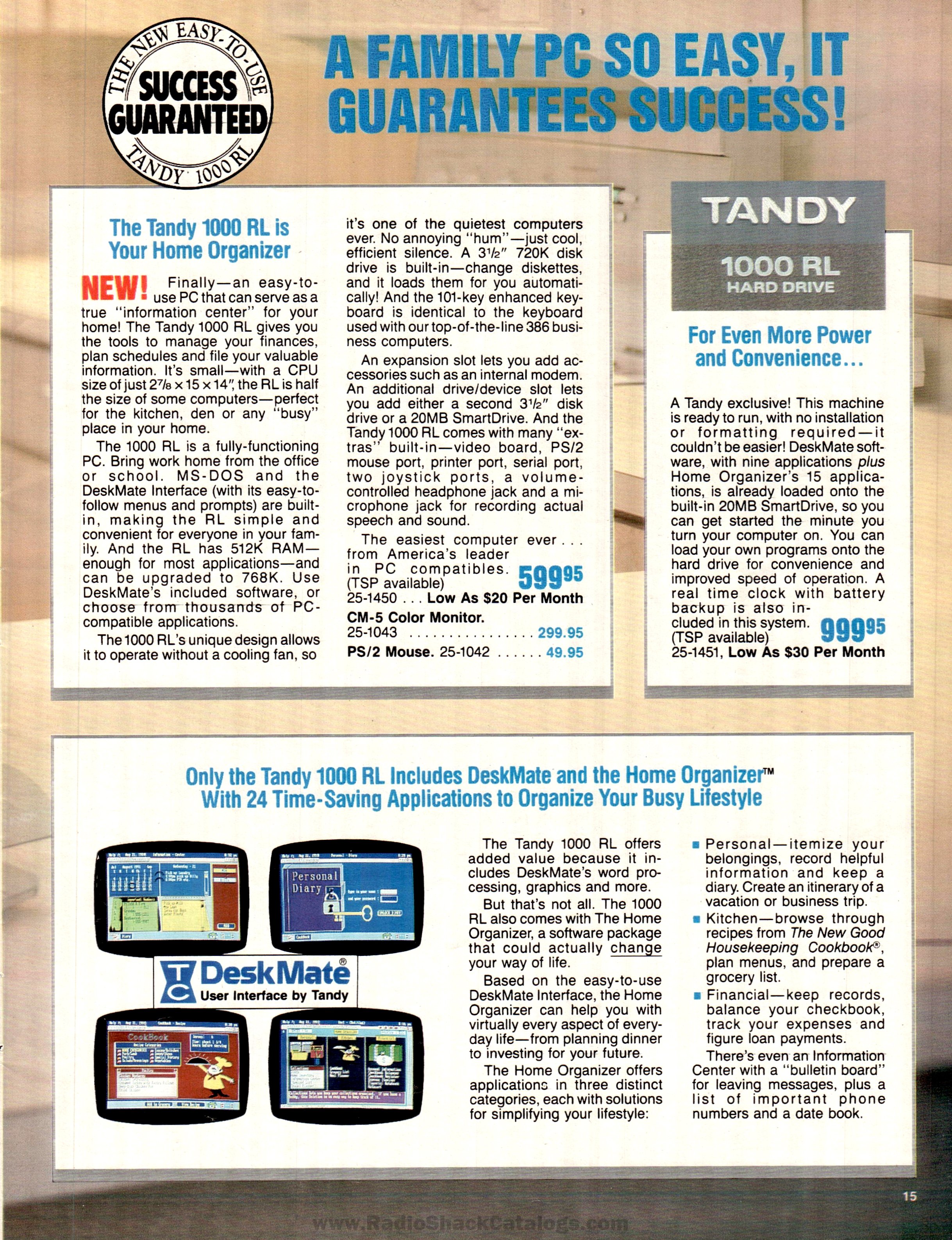
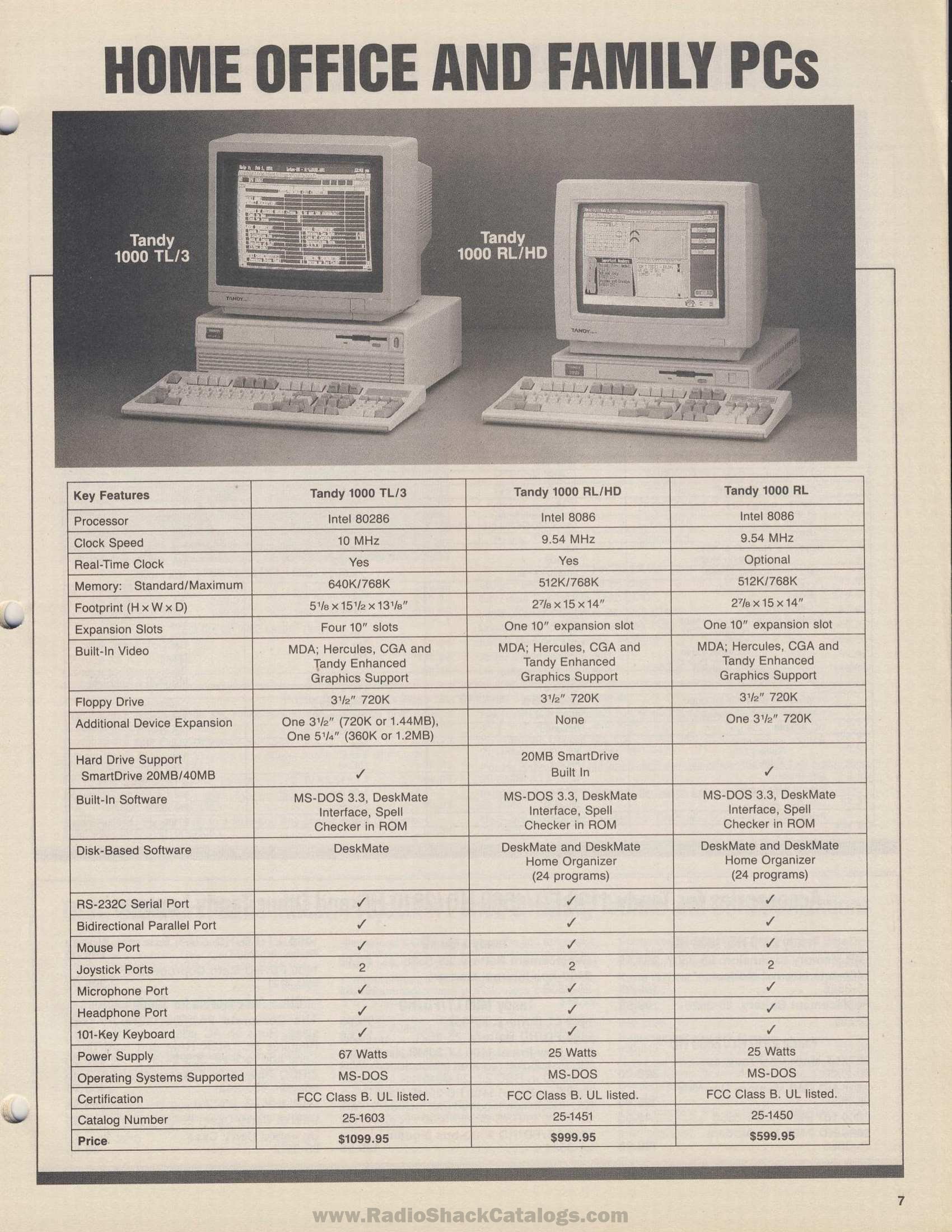
[edit | edit source]The supply is rated at 25 W and has no fan.[4]
- It feeds the main board through a six-pin connector: -12 V, +12 V, two grounds and two +5 V pins. The pin table is on Tandy 1000 RL Capacitor Replacement Guide.[5]
- One owner's supply board cracked when someone pressed the power switch too hard, so press the switch gently.[6]
- Inspect the supply and the main board for leaking capacitors and for burnt surface-mount tantalums.[3]
Floppy drives
[edit | edit source]- The RL's 3.5-inch 720 KB drives take their power through the data cable.[7] keenerb warns that fitting a non-Tandy drive to that cable shorts +12 V to ground.[3]
- The RL has room for a second 3.5-inch 720 KB drive or a SmartDrive; the RL/HD's spare bay holds its hard disk.[8]
- The floppy controller is soldered to the board.[9]
General drive cleaning is covered on Floppy Drive Repair.
Hard disk
[edit | edit source]- The built-in interface takes XT IDE drives only. If a drive does not fit the bay, the FAQ suggests turning its bracket upside down. Some 40 MB drives show only 20 MB in the RL.[10]
- To boot from the hard disk, set the boot device to DISK with MS-DOS as the start-up program.[10]
- XT-IDE cards, including CompactFlash adapters, need some setting up: owners report disabling the built-in hard disk in SETUPRL /A, putting the card at D800h, or padding the XT-IDE ROM image with 16 KB of FFh bytes.[9]
Memory and expansion
[edit | edit source]- Fit two 256K x 4 DRAMs of 100 ns in sockets U19 and U23 to go from 512 KB to 768 KB; there is no jumper.[11] Tandy's parts list confirms 20-pin sockets at U19 and U23.[1]
- The 8086 is surface mounted and there is no coprocessor socket.[12]
- The single expansion slot takes a 10-inch 8-bit card.[8] Tandy's 25-1095 AT IDE hardcard fits after its bracket is trimmed.[10]
Clock
[edit | edit source]The RL/HD has a battery-backed clock. The plain RL has none; Wikipedia says it needs a plug-in SmartWatch.[8][13] Tandy's parts list includes a CR2032 cell holder.[1]
EEPROM and setup
[edit | edit source]- Settings are held in a serial EEPROM, in an 8-pin socket at U18, and are changed with SETUPRL. SETUPRL /A shows the full set of options.[1][9]
- Removing the clock cell does not clear the settings.[9][14]
- Be careful with SETUPRL /A. One owner disabled the floppy controller and could not boot from anything until he fitted a floppy controller card.[9]
- The FAQ lists BIOS 02.00.01 as the RL's last version; it corrects DeskMate lock-ups caused by a mouse driver bug.[15]
Keyboard and mouse
[edit | edit source]- The keyboard connector looks like a PS/2 port but uses the XT protocol; a PS/2 keyboard works only if it can switch to XT.[16][17]
- The mouse port needs a special driver such as CuteMouse and may need enabling in the setup program.[18]
Maintenance checklist
[edit | edit source]- Check the rating label before connecting the mains.
- Keep the vents clear; the supply has no fan.
- Inspect the main board for burnt or cracked tantalums and the supply for leaking capacitors.
- Use only Tandy-style floppy drives on the floppy cable.
- Note the SETUPRL settings before changing anything.
Related pages
[edit | edit source]- Tandy 1000 RL
- Tandy 1000 RL-HD
- Tandy 1000 RL Troubleshooting Guide
- Tandy 1000 RL Capacitor Replacement Guide
- Tandy 1000 RLX General Maintenance
- Recommended Tools
References
[edit | edit source]- ↑ 1.0 1.1 1.2 1.3 Tandy National Parts, bill of materials 250-1450 "Tandy 1000 R L", January 1995, 25-1450.txt, TVDog's Tandy 1000 archive (retrieved 2026-10-21).
- ↑ Jeff Hayes, "Tandy 1000-series FAQ", version 2.52, 25 October 2005, TVDog's Tandy 1000 archive (retrieved 2026-10-21). Section II.I.3.
- ↑ 3.0 3.1 3.2 3.3 "Tandy 1000 RL tone of death", Vintage Computer Federation forum, February 2021, thread. Posts by falter, daver2, keenerb and compaqportableplus, 14-20 February 2021.
- ↑ Radio Shack, computer catalogue RSC-22 (1991), p. 15, "The Tandy 1000 RL is your home organizer", page scan at RadioShackCatalogs.com (retrieved 2026-10-22).
- ↑ "Tandy 1000 RLX/HD power supply replacement (6-pin connector type, wiring gauge, etc)", Vintage Computer Federation forum, July 2026, thread. Posts by TandyDean and Plasma, 18 July 2026.
- ↑ "Building a Tandy 1000 RL\RLX power supply", Vintage Computer Federation forum, May-August 2012, thread. Post by Compgeke, 15 May 2012.
- ↑ Hayes, "Tandy 1000-series FAQ" (2005), sections II.C.2 and II.C.5.
- ↑ 8.0 8.1 8.2 Radio Shack, computer catalogue RSC-22A (1991), p. 7, "Home office and family PCs", page scan at RadioShackCatalogs.com (retrieved 2026-10-22).
- ↑ 9.0 9.1 9.2 9.3 9.4 "Help with Tandy 1000 RL/HD", Vintage Computer Federation forum, March 2023 to March 2024, thread. Posts by Scottmm78, Deleted member 33842, SteveHere, indyjoenz, dr.zeissler and Cloudschatze.
- ↑ 10.0 10.1 10.2 Hayes, "Tandy 1000-series FAQ" (2005), section II.D.1.
- ↑ Hayes, "Tandy 1000-series FAQ" (2005), section II.A.1.
- ↑ Hayes, "Tandy 1000-series FAQ" (2005), sections II.F.1 and II.F.2.
- ↑ "Tandy 1000", Wikipedia (retrieved 2026-10-21). Section "1000 RL and RL/HD".
- ↑ Hayes, "Tandy 1000-series FAQ" (2005), section II.K.8.
- ↑ Hayes, "Tandy 1000-series FAQ" (2005), section III.E.2.
- ↑ Hayes, "Tandy 1000-series FAQ" (2005), section II.E.1.
- ↑ "Tandy T-1000 RL/HD", Vintage Computer Federation forum, January 2012, thread. Posts by vwestlife and Great Hierophant, 31 January 2012.
- ↑ Hayes, "Tandy 1000-series FAQ" (2005), section II.G.5.