Tandy 1000 SL General Maintenance
.png)
Routine care of the Tandy 1000 SL and Tandy 1000 SL/2 covers opening the case, the power supply, the drives, memory and other main board options, the jumpers and the EEPROM settings. The procedures come from the SL/2 owner's manual, the only Tandy document for the pair that could be obtained; the SL's technical reference manual (25-1516) could not.[1] Check each step against the machine, because the SL has a 5.25-inch drive in the upper bay where the SL/2 has a 3.5-inch drive.[2]
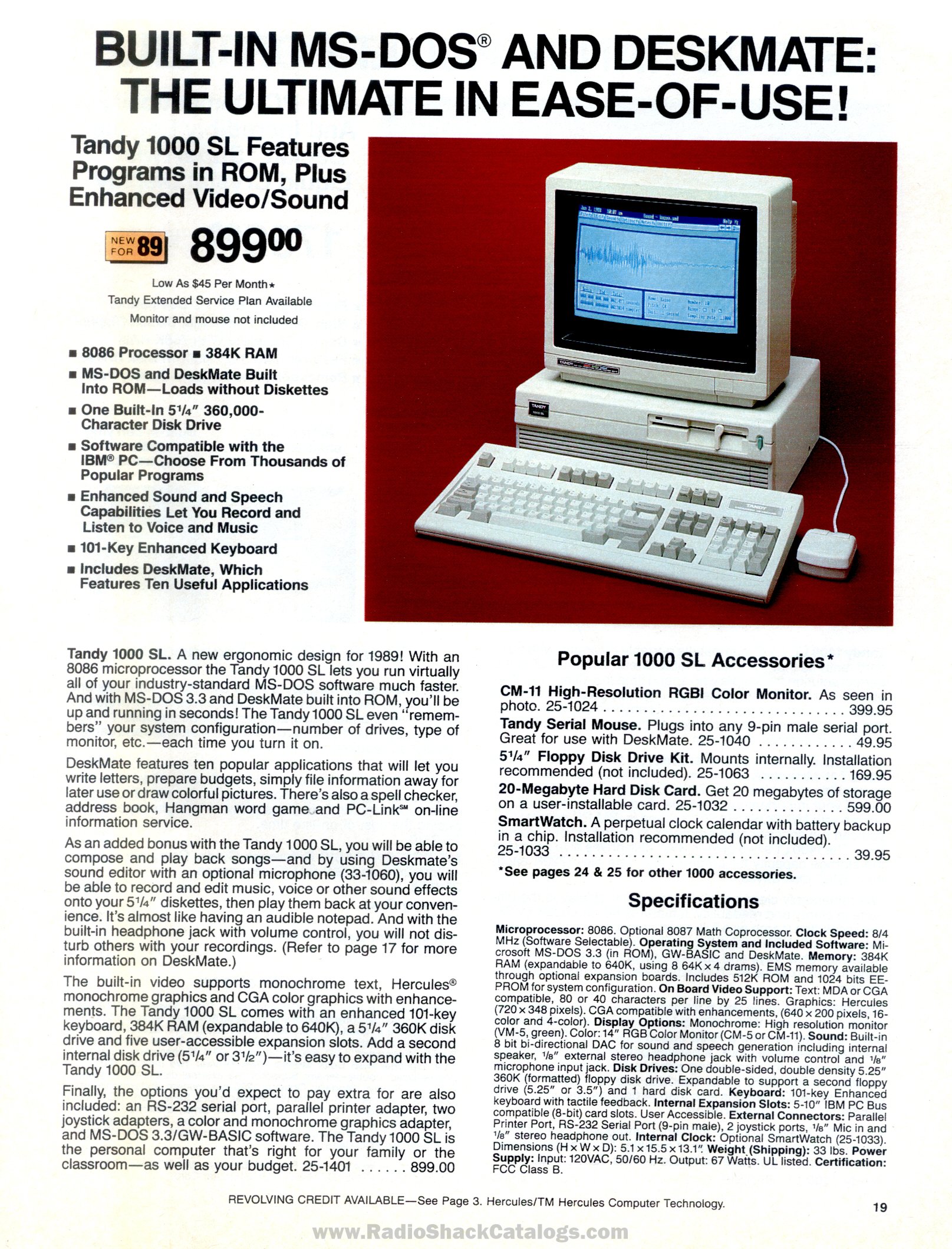
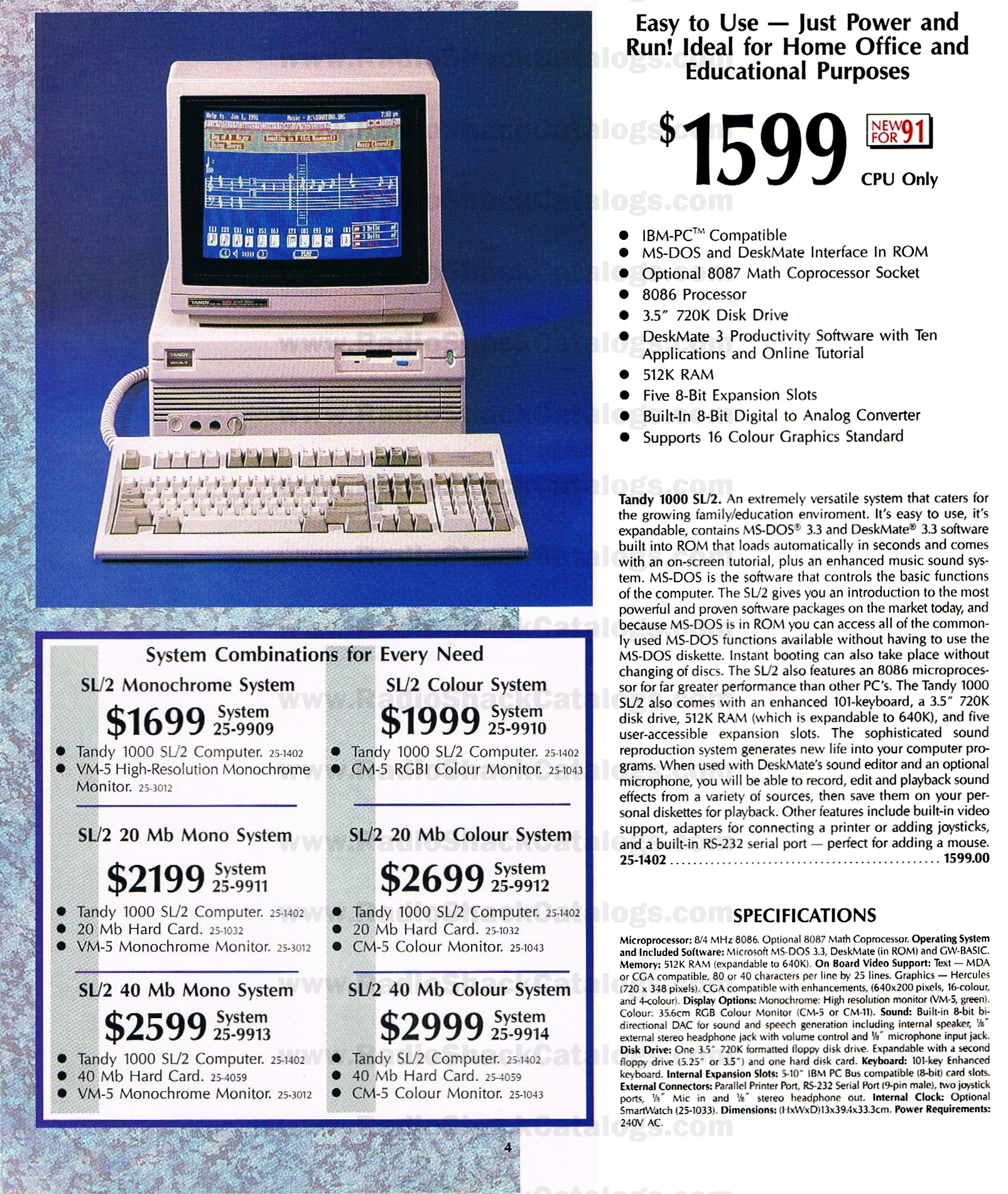
 | The supply runs from the mains. Unplug the computer before removing the cover. US machines are rated for 120 V AC; Tandy Australia sold 240 V versions. Check the rating label before connecting the machine to the mains. |
Opening the case
[edit | edit source]- Turn off the computer and everything connected to it, and unplug the computer from the mains.
- Remove the two cover mounting screws at the back.
- Pull the cover outward to release it, as the manual's drawing shows.
- When refitting, replace and tighten the two screws before switching on.
Source: SL/2 owner's manual.[1] Photograph the cables before unplugging anything inside.
Power supply and cooling
[edit | edit source]The SL's supply is rated at 67 W output.[3] Tandy's voltage limits and component data for the SL supply are in the technical reference manual, which could not be obtained. With the machine running, check for +5 V on the red wire and +12 V on the yellow wire of a drive power connector, and inspect the supply and main board for leaking or bulging electrolytic capacitors.[5] One owner has a dead SL main board with corrosion from leaking capacitors.[6] The serial EEPROM sits at U17 beneath the supply, so it is easy to disturb when the supply is removed.[6]
Another owner reports that his SL's chassis is affected by zinc whiskers and needs clearing from time to time.[6]
Floppy drives
[edit | edit source]- The SL uses standard 360 KB 5.25-inch drives.[7]
- On the SL/2, drive A: is a Tandy-style 3.5-inch drive that takes power through the data cable, on pins 3, 5, 7, 9 and 11 (+5 V) and 29, 31 and 33 (+12 V). A standard drive on the unmodified cable can damage the drive and the computer.[7]
- The floppy cable is straight, not twisted, so each drive's select jumper sets A: or B:.[7]
- A second drive goes in the 5.25-inch slot. Break out the plastic panel by pushing it down, fit the mounting rails using the lower left hole marked A-B, and secure the drive and its two grounding clips. A second 3.5-inch drive needs adapter bracket 25-1076. Run SETUPSL2 afterwards.[1]
General drive cleaning is covered on Floppy Drive Repair.
Memory and main board options
[edit | edit source]| Model | Standard | Maximum | Chips to add |
|---|---|---|---|
| SL | 384 KB | 640 KB | Eight 64K x 4 DRAMs, 120 ns |
| SL/2 | 512 KB | 640 KB | Four 64K x 4 DRAMs, 120 ns |
Neither model has a jumper to change after adding memory.[8][3]
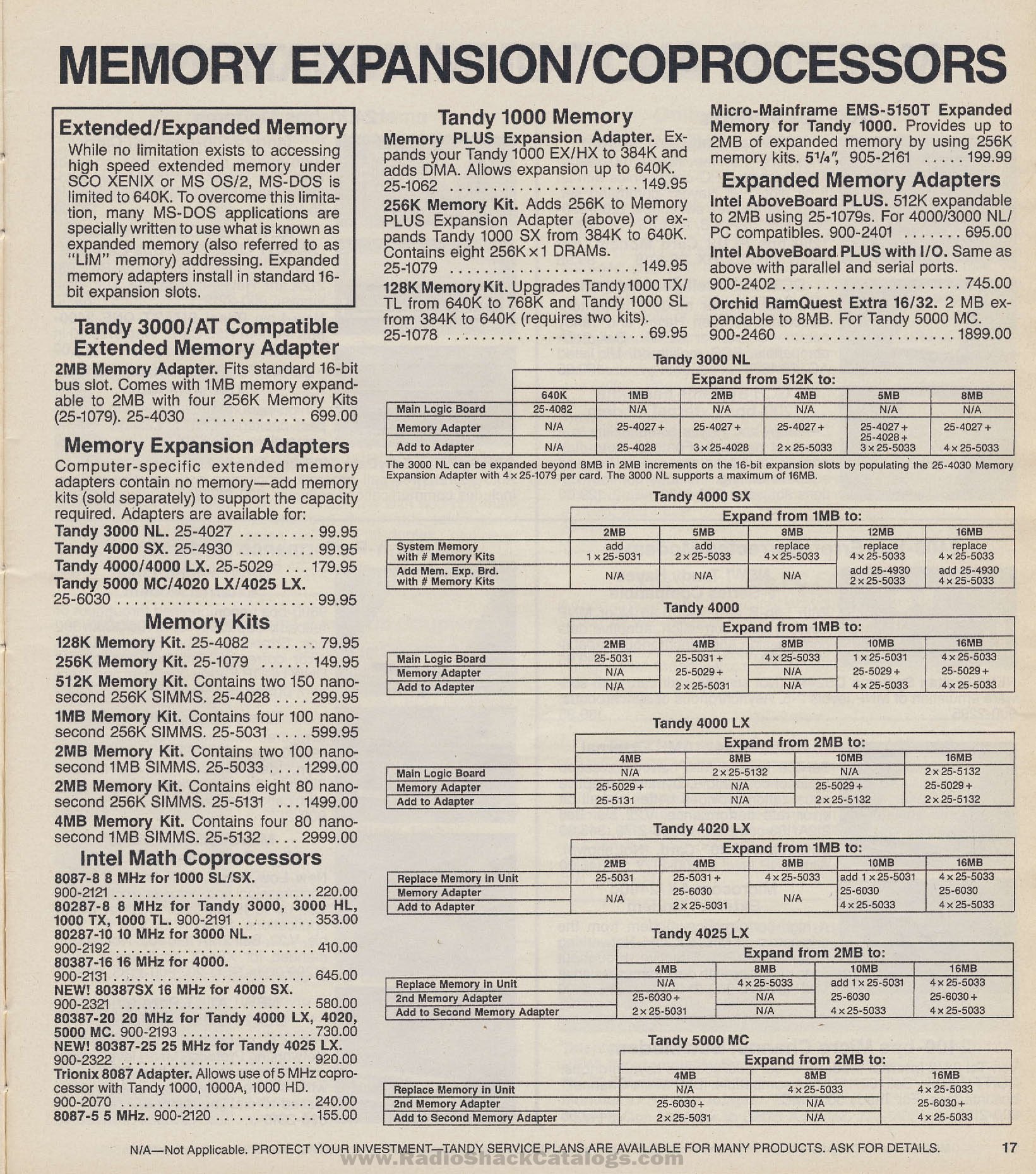
- The maths coprocessor socket takes an 8087; Radio Shack sold the 8087-8 for the SL.[9]
- The 8086 can be replaced with a NEC V30.[10]
- The optional SmartWatch clock (Dallas DS1216E) has its own socket on the SL boards, not under a ROM.[11][1] Its battery is built into the chip, so a SmartWatch that has stopped keeping time is replaced as a unit.[12]
- Expansion cards must be no longer than 10.5 inches.[2]
Jumpers
[edit | edit source]| Jumper | Default | Change to |
|---|---|---|
| Microphone/line audio, on the audio control satellite board | E2-E3 (microphone) | E1-E2 for a line-level source |
| Video interrupt, on the main board | E2-E3 | E3-E4 if a PCjr or Tandy 1000 game stalls |
Source: SL/2 owner's manual.[1][13] Wikipedia confirms the microphone/line jumper on the SL's satellite board.[2]
EEPROM, setup and DOS
[edit | edit source]The SL family keeps its settings in a serial EEPROM, not CMOS, and removing a battery does not clear them. Settings are changed with the model's setup program (SETUPSL or SETUPSL2).[14][1]
- SETUPSL /F writes the factory defaults to the EEPROM. The /A and /B options reach settings that can leave the machine unbootable.[14][6]
- To boot from a hard disk, set the boot device to DISK with MS-DOS as the start-up program.[15]
- The FAQ warns that DOS 5 or 6 can scramble the EEPROM on Tandy 1000s with DOS in ROM, and that running a DeskMate program outside DeskMate can also corrupt it.[16]
- Note the settings before changing DOS versions.
Keyboard, monitor and printer
[edit | edit source]- Use an XT keyboard, or an XT/AT switchable one set to XT. AT and PS/2 keyboards need a converter.[17][18]
- Ctrl-Alt-Shift-V switches between colour and monochrome monitors and stores the choice in the EEPROM.[19]
- The printer port is a card edge, so use a Tandy 1000 printer cable and check its orientation.[20]
Maintenance checklist
[edit | edit source]- Check the rating label before connecting the mains.
- Unplug the machine before removing the cover.
- Remove dust from the supply, fan and drives.
- Inspect the supply and main board for leaking electrolytics, and the chassis for zinc whiskers.
- Check that the EEPROM at U17 is seated.
- Clean the floppy heads and check the drive select jumpers.
- Note the setup program's settings before changing DOS versions.
Related pages
[edit | edit source]- Tandy 1000 SL
- Tandy 1000 SL/2
- Tandy 1000 SL Troubleshooting Guide
- Tandy 1000 TL General Maintenance
- Recommended Tools
References
[edit | edit source]- ↑ 1.0 1.1 1.2 1.3 1.4 1.5 Tandy Corporation, Tandy 1000 SL/2 Installation and Operation, 1989, hosted as File:Tandy 1000 SL2 Installation and Operation Manual (1989).pdf. "Options for the Tandy 1000 SL/2", pp. 21-30.
- ↑ 2.0 2.1 2.2 "Tandy 1000", Wikipedia (retrieved 2026-10-21). Section "1000 SL and SL/2".
- ↑ 3.0 3.1 3.2 Radio Shack, computer catalogue RSC-20 (1989), p. 19, Tandy 1000 SL specifications, page scan at RadioShackCatalogs.com (retrieved 2026-10-22).
- ↑ Tandy Australia, computer catalogue no. 293 (1990-91), p. 4, Tandy 1000 SL/2 specifications, page scan at RadioShackCatalogs.com (retrieved 2026-10-22).
- ↑ Hayes, "Tandy 1000-series FAQ" (2005), section II.C.3, drive power cable colours.
- ↑ 6.0 6.1 6.2 6.3 "1000SL Err I/O of port 378h, not booting", Vintage Computer Federation forum, February 2021 to November 2024, thread. Posts by keenerb (18 February 2021) and Cloudschatze (16 November 2024).
- ↑ 7.0 7.1 7.2 Jeff Hayes, "Tandy 1000-series FAQ", version 2.52, 25 October 2005, TVDog's Tandy 1000 archive (retrieved 2026-10-21). Sections II.C.2 and II.C.5.
- ↑ Hayes, "Tandy 1000-series FAQ" (2005), section II.A.1.
- ↑ Radio Shack, computer catalogue RSC-21 (1990), p. 17, "Intel math coprocessors", page scan at RadioShackCatalogs.com (retrieved 2026-10-22).
- ↑ Hayes, "Tandy 1000-series FAQ" (2005), section II.F.1.
- ↑ Hayes, "Tandy 1000-series FAQ" (2005), section IV.G.
- ↑ Hayes, "Tandy 1000-series FAQ" (2005), section III.E.2.
- ↑ Tandy 1000 SL/2 Installation and Operation (1989), "Troubleshooting", p. 35.
- ↑ 14.0 14.1 Hayes, "Tandy 1000-series FAQ" (2005), sections II.K.8, III.E.1 and III.F.2.
- ↑ Hayes, "Tandy 1000-series FAQ" (2005), section II.D.1.
- ↑ Hayes, "Tandy 1000-series FAQ" (2005), sections II.K.8 and III.A.2.
- ↑ Hayes, "Tandy 1000-series FAQ" (2005), section II.E.1.
- ↑ "Need help with Tandy 1000SL keyboard problem", Vintage Computer Federation forum, June 2024, thread. Post by keenerb, 8 June 2024.
- ↑ Hayes, "Tandy 1000-series FAQ" (2005), section II.B.5.
- ↑ Hayes, "Tandy 1000-series FAQ" (2005), section II.H.2.