Coleco Telstar Marksman General Maintenance

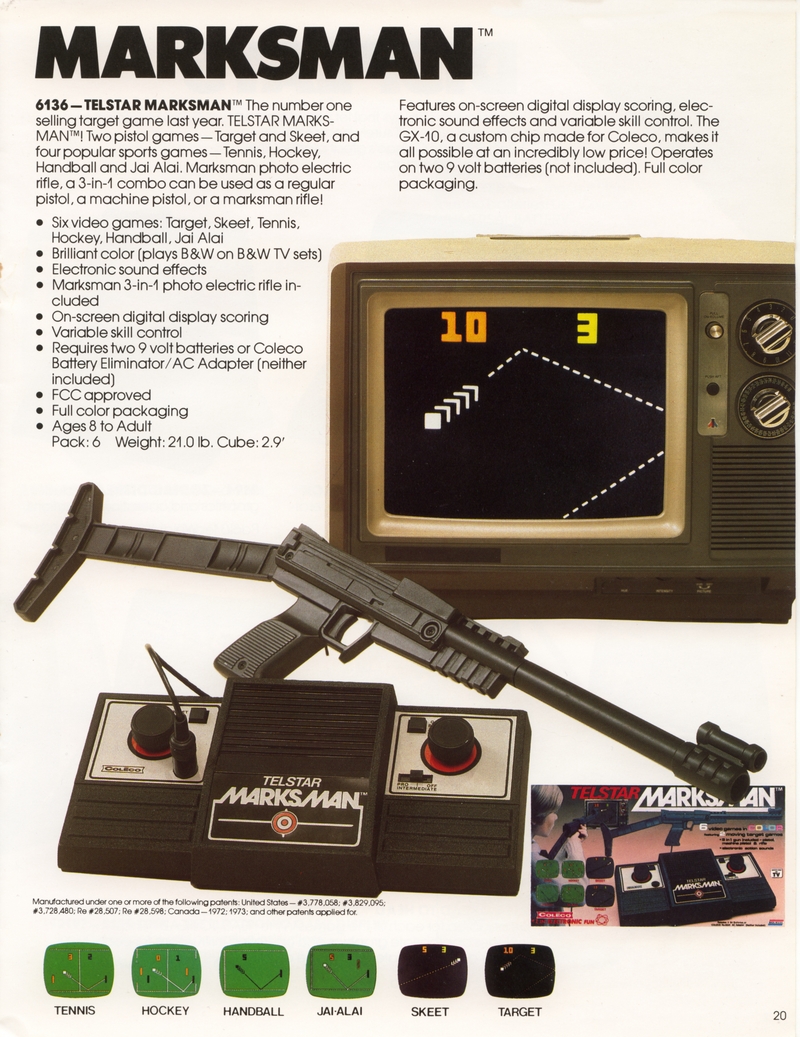
Routine care for the Coleco Telstar Marksman (model 6136), Coleco's 1978 colour Pong console with a 3-in-1 light gun.[1][2] No Coleco owner's guide for the Marksman itself has been found; the guide for the Sears Gunslinger II, which Coleco made for Sears with the same games, controls and gun, is used here where the two agree.[3][4] The points to look after are the batteries and adapter jack, the buttons and slide switch, the knobs, the gun and its socket, and the television set-up for the shooting games. Faults are covered in Coleco Telstar Marksman Troubleshooting Guide.
Before you start
[edit | edit source]- Take out the batteries and unplug any adapter. Coleco's catalogue gives the Marksman two 9 V batteries; the Sears version takes one.[2][3]
- Switch the console off before plugging the gun in or out, as Coleco instructs.[5]
- Use an analogue colour television on channel 3 or 4, matching the selector on the back.[6][7]
Batteries
[edit | edit source]In the Gunslinger II the 9 V battery sits behind a slide-out door in the base, snapped onto a clip, with a foam pad in the bottom of the compartment.[3][6] Coleco's catalogue specifies two 9 V batteries for the Marksman, but no picture of a Marksman battery compartment has been published.[2]
- Open the battery door or doors and remove the batteries.
- Inspect each snap clip and its leads for cracks, corrosion and breaks at the clip. A standard 9 V snap connector replaces a damaged one.
- Clean light corrosion with isopropyl alcohol; for worse damage see Battery Explosion, Capacitor or Corrosion Damage.
- Refit or replace the foam pad so that the battery cannot move.
- Store the console with the batteries out.[6]
Rear jacks and adapter
[edit | edit source]Two jacks at the back are soldered straight onto the edge of the circuit board and show through notches in the case; the right-hand one is marked J2 on the board.[8] Coleco's catalogue offers a Coleco battery eliminator/AC adapter for the Marksman without giving its model number, rating or polarity.[2]
- A plug pushed in at an angle loads the jack's solder joints directly. If power or picture cuts out when a plug is moved, reflow those joints when the case is open.
- Measure any adapter before use and find the polarity of the power jack by tracing it to the battery clip.
Buttons and the power switch
[edit | edit source]GAME SELECT and RESET are push buttons. The INTERMEDIATE/PRO/OFF slide switch is both the power switch and the speed control.[9][7]
- With the batteries out, work contact cleaner into the slide switch and run it through all three positions many times.
- Press GAME SELECT and RESET repeatedly; a button that needs a hard press has a dirty contact inside the case.
- Test: GAME SELECT must step through all six games, and the game must not drop out when the switch moves between INTERMEDIATE and PRO.[7]
Paddle knobs
[edit | edit source]Each knob is a push fit on its post, with a flat inside the knob lined up with a flat on the post.[6] Pull knobs straight off. If a paddle jumps or covers only part of the screen, clean the control behind the knob with contact cleaner and turn it end to end several times.
Light gun
[edit | edit source]The gun is a pistol with a rifle barrel that slides over the pistol's barrel and a rifle butt that locks into a slot in the back of the pistol; a push button on the pistol releases the butt.[5]
- Check the butt's locking tab and the pistol's push button. A broken tab leaves the butt loose but does not affect the electronics.
- Check that the barrel still slides on and can be twisted to line up the sight.[5]
- Work the trigger. Coleco advised pulling and releasing it about twelve times before first use to clear a protective coating in the mechanism.[10] A trigger that sticks after decades in storage needs the pistol opened and the mechanism cleaned.
- Inspect the cable along its length, especially where it leaves the pistol grip and at the connector.
- Look into the connector for bent or pushed-back pins. Coleco's instruction is to line the connector up with its key and never force it.[5]
The gun is photo-electric: it responds to light from the screen.[2][10] No published source shows where its sensor sits, so before suspecting the electronics check that nothing blocks the open end of the pistol and the barrel.
Gun socket
[edit | edit source]The socket is a round keyed connector on the left-hand panel, below the left knob.[11] Clean its contacts with contact cleaner and check that none is bent or recessed. The Gunslinger II chart traces missing Target and Skeet numerals to a gun connector that is not seated on its key.[12]
Channel switch and RF lead
[edit | edit source]The channel 3 or 4 selector and the game cable are at the back.[7] Coleco tells owners to move the selector carefully, and to use channel 4 only where channel 3 carries a strong local station.[6] Check the game cable and the switch box terminals; Coleco sold the No. 6111 switch kit as a spare.[4]
Television set-up
[edit | edit source]- For the ball games, adjust colour, and hue or tint if needed, and turn off automatic colour control.[7]
- For Target and Skeet, set brightness for normal viewing and contrast for a slightly grey background, and remove any sunscreen filter from the screen.[10][12]
- Switch the game off when not in use; Coleco warns that a game left on can burn its pattern into the screen.[10]
Preventive maintenance checklist
[edit | edit source]- Remove the batteries; inspect clips, leads, doors and foam.
- Check the rear jacks for loose joints.
- Clean the slide switch and test both buttons.
- Check both paddles over their full travel.
- Inspect the gun: butt lock, barrel, trigger, cable and connector.
- Clean the gun socket.
- Play all six games, and score hits in Target and Skeet with the television set up as above.
- Store with the batteries out and the gun unplugged.
Related pages
[edit | edit source]- Coleco Telstar Marksman
- Coleco Telstar Marksman Troubleshooting Guide
- Coleco Telstar Marksman Capacitor Replacement Guide
- Coleco Telstar Marksman Documentation
- Coleco Telstar Ranger General Maintenance, for the earlier black-and-white gun model
- Battery Explosion, Capacitor or Corrosion Damage
- Recommended Tools
References
[edit | edit source]- ↑ Arcade-History, "Telstar Marksman [Model 6136"] (retrieved 2026-10-19): model 6136, 1978; "Basically it's a Telstar Ranger [Model 6046] but with color graphics and a larger light gun"; games jai-alai (squash), hockey, handball, tennis, skeet and target; CPU AY-3-8512; on/off and game selector buttons; Beginner/Intermediate/Pro difficulty switch; built-in speaker; on-screen score; the light gun is a pistol with an attachable stock and barrel and a simple sight; two paddle controllers built into the console.
- ↑ 2.0 2.1 2.2 2.3 2.4 Coleco Industries, Coleco Toys and Games '80: We're the One (dealer catalogue, 1980), p. 20, scanned at digitize.textfiles.com (retrieved 2026-10-19): "6136 - Telstar Marksman"; two pistol games, Target and Skeet, and four sports games, Tennis, Hockey, Handball and Jai Alai; the Marksman photo electric rifle, "a 3-in-1 combo", usable as a regular pistol, a machine pistol or a marksman rifle; brilliant colour (plays black and white on black-and-white sets); electronic sound effects; on-screen digital display scoring; variable skill control; "The GX-10, a custom chip made for Coleco"; "Requires two 9 volt batteries or Coleco Battery Eliminator/AC Adapter (neither included)"; FCC approved; ages 8 to adult; Pack: 6, Weight: 21.0 lb, Cube: 2.9 ft (the shipping carton of six units).
- ↑ 3.0 3.1 3.2 Coleco Industries, Gunslinger II Installation Instructions and Game Rules (Sears Tele-Games), Model No. 6137SR, Guide No. 76872, 1981, p. 1, File:Sears Tele-Games Gunslinger II Installation Instructions (Guide 76872).pdf: six video games in colour, two target and four sports games (tennis, hockey, handball, jai alai); 3-in-1 gun (pistol, target pistol and rifle); digital display scoring; variable speed control; "Requires one 9 volt alkaline battery"; two rubber bumpers pressed and twisted into holes in the bottom ("Do not press too hard so as to damage front of the unit"); a foam pad in the bottom of the battery compartment; bottom view with a slide-out door and the battery snapped onto a clip.
- ↑ 4.0 4.1 Coleco, Guide No. 76872, pp. 7-8: Sears 90-day warranty, with service at any Sears store; order form for the No. 6111 switch kit ($7.20) and a replacement rifle ($12.60) from Coleco Industries, P.O. Box 460, Amsterdam, N.Y.; "Manufactured for Sears, Roebuck and Co. by Coleco Industries, Inc."
- ↑ 5.0 5.1 5.2 5.3 Coleco, Guide No. 76872, p. 4: rules for hockey, jai alai and handball; the photo-electric rifle as a 3-in-1 combo: the rifle barrel slides into the pistol barrel and is twisted to align the sight; the rifle butt slides into a slot in the back of the pistol, locking tab on the same side as the push button, and is released by the push button; turn the ON/OFF switch to OFF before connecting the rifle cable; align the connector with its key and do not force it into the rifle receptacle on the face of the console.
- ↑ 6.0 6.1 6.2 6.3 6.4 Coleco, Guide No. 76872, p. 2: one 9 V alkaline battery behind a slide-out door; avoid leaving the battery in the unit, and replace it first if the game does not work; decals; knobs placed on their posts with the flat on the knob aligned with the flat on the post; switch box connections; factory set for channel 3, with the channel selector moved carefully to channel 4 where channel 3 is a strong local station.
- ↑ 7.0 7.1 7.2 7.3 7.4 Coleco, Guide No. 76872, p. 3: panel diagram (channel 3 or 4 selector switch and game cable at the back, reset button, left paddle control, rifle receptacle, game select switch, right paddle control, on-off switch combined with the speed control, Intermediate and Pro); any one of the six games can come on at power-on, and if only the score appears the reset button must be pushed; GAME SELECT advances one game per push; hue or tint adjustment and automatic colour control off; Intermediate is the slowest speed and Pro the fastest; after 15 points the ball passes through the paddle without scoring and after two seconds the score bounces and the boundaries disappear; on black-and-white sets do not set brightness and contrast to maximum.
- ↑ Photograph by Sintegrity, File:Coleco Telstar Marksman rear jacks.jpg (CC BY-SA 4.0, from Wikimedia Commons), read at full size: two jacks mounted on the edge of a brown circuit board show through notches in the back of the case; the silkscreen beside the right-hand jack reads J2.
- ↑ Photograph by Sintegrity, File:Coleco Telstar Marksman right-hand panel.jpg (CC BY-SA 4.0, from Wikimedia Commons): GAME SELECT with the list 1 TENNIS, 2 HOCKEY, 3 JAI ALAI, 4 HANDBALL, 5 TARGET, 6 SKEET; right knob; INTERMEDIATE/PRO/OFF slide switch.
- ↑ 10.0 10.1 10.2 10.3 Coleco, Guide No. 76872, p. 5: firing range depends on TV size and control settings; set brightness for normal viewing and contrast for a slightly grey background; in Target the target bounces at random, in Skeet it crosses from left to right; a hit makes the target disappear and the score shows for 2 seconds; the left number counts shots fired and the right number hits; a game left on for a long time may burn its pattern into the TV screen; the pistol has a protective internal coating on its trigger mechanism, and the trigger should be pulled and released about 12 times before first use; FCC Part 15 notice.
- ↑ Photograph by Sintegrity, File:Coleco Telstar Marksman gun socket.jpg (CC BY-SA 4.0, from Wikimedia Commons): RESET, the left knob and a round keyed multi-pin socket for the gun cable on the left-hand panel.
- ↑ 12.0 12.1 Coleco, Guide No. 76872, p. 6: trouble shooting guide ("Replace battery first before trouble shooting. DO NOT OPEN. THIS DEVICE DOES NOT CONTAIN ANY SERVICEABLE PARTS. Warranty is voided if opened or tampered with."); ball-game symptoms and remedies (no game or faint picture; stripes or dots; rolling, flutter or buzzing; a line moving across the screen; no ball, erratic ball or score not 0-0, for which the remedies are a fresh battery, letting the game cool away from the top of the TV, and pressing Reset rapidly); Target and Skeet: if the score does not appear, push Reset more than once; if the numerals do not appear, the rifle connector is not mated correctly and must be aligned with its key and seated firmly; if shots fired count but hits do not, adjust the TV brightness and test by firing close to the screen at the numbers; if hits score continually without hitting the target, lower the brightness until the background is grey; remove any sunscreen from the TV.