

Sinclair ZX Spectrum +3 Disk Drive Belt Replacement
.jpg)
The 3-inch disk drive in the Sinclair ZX Spectrum +3 turns the disc through a rubber belt between the motor capstan and a large pulley. Spectrum for Everyone calls the belt the weak point of the drive because it deteriorates with age.[1] DataServe Retro, which services these drives, finds that a drive that has not been maintained usually has a perished belt, a dirty read/write head and dried-out grease on the worm drive that moves the head, and often all three.[2] Replace the belt and service the head and worm drive in the same session.
Several makes of 3-inch drive were fitted to the +3. DataServe's guide uses the EME-156, which it calls by far the most common; on other types the motor leads and the screws holding the controller board are in different places, but the work is the same.[2] Amstrad's own service manual has the drive's flow charts, circuit diagram and board layout; see Amstrad Spectrum +3 Service Manual.[3]
Symptoms
[edit | edit source]- The +3 reports "Drive not ready" when a disc is in the drive, although the drive light comes on and the motor can be heard. One owner whose +3 did exactly this found the belt perished, snapped and wrapped round the motor capstan as a sticky residue.[4]
Faults that look similar:
- The drive is normally not ready until a newly inserted disc has made two revolutions, so a single "Drive not ready" straight after inserting a disc is not a fault.[3]
- "Disk is write protected" on every disc means the brass write-protect pin has fallen out of the drive, usually during an earlier repair.[1]
- If the motor makes no sound at all, follow Amstrad's chart for a motor that does not turn (power to the drive, then the motor) in the Sinclair ZX Spectrum +3 Troubleshooting Guide.[3]
Safety
[edit | edit source]The +3's power supply is a separate mains unit; Amstrad's service manual specifies a flash test and an insulation test for it after any work on it.[5] Unplug the supply from the mains and from the +3 before opening the computer.
Tools and parts
[edit | edit source]- A new belt made for this drive. DataServe Retro sells one and warns that drives returned to it with undersized belts, or even a tight elastic band, had their motor bearings ruined by the extra tension.[2] Spectrum for Everyone links CPC (Farnell) part AVBELT5 as an alternative,[1] which CPC lists as a flat-section rubber belt of 71.0 mm internal diameter, 2.8 mm wide and 0.6 mm thick.[6]
- A Phillips screwdriver and a No. 0 jeweller's screwdriver.[1]
- Blunt or long-nosed tweezers and small pointed pliers.[1][2]
- Isopropyl alcohol or head-cleaning fluid, cotton buds, and a pointed head-cleaning stick or chamois stick.[1][2]
- Vaseline or another light grease for the worm drive.[2]
- DataServe Retro also sells replacement write-protect pins and the two side screws of the case, which are hard to find.[2]
Procedure
[edit | edit source]Opening the case
[edit | edit source]- Remove the two small screws on the right-hand side of the case, next to the drive.[2][1]
- Turn the +3 face down and remove the five screws from the base.[2]
- Holding the two halves together, turn it face up again. Lift the top from the right-hand end until the power LED lead stops it, then pull the LED lead off its connector on the main board.[2]
- Fold the top over to the left. The keyboard ribbons can stay connected; unplug them only if you need the room, and handle them gently.[2]
Removing the drive
[edit | edit source].png)
- Remove the screw in the front left mounting post and move the earthing wire aside. DataServe found one screw on factory drives; there may be a second in the rear post.[2]
- Loosen the metal cable tie that holds the power lead to the main board.[2]
- Lift the drive and disconnect the 26-way ribbon and the power lead from its rear. Pull the ribbon evenly; uneven force bends the pins.[2] The drawing names these connectors J1 and J2.[3]
Opening the drive
[edit | edit source].jpg)
- Lay the drive on the bench with the controller board facing up. From here until the board is screwed back on, do not lift the drive or turn it over: with the board loose, the brass write-protect pin can fall out.[1][2]
- Remove the three screws that hold the controller board. They are all different and each has a washer, so note where each one goes.[1][2]
- Unplug the motor and stepper leads from the board. On Spectrum for Everyone's drive these are a 4-way connector on one side and a 2-way connector on the other. Lever each connector out a little with a small screwdriver or pliers, then pull it the rest of the way with your fingers; do not pull on the wires.[1][2] DataServe says disconnecting them is optional but gives more room.[2]
- Slide the board slightly away from the front of the drive to free the drive LED from its hole in the fascia, then tilt the board up a few centimetres to expose the belt.[2]
-
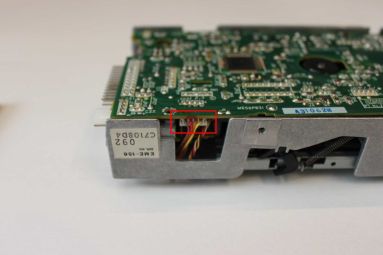 The 4-way connector (boxed); the drive label reads EME-156
 -
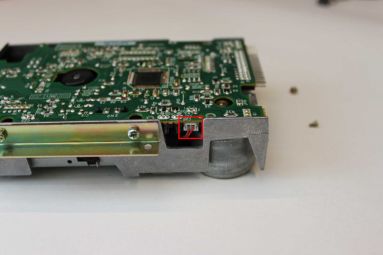 The 2-way connector (boxed) on the other side
.jpg)
.jpg)
Replacing the belt
[edit | edit source]- Lift the old belt off the brass motor capstan and the large pulley with tweezers. If it has broken, pick out every piece, including any inside the drive and any stuck to the pulley.[2][1]
- Remove all the rubber from the capstan and the pulley. Scrape off stubborn pieces carefully with a small flat-bladed screwdriver. For the sticky black residue, put a few drops of head-cleaning fluid on a cotton bud and rub the capstan while turning it with your fingers, until it is clean. Spectrum for Everyone uses isopropyl alcohol for the same job.[2][1] Any residue left makes the new belt slip, ride off the pulley or age quickly.[2]
- Let the capstan dry for a couple of minutes.[2]
- With the tweezers, put the new belt round the large pulley first, then stretch it over the capstan.[2][1]
- Check that the belt sits straight on both and is not twisted.[2][1]
Head and worm drive
[edit | edit source]DataServe does this while the drive is open:[2]
- With the controller board screwed back on (see below), turn the drive over so the board is underneath.
- Lift back the spring-loaded black arm with the felt pad, next to the stepper motor's worm drive, to expose the read/write head.
- Clean the head with head-cleaning fluid on a pointed head-cleaning stick or chamois stick. If you use a cotton bud, make sure no fibres are left on the head. Let it dry.
- Put a little Vaseline or other light grease on the stepper motor's worm.
Amstrad's notes on drive errors begin "Always ensure the head is clean".[3]
Reassembly
[edit | edit source].jpg)
- Check that the brass write-protect pin is in its recess, just in front of and to the left of the belt capstan viewed from the front of the drive.[2] Some 3-inch drives sense the write-protect hole optically and have no pin.[1]
- Reconnect the motor and stepper leads.[1]
- Lower the board, with the drive LED back in its recess in the fascia, and refit the three screws in their own holes.[2]
- Refit the drive to the computer. The red (on some cables blue) wire of the ribbon goes to pin 1 of the drive's connector, which is the end next to the power connector.[2] Reconnect the power lead, retighten the cable tie, and refit the mounting screw with the earthing wire.[2]
- Reconnect the LED lead (and the keyboard ribbons if you removed them), close the case and refit the five base screws and the two side screws.[2]
Testing
[edit | edit source]- Switch on, insert a disc and type
CAT. The drive should run and list the disc.[4] - Save a short program to a disc that is not write protected and load it back. A "Disk is write protected" report on a writable disc means the write-protect pin is missing.[1]
- If the drive reads unreliably, Amstrad's first check is that index pulses come every 200 ± 5 ms (300 rpm). Its chart then sets the speed with VR201 to 200 ± 1 ms, and replaces the motor or the drive if it cannot.[3] The drive's circuit diagram shows the motor only as a load switched on and off by Q1 at CN3, and the preset VR1 on the controller board is in the read circuit, so the speed control is not on that board.[3] Fit a belt of the right size before considering any adjustment. Amstrad wrote the chart for service agents, who were told not to repair the mechanism or its board (part Z70312) and to return a faulty drive to Amstrad.[3]
If write errors persist with a new belt and a clean head, try another disc. Amstrad's notes say that if the error goes away with another disc, the first disc is defective.[3]
Related pages
[edit | edit source]- Sinclair ZX Spectrum +3
- Sinclair ZX Spectrum +3 General Maintenance
- Sinclair ZX Spectrum +3 Troubleshooting Guide
- Sinclair ZX Spectrum +3 Capacitor Replacement Guide
- Amstrad Spectrum +3 Service Manual
- Floppy Drive Repair
References
[edit | edit source]- ↑ 1.00 1.01 1.02 1.03 1.04 1.05 1.06 1.07 1.08 1.09 1.10 1.11 1.12 1.13 1.14 1.15 1.16 "Replacing the drive belt on your +3 FDD", Spectrum for Everyone, February 2017. Tools, case and drive screws, the three controller-board screws with washers, the 4-way and 2-way connectors, belt routing, the write-protect pin, and the CPC belt it links to.
- ↑ 2.00 2.01 2.02 2.03 2.04 2.05 2.06 2.07 2.08 2.09 2.10 2.11 2.12 2.13 2.14 2.15 2.16 2.17 2.18 2.19 2.20 2.21 2.22 2.23 2.24 2.25 2.26 2.27 2.28 2.29 2.30 DataServe Retro, "Servicing the Sinclair ZX Spectrum +3 Disk Drive". Opening the case, removing the drive, the EME-156 drive, the belt, residue cleaning, head cleaning, worm-drive grease, ribbon orientation, the write-protect pin, and the warning about undersized belts.
- ↑ 3.0 3.1 3.2 3.3 3.4 3.5 3.6 3.7 3.8 Amstrad plc, Spectrum +3 Service Manual, hosted as File:Amstrad Spectrum +3 Service Manual.pdf. Diagnostic flow chart and motor-rotation chart, PDF pp. 6–7 (index period 200 ± 5 ms; VR201 set to 200 ± 1 ms; faulty mechanisms returned to Amstrad); FD-1 EME-156 drive circuit diagram, printed p. 12; drive mechanical drawing, printed p. 13; "Software Errors", printed p. 15.
- ↑ 4.0 4.1 MattInX, "Sorry? I can't hear you!", MattInX's Miscellaneous Musings, 29 January 2016. "Drive not ready" after the drive LED lit and the drive whirred; the belt found perished and wrapped round the capstan.
- ↑ Amstrad plc, Spectrum +3 Service Manual, "Safety tests (power adaptor)", printed p. 2. Hosted as File:Amstrad Spectrum +3 Service Manual.pdf.
- ↑ CPC (Farnell), "Flat Section Drive Belt 71.0 x 2.8 x 0.6mm Rubber", order code AVBELT5 (retrieved 2026-10-25).