The LC 580 analog board, with the four cable connectors that are unplugged before it is removed: BP2 (degauss), BD1 (CRT), BD8 (microphone) and SSI (speaker). Apple Computer, Service Source.
The analog board of the Macintosh LC 580 drives the 14-inch shadow-mask CRT. Apple's exploded view shows no separate power supply module, and its symptom charts send a machine with no picture, no sound and no drive activity to the analog board before the logic board. The board stands upright in two plastic guides in the chassis and lifts out once the rear housing is off, the CRT is discharged and the cables and CRT/video board are disconnected.[1] Apple's part number for the board is 661-0940.[2] The Macintosh Performa 580CD is covered by the same manual, which applies to both the Macintosh and Performa versions.[3] The Macintosh Performa 588CD, sold outside the United States, has the same specification on Apple Japan's data sheet, with a 33 MHz 68LC040, an IDE hard disk and a 14-inch shadow-mask screen, and is serviced as an LC 580.[4]
Apple's symptom charts list a new analog board for these faults, after the cures given before it:[5]
Clicking, chirping or thumping. The analog board is the first cure, then the logic board.
Smoke or a burning smell. The analog board is the only cure listed.
No picture, no sound and no drive activity, once the power cord, the power switch and another cord have been tried. The logic board comes after the analog board.
A screen that is black, too dark or too bright while sound and drives work, after the brightness and contrast buttons, the yoke cable connection and the video adjustments. The CRT comes after the analog board.
A bright screen with sound but no picture, after the video adjustments.
A black screen with a single horizontal or vertical line, after checking the yoke cable with the power off.
A picture that breaks into diagonal lines or rolls, convergence, focus, size or geometry that the adjustments do not cure, and jitter that does not go away when the machine is moved away from other equipment and fluorescent lights.
Bad linearity, where text and graphics are a different size at the top, bottom or sides of the screen. The analog board is the only cure listed.
Apple's First Checklist warns that a misadjusted screen can look like an analog board or CRT failure, and that magnetised metal nearby can distort the raster. Run the adjustments in Macintosh LC 580 (Adjustments section) before buying a board.[5]
Warning: the analog board works at mains voltage and drives the CRT, which holds a high-voltage charge after the machine is unplugged. Apple's preliminary steps for this board are to remove the rear housing, discharge the CRT and remove the anode cap. Apple notes that, unlike other monitors, the LC 580 must be face down when the CRT is discharged. Never put on a grounding wrist strap until the CRT has been discharged.[1] See CRT Discharge Procedure.
Work with the unit face down on a clean, soft surface. Apple warns that this avoids stress on the front bezel, which can otherwise crack.[1]
Twisting, bending or forcing the CRT/video board can damage the neck of the tube; pull it straight off.[1]
The five mounting screws, the I/O door and the feet on the rear housing. Apple Computer, Service Source.
Unplug the power cord.
If the I/O door is held by security screws, remove them, pull down the door's two tabs and take it off. If it is not, leave it in place; it comes away with the rear housing.[1]
Place the unit face down on a clean, soft surface.[1]
Remove the five mounting screws with the Torx screwdriver.[1]
Prise the case open with a case cracker and lift off the rear housing.[1]
With the unit still face down, discharge the CRT and remove the anode cap. See CRT Discharge Procedure.[1]
Put on the grounding wrist strap now, not before.[1]
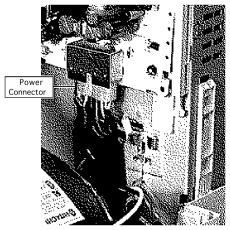
The board raised in its guides to expose the power connector. Apple Computer, Service Source. Pull the board up a little further to expose a connector and a cable.[1]
The white power connector. Apple Computer, Service Source. Disconnect the white power connector.[1]
Sliding the analog board out, with the ribbon cable. Apple Computer, Service Source. Disconnect the ribbon cable.[1]
Slide the analog board out of the chassis assembly.[1]
If you are fitting a different board, move the cable retainer from the old board to the new one.[1]
The ribbon cable hangs on a wire hinge inside the chassis harness assembly. If it has fallen off, hang it back on the hinge.[1]
Move the loose analog board cables aside so that none of them hangs below the board as it goes in.[1]
Slide the board part way into the guides. Connect the ribbon cable and the white power connector before sliding the board fully home.[1]
Push the power connector cables fully into the EMI shielding. Apple warns that the wires can wear through if they are left out.[1]
Refit the pink connector and push the CRT/video board straight on to the neck of the tube. Refit the anode cap, reconnect BP2, BD1, BD8 and SSI, route the degauss wires through the cable retainer and reconnect the two ground cables.[1]
Refit the rear housing and its five screws. If the feet on the rear housing are worn, replace them.[1]
Switch on and check for the start-up chime, a picture and sound from the speakers.[5]
Apple requires the cutoff adjustment whenever the analog board is replaced. Let the machine run for at least 10 minutes, then do cutoff followed by white balance.[1][6] The targets and controls are summarised on the Macintosh LC 580 page.
If the picture is off centre, the wrong size, out of focus or out of convergence, work through Apple's geometry, focus and convergence adjustments. The controls are at the back, so Apple says to watch the screen in a mirror and not to reach round the machine.[6][7]
The LC 580 board is a different part from the board in the LC 520, LC 550 and LC 575, which Apple lists as 661-0192; see Macintosh LC 520 Analog Board Replacement.[2][8] The LC 580 board sits in plastic guides and has a white power connector and a ribbon cable to unplug, steps that the LC 520 procedure does not include.[1][8]
Apple gives two CRT part numbers for the LC 580: 661-0945 for the northern hemisphere and 661-0947 for equatorial and polar regions.[2]
↑ 2.02.12.22.3Apple Computer, Macintosh LC 580/Performa 580CD Service Source, Exploded View (PDF p. 151): analog board 661-0940; analog board guide rails 922-1477 and 922-1478; CRT 661-0945 (northern hemisphere) and 661-0947 (equatorial and polar).
↑Apple Computer, Macintosh LC 580/Performa 580CD Service Source, General Information pp. 1-2 (PDF pp. 3-4); Specifications (PDF pp. 8-20): 14-inch shadow-mask CRT.
↑ 5.05.15.2Apple Computer, Macintosh LC 580/Performa 580CD Service Source, Troubleshooting: First Checklist pp. 2-3 and Symptom Charts, Video pp. 5-10 and Miscellaneous p. 24 (PDF pp. 23-24, 26-31 and 45).
↑ 6.06.1Apple Computer, Macintosh LC 580/Performa 580CD Service Source, Adjustments, Video pp. 14-20 (PDF pp. 127-133).
↑Apple Computer, Macintosh LC 580/Performa 580CD Service Source, Adjustments: Geometry pp. 7-13, Convergence pp. 27-31 and Geometric Distortion pp. 32-36 (PDF pp. 120-126 and 140-149).
↑ 8.08.1Apple Computer, Macintosh LC 520/550/575 Service Source, Exploded View (PDF p. 176): analog board 661-0192. Hosted as File:Lc 520.550.575.pdf.