

Apple Multiple Scan 15 Display
| Apple Multiple Scan 15 Display | |
|---|---|
 |
|
| Apple Multiple Scan 15 Display | |
| Manufacturer | Apple Computer |
| Type | 15-inch multiple-scan colour monitor |
| Interface | Attached video cable, RGB analogue |
| Model | M3089 (order number) |
| Power | 90-134 and 198-260 V AC, 47-63 Hz; 90 W maximum |
The Apple Multiple Scan 15 Display is a 15-inch flat square colour monitor with front-panel digital controls for brightness, contrast, geometry, centring and zoom.[1] Apple's August 1997 data sheet lists it under order number M3089 with stereo speakers, a headphone jack, an attached video cable and a sound output cable, for Power Macintosh, Quadra, Performa and Centris computers and, through an adapter, IBM PC-compatibles.[2]
The monitor contains a CRT. Apple serviced it by returning the whole unit and its Service Source has no take-apart or internal procedures. Read CRT Discharge Procedure before opening one.
Specifications
[edit | edit source]| Item | Value |
|---|---|
| Picture tube | 15 in flat square shadow mask, 13.3 in viewable; 0.28 mm dot pitch; polished surface |
| Resolutions | 640 × 480, 800 × 600 and 832 × 624; 1024 × 768 only on PCs through a Mac/PC adapter |
| Scan rates | Vertical 60-75 Hz; horizontal 31.77-56.5 kHz |
| Video input | RGB analogue, RS-343A, 0.714 V p-p positive-going; sync on green 0.286 V ±10 %; separate or composite sync 1-5 V p-p, either polarity |
| Controls | Front panel: power, brightness, contrast; select and +/− buttons for centre and size; zoom; recall |
| Mains | 90-134 and 198-260 V AC, self-configuring, 47-63 Hz |
| Power | 90 W maximum (data sheet: under 30 W in energy-saver mode) |
| Size | 424 mm high, 405 mm wide, 452.3 mm deep |
| Weight | 14 kg (31 lb) |
| Operating environment | 10-40 °C; 20-95 % humidity, non-condensing |
The data sheet gives the viewable image as 13.75 in and the active area as 260 × 195 mm nominal; the Service Source gives 13.3 in.[2][1]
Degauss is automatic at power-on. To degauss by hand, switch the display off and on; a full degauss needs it to have been off for 20 minutes or more.[1]
Front-panel controls
[edit | edit source]The geometry controls are behind the front panel. Hold the select button until the indicator for the setting you want lights (vertical centre, horizontal centre, height or width), then use "+" and "−". The zoom button fills the screen and removes the black border; press it again to return to normal size. The recall button returns to the stored settings; turn zoom off before pressing it.[3]
The display keeps your settings at each power-on. Pushing a pen or straightened paperclip into the opening to the left of the zoom button stores the current settings permanently in place of the factory settings; after that, the factory settings cannot be recalled.[3]
If the indicator light goes out before you finish, the display has taken a pause of more than 10 seconds as the end of the adjustment. This is normal.[4]
Known faults
[edit | edit source]See Apple Multiple Scan 15 Display Troubleshooting Guide for Apple's symptom charts. Apple published no internal adjustments, parts list or schematic for this display.[1]
Documentation
[edit | edit source]- Apple Multiple Scan 15 Service Source: Apple's 32-page Service Source
- File:Apple Multiple Scan 15 Display Data Sheet 1997.pdf: Apple's August 1997 data sheet
Gallery
[edit | edit source]-
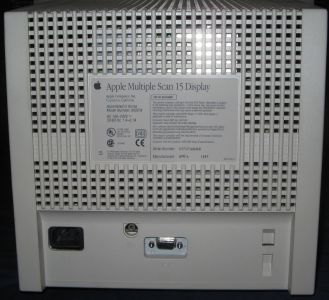 Rear panel and rating label (Rob Watts, CC BY-SA 3.0)

Related pages
[edit | edit source]- Apple Multiple Scan 15 Display Troubleshooting Guide
- Apple Multiple Scan 14 Display, Apple Multiple Scan 17 Display, Apple Multiple Scan 1705 Display
- CRT Discharge Procedure
References
[edit | edit source]- ↑ 1.0 1.1 1.2 1.3 1.4 Apple Computer, Apple Multiple Scan 15 Display (Service Source), 32 pp., Specifications, pp. 1-6 (PDF pp. 6-11). Hosted here: File:Multiple scan 15 display.pdf (see Apple Multiple Scan 15 Service Source).
- ↑ 2.0 2.1 Apple Computer, Apple Multiple Scan 15 Display data sheet, August 1997, L00732B. Hosted here: File:Apple Multiple Scan 15 Display Data Sheet 1997.pdf.
- ↑ 3.0 3.1 Apple Multiple Scan 15 Display Service Source, Adjustments, pp. 1-14 (PDF pp. 19-32).
- ↑ Apple Multiple Scan 15 Display Service Source, Troubleshooting, Symptom Charts/Miscellaneous, p. 5 (PDF p. 17).