
Apple Hard Disk 20
| Apple Hard Disk 20 | |
|---|---|
 |
|
| Apple Hard Disk 20 with its interface cable | |
| Manufacturer | Apple Computer, Inc. |
| Type | External hard disk drive |
| Release date | 17 September 1985[1] |
| Discontinued | September 1987[1] |
| Price | US$1,495 (1985)[1] |
| Interface | DB-19 external disk drive port |
| Compatible | Macintosh 512K (with the Startup diskette), Macintosh 512Ke, Macintosh Plus, Macintosh SE |
| Dimensions | 246 × 78.5 × 266 mm (9.7 × 3.1 × 10.5 in) |
| Weight | 3.2 kg (7 lb) |
| Power | 85-270 V AC, 47-64 Hz, 30 W |
| Storage | 20,769,280 bytes formatted |
The Apple Hard Disk 20 (HD20) is Apple's first hard disk for the Macintosh, a 20 MB external drive that plugs into the external floppy disk port. It is not a SCSI device.[2][3] Apple introduced it on 17 September 1985 at US$1,495, for the Macintosh 512K, and stopped making it in September 1987.[1] Apple's service manual describes the capacity as "about 50 single-sided 3 1/2 inch diskettes".[2]
History
[edit | edit source]Apple designed the HD20 for the Macintosh models that have no SCSI port, and it connects to the external floppy disk port instead.[3] The Macintosh Plus, SE, Portable and IIci kept the HD20 software in ROM alongside SCSI.[4]
For the earlier machines, the Hard Disk 20 startup software holds a driver for the drive together with the hierarchical (128K ROM) version of the File Manager, which is how a Macintosh with the original 64K ROM can use it.[4] On a Macintosh 128K or 512K, the Startup diskette starts the computer and is then ejected, and the desktop appears with the HD20's icon in the corner.[2]
Specifications
[edit | edit source]| Item | Value |
|---|---|
| Formatted capacity | 20,769,280 bytes |
| Data surfaces | 4, one head per surface |
| Blocks | 39,040 of 532 bytes (512 bytes of user data, 20 bytes of system data) |
| Tracks | 305 per surface, 600 tracks per inch |
| Sectors | 32 per track, 9,760 per surface |
| Average seek time | 85 ms |
| Head-to-disk transfer rate | 7.5 Mbit/s |
| Rotational speed | 2,744 rpm |
| Start-up and spin-down time | 15 s and 25 s |
| Head positioning | Stepper motor |
| Interface transfer rate | 500 kbit/s, serial |
| Line voltage | 85-270 V AC RMS, 47-64 Hz |
| Power | 30 W, 0.25 A maximum |
| Operating temperature | 10-40 °C (50-104 °F) |
| Storage temperature | −40 to 50 °C |
| Relative humidity | 20-80 %, non-condensing |
| Weight | 3.2 kg (7 lb) |
| Width × height × depth | 246 × 78.5 × 266 mm (9.7 × 3.1 × 10.5 in) |
The power supply accepts any mains voltage from 85 to 270 V without a switch or a step-down transformer, so an HD20 from another country needs only a different mains plug or lead.[6]
Wikipedia's specification list, taken from a Mac GUI article, gives two recording surfaces and 610 cylinders, 38,964 data blocks and 76 spare blocks.[1] Both descriptions come to 1,220 tracks of 32 sectors, or 39,040 blocks in all; Apple's article gives four surfaces of 305 tracks.[5]
Interface
[edit | edit source]The HD20 talks to the Macintosh over the signals of the DB-19 floppy port using Apple's Directly Connected Disk (DCD) protocol. It has its own power supply and takes no power from the port. The Apple Directly Connected Disks Specification gives the pin assignments and the 489.58 kbit/s line rate.[7]
A second DB-19 connector on the back of the HD20, the expansion port, takes an external floppy drive or another HD20. Its pinout is identical to the disk drive connector on the computer.[4] Apple allows up to three more hard or floppy disk drives to be daisy-chained through the expansion port.[2]
Apple says a cable of 30 inches (76 cm) between the Macintosh and the HD20 is safe as long as it is shielded and well connected; longer cables are not recommended because of cable capacitance and voltage drop. Flat or unshielded cables and nearby sources of interference can also upset the link.[8]
Compatibility
[edit | edit source]Support for the HD20 lives in the computer's ROM, not in the system software.[9] Apple's own sources give this picture:
| Macintosh | Can start up from the HD20 | Notes |
|---|---|---|
| Macintosh 128K, Macintosh 512K | With the Hard Disk 20 Startup diskette | Apple's set-up procedure covers the 512K "(or 128K)"; the specification article lists the 512K but not the 128K.[2][5] |
| Macintosh 512Ke, Macintosh Plus | Yes | No Startup diskette needed.[2][10] |
| Macintosh SE (including the FDHD model) | Yes | [10] |
| Macintosh Classic | Yes | Listed by Apple as having HD20 support in ROM.[9] |
| Macintosh Portable, Macintosh IIci | Yes | [10][9] |
| Macintosh SE/30, Macintosh IIcx | No | Both have an external disk connector but no HD20 driver in ROM.[3] |
| Macintosh II, Macintosh IIx, Macintosh IIfx | No | No external floppy connector.[3] |
| Macintosh IIsi, Macintosh LC | No | No HD20 support in ROM.[9] |
Apple's hardware guide says the machines without HD20 code in ROM can load the driver from the Hard Disk 20 startup disk as an Init file and then read and write the drive, though not start up from it.[4] A later Apple support article for the SE/30 is more cautious. It describes an unsupported Init utility for copying files off an HD20, warns against writing to the HD20 with it, and gives Apple's recommended route: connect the HD20 and a SCSI drive to a Macintosh Plus or SE, copy everything to the SCSI drive, then move the SCSI drive to the SE/30.[11]
No Apple II model can use the HD20, and Apple never made a controller card for it.[12]
Personal Computer Peripherals Corporation sold the HD-20 WSI, a plug-in board, cable and software that turned an HD20 into a SCSI drive for the Macintosh Plus, SE and II without soldering.[13]
Construction
[edit | edit source]
Apple serviced the HD20 as three exchange modules: the controller board (661-0300), the power supply (661-0301) and the hard disk assembly (HDA, 661-0302), which is the drive mechanism with its analogue board.[2] The parts list also includes a fan and a "Screw (Rodime)" (440-6105).[2] The mechanism is a 3.5-inch half-height Rodime 552, according to a 2002 Usenet post reproduced by Herb Johnson,[14] and the unit photographed for Apple Hard Disk 20 Maintenance has a Rodime RO552.
The cable between the controller board and the HDA (590-0336) is not a standard ribbon cable. Apple warns not to substitute another ribbon cable.[2]
Some controller boards carry a HAL chip at board location C3, where the silkscreen reads "PAL is 16R6". On units with serial numbers from F619xxx, Apple linked that HAL chip to drives that would not initialise and applications that failed to launch or copy, and its cure was a replacement controller board.[15]
Using an HD20 today
[edit | edit source]Apple's owner's guide puts the HD20 under the Macintosh with its side vents clear. If it sits beside the Macintosh, it goes on the right: on the left it risks magnetic interference from the Macintosh's power supply and video circuitry.[16]
Switch the HD20 on first and wait for the green light on the front to stop blinking, which takes about 15 seconds, then switch on the Macintosh. Never switch the HD20 off while the light is blinking.[2] The full procedure, with disassembly, is on Apple Hard Disk 20 Maintenance.
Apple did not recommend more than one System file on an HD20.[17] For a Macintosh 512Ke, Apple's System 6.0 documentation recommends System 4.1 with Finder 5.5; 512Ke owners who installed System 6.0.3 found the machine hung at start-up, with or without an HD20.[18]
Apple's "HD 20 Test" version 1.1, on the drive's startup disk, has two hidden functions: Command-D opens a detailed window with a "Dstrct" option that writes zeros to every block, and Command-E starts a 24-hour extended test.[19]
Known faults
[edit | edit source]- A drive that never comes ready: the light is not on and steady after 60 seconds. Apple's notes say this usually means a bad HDA.[2]
- "Init Failed" when initialising on a known-good Macintosh: Apple's cure is the controller board, then the HDA.[20]
- Drives chained behind the HD20 not seen, or intermittent: usually the expansion port connector on the first HD20's controller board.[2]
- Hard Drive Diagnostic 4.0 always fails an HD20 tested on a Macintosh SE, even a good one. Test on a Macintosh Plus.[21]
Symptom-by-symptom diagnosis is on Apple Hard Disk 20 Troubleshooting Guide.
Documentation
[edit | edit source]- Apple Hard Disk 20 Owner's Guide: Apple's 1985 owner's guide, with set-up, placement, owner troubleshooting and the specifications.[16]
- Apple Hard Disk 20 Technical Procedures: Apple's 1985-86 service procedures, with set-up, diagnostics, the troubleshooting flowchart, take-apart and the parts list.[2]
- Apple Hard Disk 20 Service Source: the later take-apart volume with an exploded view.
- Apple Directly Connected Disks Specification: the interface between the drive and the computer.[7]
- Guide to the Macintosh Family Hardware, second edition, pp. 80-81 and 342-343: which machines support the drive, and the expansion port.[3][10][4]
Gallery
[edit | edit source]-
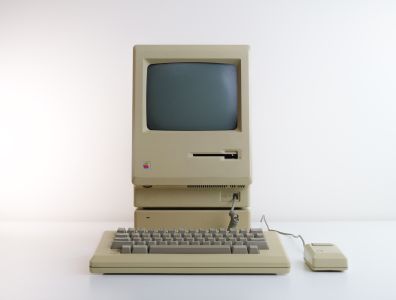 Macintosh 512Ke standing on a Hard Disk 20
-
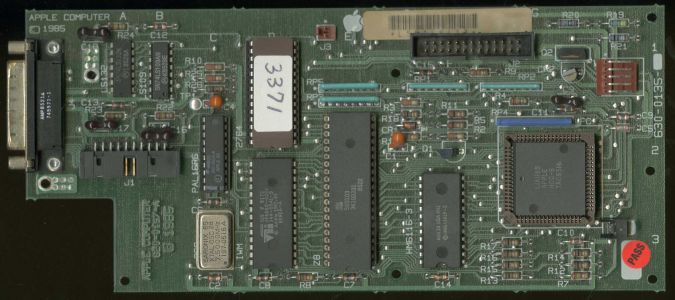 Hard Disk 20 controller board
-
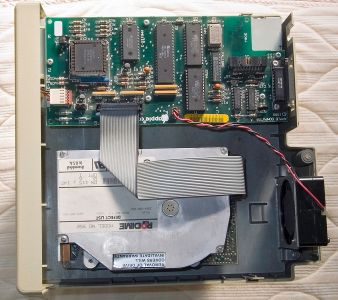 Hard Disk 20 with the cover removed


Related pages
[edit | edit source]- Apple Hard Disk 20 Maintenance
- Apple Hard Disk 20 Troubleshooting Guide
- Apple Hard Disk 20SC
- Apple Floppy Disk Drive
- Apple 400K Drive
- Hard Drive Maintenance and Repair
References
[edit | edit source]- ↑ 1.0 1.1 1.2 1.3 1.4 Wikipedia, "Hard Disk 20", retrieved 2026-10-04. Source for the introduction date (17 September 1985), the US$1,495 price and the September 1987 discontinuation.
- ↑ 2.00 2.01 2.02 2.03 2.04 2.05 2.06 2.07 2.08 2.09 2.10 2.11 2.12 Apple Computer, Hard Disk 20 Technical Procedures (from Apple Service Technical Procedures, Volume Six), hosted as File:Apple Hard Disk 20 Technical Procedures.pdf and described at Apple Hard Disk 20 Technical Procedures. Section 1, Basics, pp. 1.2-1.3 (20 MB; external drive port; daisy-chaining; set-up and switch-off order; the Startup diskette on the 512K and 128K; the Macintosh Plus needs none); Section 2, p. 2.2 (Hard Disk Drive Diagnostic, 15-minute and overnight tests); Section 3, pp. 3.2-3.9 (three exchange modules; cable caution; flowchart notes; daisy-chaining problems); Section 5, p. 5.3 (parts list, rev. Feb 86).
- ↑ 3.0 3.1 3.2 3.3 3.4 Apple Computer, Guide to the Macintosh Family Hardware, second edition (Addison-Wesley, 1990), chapter 2, p. 80 (note: the HD20 is a non-SCSI drive for Macintosh models without a SCSI port; the SE/30 and IIcx lack an HD20 driver in ROM; the II, IIx and IIfx have no external floppy connector). Hosted as File:Apple Guide to the Macintosh Family Hardware 2nd Edition 1990.pdf.
- ↑ 4.0 4.1 4.2 4.3 4.4 Guide to the Macintosh Family Hardware, second edition, chapter 9, "Compatibility with the Hard Disk 20", p. 342, and the developer tip on p. 343 (expansion port pinout identical to the computer's; startup software with HD20 driver and hierarchical File Manager; in ROM on the Plus, SE, Portable and IIci; usable as an Init on other machines for reading and writing but not for starting up).
- ↑ 5.0 5.1 5.2 Apple Computer, "Hard Disk 20: Specification (Discontinued)", Tech Info Library article 1306, revised 14 September 1993, in the archive.org collection Apple's Technical Information Library Articles, https://archive.org/details/APPLE_TIL_ARTICLES, file TIL00001_to_TIL60496.zip. Source for every figure in the specification table, and for use with the Macintosh 512K, 512Ke, Plus and SE with the Startup disk.
- ↑ Apple Computer, "HD20: Line voltage", Tech Info Library article 1611, revised 9 January 1986, APPLE_TIL_ARTICLES collection (archive.org), file TIL00001_to_TIL60496.zip. Source for automatic operation from 85 to 270 V, 47 to 64 Hz, without a step-down transformer.
- ↑ 7.0 7.1 Apple Computer, Rigid Disk Interface Specification / Software Protocol for Directly Connected Disks, version 1.2a, May 1985, hosted as File:Apple Directly Connected Disks Specification 1985.pdf. Source for the DCD use of the DB-19 pins, the self-powered device and the 489.58 kbit/s line rate.
- ↑ Apple Computer, "Hard Disk 20: Cable length limit with Macintosh", Tech Info Library article 1957, revised 12 October 1987, APPLE_TIL_ARTICLES collection (archive.org), file TIL00001_to_TIL60496.zip. Source for the 30-inch limit with a shielded cable and the reasons for it.
- ↑ 9.0 9.1 9.2 9.3 Apple Computer, "Apple HD-20 (Non-SCSI): Which Macintosh Computers Support It", Tech Info Library article 4423, revised 4 March 1991, APPLE_TIL_ARTICLES collection (archive.org), file TIL00001_to_TIL60496.zip. Source for ROM-based support on the 512Ke, Plus, SE, Classic, IIci and Portable, and its absence on the SE/30, II, IIx, IIcx, IIsi, IIfx and LC.
- ↑ 10.0 10.1 10.2 10.3 Guide to the Macintosh Family Hardware, second edition, Table 2-1, "Non-SCSI disk drives used by Macintosh computers", p. 81 (start up from HD20: yes on the 512K enhanced, Plus, SE, SE FDHD, Portable and IIci; no on the SE/30, IIcx and IIfx).
- ↑ Apple Computer, "Old HD-20 and New Macintosh SE/30", Tech Info Library article 6182, revised 1 November 1990, APPLE_TIL_ARTICLES collection (archive.org), file TIL00001_to_TIL60496.zip. Source for the SE/30 sharing the IIx logic board ROM without HD20 support, the transfer procedure through a Macintosh Plus or SE and an HD20 SC, HD40 SC or HD80 SC, and the unsupported read-only Init utility with its warning against writing.
- ↑ Apple Computer, "Apple II Family: No Support for Macintosh Hard Disk 20", Tech Info Library article 7334, revised 25 June 1991, APPLE_TIL_ARTICLES collection (archive.org), file TIL00001_to_TIL60496.zip.
- ↑ Apple Computer, "Apple HD-20: How To Convert It Into A SCSI Device", Tech Info Library article 3449, revised 5 December 1988, APPLE_TIL_ARTICLES collection (archive.org), file TIL00001_to_TIL60496.zip. Source for the HD-20 WSI conversion from Personal Computer Peripherals Corporation.
- ↑ Herb Johnson, "Apple brand HD20, HD20 SC Info", 2010, retrieved 2026-10-04. Reproduces a comp.sys.apple2 post by Paul Grammens (14 March 2002) identifying the mechanism as a 3.5-inch half-height Rodime 552, and notes from Paul Gooch that the 64K ROM Macintosh 128K and 512K need the HD20 Init while the 512Ke and Plus do not.
- ↑ Apple Computer, "Hard Disk 20: Failure To Launch Application Or Format", Tech Info Library article 1962, revised 17 January 1992, APPLE_TIL_ARTICLES collection (archive.org), file TIL00001_to_TIL60496.zip. Source for the HAL chip at C3 (silkscreen "PAL is 16R6"), serial numbers F619xxx and later, and replacement of the controller board.
- ↑ 16.0 16.1 Apple Computer, Macintosh Hard Disk 20 (owner's guide, 1985), hosted as File:Apple Hard Disk 20 Owners Guide 1985.pdf and described at Apple Hard Disk 20 Owner's Guide. Printed p. 2 (PDF p. 13): placement under the Macintosh or on its right, vents clear; pp. 40-41 (PDF pp. 47-48): Hard Disk 20 Test, about 15 minutes, suggested every month or so.
- ↑ Apple Computer, "Hard Disk 20: No Multiple System Folders", Tech Info Library article 676, revised 12 October 1987, APPLE_TIL_ARTICLES collection (archive.org), file TIL00001_to_TIL60496.zip.
- ↑ Apple Computer, "System 6.0.3: Incompatible with Macintosh 512Ke and HD20", Tech Info Library article 4437, revised 22 September 1989, APPLE_TIL_ARTICLES collection (archive.org), file TIL00001_to_TIL60496.zip. Source for the start-up hang under System 6.0.3 on the 512Ke and the recommendation of System 4.1 and Finder 5.5.
- ↑ Apple Computer, "HD-20: Erasing Information to Government Specs", Tech Info Library article 2225, revised 27 August 1992, APPLE_TIL_ARTICLES collection (archive.org), file TIL00001_to_TIL60496.zip. Source for the hidden Command-D low-level format and Command-E 24-hour test in HD 20 Test 1.1.
- ↑ Apple Computer, "Hard Disk 20 P/C: First Time Start-Up = Init Failed", Tech Info Library article 1604, revised 30 January 1992, APPLE_TIL_ARTICLES collection (archive.org), file TIL00001_to_TIL60496.zip.
- ↑ Apple Computer, "Hard Disk 20: Hard Drive Diagnostic 4.0 Problem/Cure", Tech Info Library article 3100, revised 22 July 1988, APPLE_TIL_ARTICLES collection (archive.org), file TIL00001_to_TIL60496.zip.