

SGI Indy
.jpg) | |
| An Indy from the University of South Australia collection (Bilby, CC BY 3.0) | |
| Specifications | |
|---|---|
| Manufacturer | Silicon Graphics |
| Type | Workstation |
| Released | 12 July 1993[1] |
| Discontinued | 30 June 1997[1] |
| CPU | MIPS R4000, R4400, R4600 or R5000 on a plug-in CPU module, 100 to 200 MHz[2] |
| Memory | 16 to 256 MB in eight 72-pin SIMM sockets[3][2] |
| Storage | Two internal 3.5-inch bays, 1 inch high, on the Fast SCSI-2 bus[3] |
| Display | External monitor on a 13W3 connector, up to 1280 × 1024 at 76 Hz[3] |
| Sound | Stereo analogue and AES/EBU digital audio in and out, internal speaker; 48, 44.1 and 32 kHz sampling[3] |
| Graphics | 8-bit XL, 24-bit XL or XZ[3] |
| Expansion | Two GIO-32 slots[3] |
| Power | 170 W autoswitching supply; 100–132 V or 200–264 V AC, 47–63 Hz[3][4] |
| Dimensions | 76 × 406 × 356 mm (3 × 16 × 14 in)[4] |
| Weight | 7.3 kg (16 lb)[3] |
| OS / Firmware | IRIX 5.1 to 6.5.22[1] |
| Predecessor | SGI Indigo[2] |
| Successor | SGI O2[2] |
| Codename | Guinness[1] |
The SGI Indy is a desktop Unix workstation that Silicon Graphics introduced on 12 July 1993 as the lowest-priced machine in its range, code-named "Guinness". It was the first computer to come with a video camera as standard, the IndyCam, and SGI discontinued it on 30 June 1997.[1] The Challenge S server uses the same case with a system board that has no graphics or audio hardware.[1][2] The parts that most often need attention are the power supply, which also carries the front-panel buttons and speaker, and the Dallas DS1386 timekeeper module, whose built-in battery holds the clock, the PROM settings and the Ethernet address.[5][6]
History and models
[edit | edit source]The base Indy was launched at US$5,000 as a diskless machine with 16 MB of memory and a 100 MHz R4000PC processor; SGI raised the base memory to 32 MB later in 1993 because IRIX 5.1 handled 16 MB poorly.[1] The July 1994 product guide lists R4600PC (100 MHz), R4600SC (133 MHz) and R4400SC (150 MHz) CPU modules with 8-bit XL, 24-bit XL and XZ graphics.[3] The R5000 modules came later, and the latest IRIX release for the Indy is 6.5.22.[1]
Every Indy uses the same system board and chassis; configurations differ in the CPU module and the graphics board.[2] Andrej Bukošek lists these CPU modules:
| Processor | Clock (MHz) | L1 cache I/D (KB) | L2 cache (KB) | Module part number |
|---|---|---|---|---|
| R4000 | 100 | 8/8 | none | 030-8100-00x |
| R4000 | 100 | 8/8 | 1024 | 030-8245-00x |
| R4400 | 100 | 16/16 | 1024 | 030-8260-00x |
| R4400 | 150 | 16/16 | 1024 | 030-8201-00x |
| R4400 | 175 | 16/16 | 1024 | 030-8205-00x |
| R4400 | 200 | 16/16 | 1024 | 030-0882-00x |
| R4600 | 100 | 16/16 | none | 030-8236-00x |
| R4600 | 133 | 16/16 | none | 030-0752-00x |
| R4600 | 133 | 16/16 | 512 | 030-8252-00x |
| R5000 | 150 | 32/32 | none | 030-0991-00x |
| R5000 | 150 | 32/32 | 512 | 030-0986-00x |
| R5000 | 180 | 32/32 | 512 | 030-0985-00x |
Kaya Kupferschmidt's buyer's guide gives the same numbers for most modules but lists the R4000SC as 030-8101-004.[7] Several modules need a newer PROM than early boards carry: the R4400 200 MHz needs a PROM dated 15 July 1994 or later, the R4600 133 MHz one dated 28 September 1994 or later, and the R5000 modules one dated 12 February 1996 or later. XZ graphics need a PROM dated 20 June 1994 or later.[2] The PROM is a UV-erasable M27C4002 EPROM, so an upgrade means programming a new chip; the last version is SGI part 070-9101-011.[2][7]
Hardware
[edit | edit source].jpg)
System board and CPU module
[edit | edit source]The diagnostics identify the Indy system board as IP24; the board in Bukošek's machine is SGI part 030-8123-016.[8][2] The CPU module plugs into a connector on the system board at the front of the case, between the power supply and the system disk, and is held by two screws. SGI made modules in several shapes, each under its own heat sink, which SGI's guide says not to remove.[9]
Memory
[edit | edit source]There are eight SIMM sockets in two banks. Bank 0 (sockets S1 to S4) is next to the power supply and bank 1 (S5 to S8) is next to the graphics board. SIMMs go in groups of four of the same size, starting with bank 0, and the Indy shipped with bank 0 filled.[10] The sockets take 72-pin fast-page-mode SIMMs with parity, 60 or 70 ns; eight 32 MB SIMMs give the 256 MB maximum.[2]
Graphics, video and I/O
[edit | edit source]The three graphics options are the 8-bit XL and 24-bit XL boards, which have no geometry hardware, and the XZ, which has four geometry engines and takes up both GIO slots.[3][1] All three use a 13W3 monitor connector with sync on green.[5] Every Indy has composite and S-Video inputs and a digital input for the IndyCam; video output needs the Indy Video GIO card.[1] The rear panel also carries two serial ports, a parallel port, 10BASE-T and AUI Ethernet, ISDN, Fast SCSI-2, PS/2 keyboard and mouse, and audio jacks.[3]
Power supply
[edit | edit source]SGI fitted a 170 W autoswitching power supply, which its product guide says allows the Indy to run anywhere in the world; the owner's guide gives input ranges of 100–132 V and 200–264 V.[3][4] Two makes were used: the earlier Nidec unit (SGI part 9430813) and the later Sony unit (SGI part 060-0008-001), which is quieter.[2][7] The Nidec label reads model FLU5-170-1-6560, +5 V at 25 A, +3.3 V at 7 A, −12 V at 0.75 A and a 5 V auxiliary output; the TechPubs Wiki gives +12 V at 4.5 A.[11][6]
The supply connects to the system board through a 20-pin Molex Mini-Fit Jr. power connector and a 20-pin auxiliary header. The auxiliary header carries the run and power-good signals, a fan-control voltage from the board's temperature sensor, and the wiring for the power, reset and volume buttons, the red and green LED and the speaker.[6] The buttons and speaker are on a small board at the front of the supply, and the LED is inside the supply too.[12][13] The supply's fan cools the whole system.[12] The Nidec fan always turns and speeds up with temperature, while the Sony fan does not start until the board's sensor reaches about 45 °C.[6]
Clock and NVRAM
[edit | edit source]The time of day, the PROM environment and the Ethernet address are kept in a Dallas DS1386-8K-150 timekeeper module, which has its battery sealed inside; the -120 version works as a substitute.[2][5] Adrian Chadd found that pin 3 of the module's socket carries the always-on 5 V auxiliary rail, so a DS1386-32K, which uses that pin as an address line, cannot simply be plugged in.[14]
Known faults
[edit | edit source]- Power supply failure. The TechPubs Wiki names the supply as the part most likely to fail, with neither make clearly more reliable.[5] Owners report dead Nidec supplies with no fan and no response to the power button, and a red LED that flickers while the supply clicks.[15][16] See SGI Indy Capacitor Replacement Guide.
- Dead DS1386 battery. The machine loses the time, and the Ethernet address reads ff:ff:ff:ff:ff:ff, which stops it at the PROM monitor until the address is rewritten.[5][2] See SGI Indy Troubleshooting Guide.
- Shorted tantalum capacitors on the system board. An Indy R5000 lit both LEDs for a second, switched off and gave off a foul smell; the cause was a burnt tantalum capacitor, C602 (4.7 µF 20 V), on the underside of the board.[17] dexter1 reports that C16, one of three yellow capacitors (C15 to C17) in a row on the board, sometimes blows.[16]
- Worn front-panel buttons. The power, reset and volume buttons are on the supply's front board, and weblacky found supplies whose buttons worked intermittently or not at all.[12]
- A forgotten PROM password, which is cleared by removing the jumper beside the power supply connectors.[18]
Routine care is on SGI Indy General Maintenance.
Documentation
[edit | edit source]- Indy Workstation Owner's Guide, 007-9804-060, 1996: File:SGI Indy Workstation Owner's Guide (007-9804-060).pdf
- Indy Product Guide, INDY-TMG-(07/94), 1994: File:SGI Indy Product Guide (INDY-TMG-07-94).pdf
Contents and coverage of each are on SGI Indy Documentation.
Gallery
[edit | edit source]-
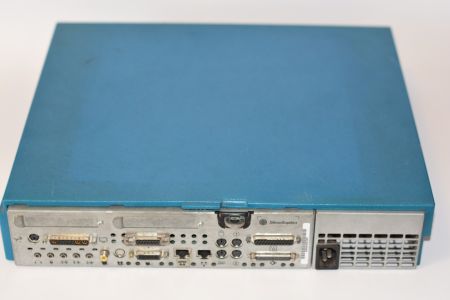 Rear panel and the power supply inlet (Rules666, CC BY-SA 4.0)
 -
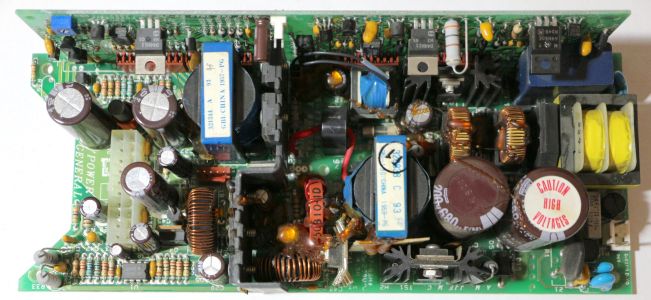 Main board of a Nidec power supply (Andrej Bukošek)
 -
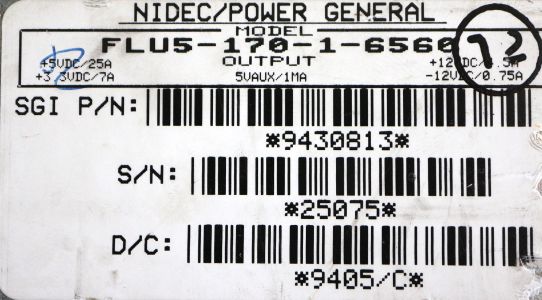 Nidec power supply rating label (Andrej Bukošek)
.jpg)
.jpg)
.jpg)
Related pages
[edit | edit source]- SGI Indy General Maintenance
- SGI Indy Troubleshooting Guide
- SGI Indy Capacitor Replacement Guide
- SGI Indy Documentation
- SGI Indigo
- SGI Indigo²
- SGI O2
References
[edit | edit source]- ↑ 1.00 1.01 1.02 1.03 1.04 1.05 1.06 1.07 1.08 1.09 "SGI Indy", Wikipedia, revision of 28 July 2026, en.wikipedia.org/wiki/SGI_Indy. Code name, introduction and discontinuation dates, launch configuration and price, Challenge S, graphics and video options, IRIX versions.
- ↑ 2.00 2.01 2.02 2.03 2.04 2.05 2.06 2.07 2.08 2.09 2.10 2.11 2.12 2.13 Andrej Bukošek, "SGI Indy", Hardware collection, bukosek.si (retrieved 21 October 2026). CPU module table and part numbers, PROM version requirements and EPROM type, memory type, power supply part numbers, DS1386-8K-150, MAC address procedure, system board part number, Challenge S, predecessor and successor.
- ↑ 3.00 3.01 3.02 3.03 3.04 3.05 3.06 3.07 3.08 3.09 3.10 3.11 Silicon Graphics, Indy Product Guide, INDY-TMG-(07/94), 1994, pp. 5 and 7–8 (File:SGI Indy Product Guide (INDY-TMG-07-94).pdf). Rear-panel callouts (170 W autoswitching power supply, I/O ports) and technical specifications (CPU modules, graphics, memory 16–256 MB, two internal 3.5 × 1 in devices, two GIO-32 slots, weight 16 lb, power requirements).
- ↑ 4.0 4.1 4.2 Silicon Graphics, Indy Workstation Owner's Guide, 007-9804-060, 1996, p. 181, Table 9-3 (File:SGI Indy Workstation Owner's Guide (007-9804-060).pdf). Dimensions, power requirements, temperature, humidity, heat dissipation.
- ↑ 5.0 5.1 5.2 5.3 5.4 "Indy", TechPubs Wiki, tech-pubs.net (retrieved 21 October 2026). Power supply as the part most prone to failure, MAC address in battery-backed RAM, DS1386-8K-150 and -120, 13W3 sync-on-green graphics.
- ↑ 6.0 6.1 6.2 6.3 "Indy Power Supply Information", TechPubs Wiki, based on measurements posted by SGUG forum member Elf in 2019, tech-pubs.net (revision of 27 September 2025). Rail ratings, connector pinouts, run and power-good signals, Nidec and Sony fan control.
- ↑ 7.0 7.1 7.2 Kaya Kupferschmidt, "Buying an Indy" and "The SGI Indy", Obsolete Hardware, 2003, hardware.majix.org. CPU module part numbers, PROM 070-9101-011, Nidec and Sony supplies.
- ↑ SGI, 007-9804-060, p. 114. The IDE diagnostics identify the system as IP24.
- ↑ SGI, 007-9804-060, pp. 152–155. Removing and installing the CPU module.
- ↑ SGI, 007-9804-060, pp. 43–48. SIMM banks, socket numbers and installation order.
- ↑ Andrej Bukošek, photograph of an Indy Nidec power supply label (File:SGI Indy Nidec power supply label (Andrej Bukosek).jpg). Model FLU5-170-1-6560 and output ratings.
- ↑ 12.0 12.1 12.2 "Repair / Refurbish Indy power supply", IRIX Network forums, posts by weblacky, 20–21 July 2023, forums.irixnet.org. Front-panel board with buttons and speaker inside the supply, worn microswitches.
- ↑ "Indy - boot tune but no green LED?", IRIX Network forums, 15 June 2025, forums.irixnet.org. A reply suggests the LED may have failed and that it is tested with a meter in diode mode after opening the supply.
- ↑ Adrian Chadd, "Installing a 32k DS1386 into an SGI Indy that expects an 8k DS1386", 15 December 2025, adrianchadd.blogspot.com. Pin 3 of the DS1386-8K socket carries auxiliary 5 V.
- ↑ "dead indy", IRIX Network forums, July 2022, forums.irixnet.org. Nidec supply with no fan and no response to the power button.
- ↑ 16.0 16.1 "Indy will not power on", IRIX Network forums, January to March 2019, forums.irixnet.org. Flickering red LED and clicking from a failed Nidec supply, cured by fitting a Sony supply; dexter1 on tantalum capacitor C16.
- ↑ "Value of capacitor C602 on Indy logic board needed!", IRIX Network forums, 30 May 2019, forums.irixnet.org. Burnt tantalum C602 under an Indy R5000 system board, value 4.7 µF 20 V from another owner's board.
- ↑ SGI, 007-9804-060, pp. 127–128. Disabling the System Maintenance password with the jumper on the system board.