

SGI O2
.jpg) | |
| An O2 with its O2Cam camera (Peter Wallén, CC BY 3.0) | |
| Specifications | |
|---|---|
| Manufacturer | Silicon Graphics |
| Type | Workstation |
| Released | 1996[1] |
| CPU | R5000, RM5271 or RM7000 (180–350 MHz); R10000 or R12000 (150–400 MHz)[2] |
| Memory | 32 MB to 1 GB in eight proprietary ECC SDRAM DIMM sockets[2][3] |
| Storage | Two drive sleds for SCA Ultra SCSI disks (one on R10000 and R12000 models); CD-ROM[1] |
| Display | — |
| Sound | — |
| Graphics | Integrated, sharing main memory[2] |
| Expansion | One PCI slot[1] |
| Power | 100–120 V or 200–240 V AC, 47–63 Hz, 245 W maximum[4] |
| Dimensions | 292 × 229 × 323 mm (11.5 × 9 × 12.7 in, length × width × height)[5] |
| Weight | 9.1 kg (20 lb)[5] |
| OS / Firmware | IRIX 6.3 and 6.5[1] |
| Predecessor | SGI Indy[1] |
| Codename | Moosehead[1] |
The SGI O2 is a desktop Unix workstation that Silicon Graphics introduced in 1996 to replace the Indy, developed as the "Moosehead" project. It has a single MIPS processor and a unified memory architecture, in which graphics, video and textures all use main memory. The Octane was its larger counterpart, and the O2 was SGI's last low-end workstation.[1][2] The CPU, graphics, memory, SCSI controller and I/O are on a single system module that slides out of the back of the case.[6][7] The faults owners deal with most are an ageing power supply, a flat Dallas DS1687 clock chip, poorly seated memory, and system boards damaged by pulling the module with the mains lead still connected.[8][2][6][9] The later SGI O2+ is the same machine in purple skins.[2][6]
Models
[edit | edit source]The O2 was built in two main configurations, defined by the CPU module. The R10000 and R12000 modules have a much larger heat sink, so those machines use a chassis with a single disk bay and a taller PCI riser; later chassis have a removable divider so that an R5000 machine can be upgraded.[2] Andrej Bukošek lists these modules:
| Processor | Clock (MHz) | L2 cache (KB) | Module part number |
|---|---|---|---|
| R5000 | 180 | none | 030-1039-00x |
| R5000 | 180 | 512 | 030-1102-00x |
| R5000 | 200 | 1024 | 030-1276-00x |
| RM5271 | 300 | 1024 | 030-1493-00x |
| RM7000 | 350 | 256, plus 1024 L3 | 030-1733-00x |
| R10000 | 150 | 1024 | 030-1197-00x |
| R10000 | 175 | 1024 | 030-1082-00x |
| R10000 | 195 | 1024 | 030-1247-00x |
| R10000 | 225 | 1024 | 030-1375-00x |
| R10000 | 250 | 1024 | 030-1330-00x |
| R12000 | 270 | 1024 | 030-0994-00x |
| R12000 | 300 | 1024 | 030-0993-00x |
| R12000 | 400 | 2048 | 030-1529-00x |
Hardware
[edit | edit source].jpg)
System module
[edit | edit source]The system module carries the system board, CPU module, memory and PCI tray, and its rear panel has the SCSI, parallel, monitor, Ethernet, two serial and PS/2 keyboard and mouse connectors.[7][2] It is released by a lever on its left side and slides out of the left of the case as seen from the back. SGI's guide warns: always remove the power cable before removing the system module.[7] The case connects to the module through a frontplane board, which also takes the power supply connector.[10][2] The Ethernet address and system ID are held in a small chip on the circuit board under the PCI tray, not in the clock chip, and SGI's guide warns against mixing PCI trays between machines.[11][2][6]
Memory
[edit | edit source]There are eight DIMM sockets, paired into banks A to D, with socket 1 nearest the CPU. Bank A (sockets 1 and 2) must always be filled; both DIMMs in a bank must be the same size and type; the largest DIMMs go in bank A; and banks must be filled in order without gaps. The maximum is 1 GB.[3] The DIMMs are SGI's own ECC SDRAM modules and fit no other SGI machine. 128 MB DIMMs need PROM version 4.4 or later.[2]
| Kit (2 DIMMs) | DIMM size | SGI part number | Colour code 1 | Colour code 2 | Sides | Type |
|---|---|---|---|---|---|---|
| 32 MB | 16 MB | 030-0881-xxx | Purple | – | Single | A |
| 64 MB | 32 MB | 030-0876-xxx | Yellow | – | Double | A |
| 128 MB | 64 MB | 030-1492-xxx | Green | White | Single | B |
| 256 MB | 128 MB | 030-1080-xxx | Silver | – | Double | A |
| 256 MB | 128 MB | 030-1473-xxx | Silver | White | Double | B |
Graphics, video and audio
[edit | edit source]Graphics are built into the chipset and use main memory for the frame buffer and textures. Add-on boards give dual-head output or connections for SGI's 1600SW and Presenter flat panels, and disable the main monitor port when fitted.[2] Audio and video come from a module mounted at the far left side of the case:[1] audio only, AV1 with analogue video and the O2Cam connector, or AV2 with serial digital video.[2]
Power supply and cooling
[edit | edit source]SGI's site guide gives a maximum of 245 W from the wall, 835 BTU per hour of heat and 37 cfm of airflow. Air enters both sides of the case and leaves at the rear.[4][12] The supply measured by Elf for the TechPubs Wiki is a Sony APS-90, SGI part 060-0022-001, rated at +3.43 V 31 A, +5.1 V 10 A, +12 V 3.2 A, −12 V 0.25 A and a 3.3 V standby output of 10 mA.[10] Unlike the Indy and Indigo² supplies it does not start by itself: the system board starts it by grounding a run line.[10] The fan in the supply, a Panaflo FBA08A12U1A, is the only exhaust fan in the machine.[2] The supply sits behind a snap-off bezel and slides out once a release lever is moved.[13]
Clock
[edit | edit source]The real-time clock is a Dallas DS1687-5 on the system board, under the PCI riser, with its crystal and lithium battery inside the package. Besides the time it holds the PROM settings and switches the machine on when the power button is pressed.[2] The DS1687-5 is still made; the -3 version is a 3.3 V part and must not be fitted.[2][14]
Known faults
[edit | edit source]- Power supply failure. One owner repaired a failed supply by replacing only the six largest output capacitors.[8] See SGI O2 Capacitor Replacement Guide.
- System board damaged by removing or inserting the system module with the mains lead connected. The usual symptom afterwards is a solid red LED, and the CPU, memory and other modules generally survive.[7][9]
- Flat clock battery. The O2 loses its PROM settings whenever it is unplugged, and a failing chip can stop the machine from switching on, or let it switch on only some of the time.[2]
- Memory contact faults after the machine has been moved, giving random memory errors or no boot, with a solid red or blinking amber LED.[6]
- Toshiba CD-ROM drives whose tray will not open or will not stay shut, caused by a split plastic gear on the tray motor.[6]
- A worn supply fan. The original fan's sleeve bearing gets noisier with age, and a replacement needs enough static pressure to pull air through the whole case.[2]
See SGI O2 Troubleshooting Guide and SGI O2 General Maintenance.
Documentation
[edit | edit source]- O2 Workstation Hardware Reference Guide, 007-3275-002, 1996: File:SGI O2 Workstation Hardware Reference Guide (007-3275-002).pdf
- Silicon Graphics O2 Workstation Memory Installation Instructions, 007-3778-002, 1997: File:SGI O2 Workstation Memory Installation Instructions (007-3778-002).pdf
- Site Preparation for SGI 2000-Series, Origin Family, Onyx2, Octane, and O2, 007-3452-004: File:SGI Site Preparation for SGI 2000-Series, Origin, Onyx2, Octane and O2 (007-3452-004).pdf
Contents and coverage are on SGI O2 Documentation.
Gallery
[edit | edit source]-
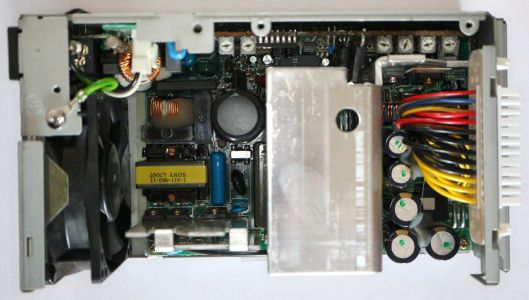 Inside the O2 power supply (Andrej Bukošek)
 -
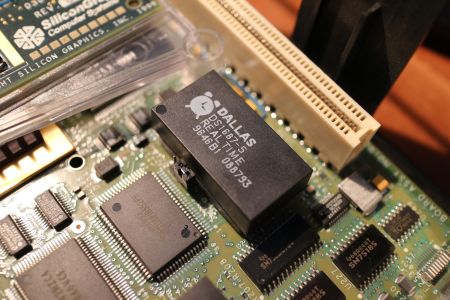 The DS1687-5 clock chip and its jumper pins (Andrej Bukošek)
.jpg)
.jpg)
Related pages
[edit | edit source]- SGI O2 General Maintenance
- SGI O2 Troubleshooting Guide
- SGI O2 Capacitor Replacement Guide
- SGI O2 Documentation
- SGI O2+
- SGI Indy
- SGI Octane
References
[edit | edit source]- ↑ 1.0 1.1 1.2 1.3 1.4 1.5 1.6 1.7 "SGI O2", Wikipedia, revision of 1 February 2026, en.wikipedia.org/wiki/SGI_O2. Introduction in 1996, Moosehead project, replacement for the Indy, CPU ranges, drive sleds, PCI slot, IRIX versions.
- ↑ 2.00 2.01 2.02 2.03 2.04 2.05 2.06 2.07 2.08 2.09 2.10 2.11 2.12 2.13 2.14 2.15 2.16 2.17 2.18 Andrej Bukošek, "SGI O2", Hardware collection, bukosek.si (retrieved 22 October 2026). Architecture, configurations, CPU module table, memory, display and audio-visual options, power supply fan, DS1687-5 clock chip, system ID chip on the PCI riser.
- ↑ 3.0 3.1 3.2 Silicon Graphics, Silicon Graphics O2 Workstation Memory Installation Instructions, 007-3778-002, 1997, pp. 4–6 (File:SGI O2 Workstation Memory Installation Instructions (007-3778-002).pdf). DIMM kits, colour codes and bank rules.
- ↑ 4.0 4.1 SGI, 007-3452-004, pp. 31–32, Table 3-2. Voltage, frequency, 245 W maximum, 835 BTU/h, 37 cfm.
- ↑ 5.0 5.1 Silicon Graphics, Site Preparation for SGI 2000-Series, Origin Family, Onyx2, Octane, and O2, 007-3452-004, p. 30, Table 3-1 (File:SGI Site Preparation for SGI 2000-Series, Origin, Onyx2, Octane and O2 (007-3452-004).pdf). O2 chassis dimensions and weight.
- ↑ 6.0 6.1 6.2 6.3 6.4 6.5 "O2", TechPubs Wiki, tech-pubs.net (revision of 21 September 2025). Memory contact faults, CD-ROM tray gear, MAC address on the PCI riser, warning about removing the system module.
- ↑ 7.0 7.1 7.2 7.3 Silicon Graphics, O2 Workstation Hardware Reference Guide, 007-3275-002, 1996, pp. 23–27 (File:SGI O2 Workstation Hardware Reference Guide (007-3275-002).pdf). Removing the system module; caution to remove the power cable first.
- ↑ 8.0 8.1 "O2 PSU disassembly and refurb", IRIX Network forums, January to May 2020, forums.irixnet.org. Raion's teardown and capacitor list; a supply repaired by replacing the six largest output capacitors.
- ↑ 9.0 9.1 "What parts can you fry if removing a plugged O2 system module?", IRIX Network forums, weblacky, 17 March 2024, forums.irixnet.org. Solid red LED and a damaged system board after removing the module with power connected.
- ↑ 10.0 10.1 10.2 "O2 Power Supply Information", TechPubs Wiki, based on measurements posted by SGUG forum member Elf, tech-pubs.net (revision of 27 September 2025). Sony APS-90 supply, ratings, run line, frontplane connector.
- ↑ SGI, 007-3275-002, pp. 20–21. Serial number locations; caution that the board beneath the PCI tray holds the serial number.
- ↑ SGI, 007-3452-004, p. 29, Figure 3-2. Air intake on both sides, exhaust at the rear.
- ↑ SGI, 007-3275-002, pp. 143–151. Replacing the power supply.
- ↑ "Possible run of Octane&O2 Dallas RTC replacement PCB modules", IRIX Network forums, July 2019, forums.irixnet.org. DS1687-5 in the O2 and Octane, still available as the DS1687-5IND+.