

SGI Octane
 | |
| An original Octane in the green case with the Silicon Graphics cube logo (Afrank99, CC BY-SA 2.0) | |
| Specifications | |
|---|---|
| Manufacturer | Silicon Graphics, Inc. |
| Type | Workstation |
| Released | 1997[1] |
| CPU | One or two MIPS R10000, R12000 or R14000 processors on a replaceable CPU module[2][3] |
| Memory | 64 MB to 2 GB in eight DIMM sockets (original system board); up to 8 GB on the later board[4][3] |
| Storage | Three internal 3.5-inch SCSI drive positions[5] |
| Display | Monitor port on the graphics board[6] |
| Sound | Built-in audio with analogue, coaxial digital and optical digital ports[7] |
| Graphics | SI, SE, SSI, SSE, MXI or MXE XIO boards; VPro on later machines[8][9] |
| Expansion | XIO module with four slots; optional PCI module with three slots[10][11] |
| Power | 100-240 V AC, 50-60 Hz, 10-4.2 A, 850 W[7] |
| Dimensions | 41.3 × 28 × 33.7 cm (H × W × D)[7] |
| Weight | 32.7 kg installed[12] |
| OS / Firmware | IRIX 6.4 and later[1] |
| Predecessor | SGI Indigo² |
| Successor | SGI Octane2 |
| Codename | Racer[1] |
| Model no. | IP30 system board |
The SGI Octane is a deskside MIPS workstation made by Silicon Graphics and sold from 1997, with one or two processors.[1] Its system board is the IP30. The Octane has no shared system bus: a crossbar switch ASIC called the crossbow (Xbow), on the frontplane, links the processor and memory to the XIO slots and the PCI bridge.[1][3][13] The machine is built from modules that slide into the back of the chassis: the system module, the XIO module, the optional PCI module and the power supply.[6] The SGI Octane2 uses the same chassis with a revised power supply, system board and Xbow.[3]
History and models
[edit | edit source]SGI's code name for the Octane was Racer, and for the Octane2 Speedracer.[1] IRIX 6.4 was the first release to support the Octane, with IMPACT-class graphics.[1] The first graphics boards were the SI, SSI and MXI; the SE, SSE and MXE look identical but are faster. hinv reports an SE board as ESI, an SSE as ESSI and an MXE as EMXI.[8] A texture memory option board fits on the SI or SE.[14]
Later Octanes take VPro graphics, fitted on an XIO Tri-Module in place of the earlier XIO module. SGI's upgrade guide sets three conditions: a power supply that hinv -m reports as PWR.SPPLY.ER 060-0035-001 or later, IRIX 6.5.10 or later, and boot PROM revision 4.0 for the V6 and V8 boards or 4.5 for the V10 and V12. The V10 and V12 also need frontplane Xbow revision 1.4 or later.[9][15] An earlier flier asked owners whose Xbow reported revision 1.2 to have SGI fit a new frontplane before installing some new XIO boards; revision 1.3 and later needed no change.[16]
Original Octanes have green covers with the OCTANE name and the Silicon Graphics cube logo. Later green machines carry the "silicon graphics octane" lettering and the lowercase sgi logo, and the Octane2 has blue covers. The plastics fit either chassis.[1][3]
Hardware
[edit | edit source]
Modules
[edit | edit source]The system module carries the IP30 board, the CPU module, the memory and the built-in I/O ports. The XIO module, on the right as seen from the back, holds up to four boards in slots A to D; SSI, SSE, MXI and MXE boards take two slots. Graphics boards must sit at the top and right as the module goes in, or they overheat.[10] The optional PCI module takes three boards: two full-size and one half-size, one full-size and two half-size, or three half-size. It is a 5 V environment with a 45 W limit for all its boards together.[11] The power supply slides in at the bottom of the chassis and plugs straight into the frontplane.[17]
Each module meets the frontplane through compression connectors. A connector has 96 pads; the half on the module is made of fine bristles (dendrites) that press against flat gold pads on the frontplane. The system module has two of them, the PCI module and each XIO board one.[18]
The frontplane module sits behind the drive bays. It carries the system identification module and, on its back, the system fan.[19] The light module, behind the bezel under the system drive, lights the lightbar on the front.[20]
Processors and memory
[edit | edit source]CPU modules come in single and dual versions. The dual module is held by six captive screws, the single by four.[2] A second processor cannot be added to a single module; the whole module is changed.[3] The TechPubs Wiki lists R10000 modules at 175 to 250 MHz, R12000 at 270, 300 and 400 MHz, R12000A at 360 and 400 MHz, and R14000A at 550 and 600 MHz.[3]
The 2002 edition of the owner's guide gives 64 MB (two 32 MB DIMMs) to 2 GB (eight 256 MB DIMMs) in four banks of two sockets. Bank 1 must always be filled, banks are filled in order, and both DIMMs in a bank must match in capacity and construction. SGI DIMMs have colour-coded labels: yellow 32 MB, blue 64 MB stacked, green 64 MB, brown 128 MB, red 256 MB stacked.[4] The TechPubs Wiki gives two system board revisions: 030-0887-00x, usually with a black handle, limited to 2 GB, and 030-1467-001, with a silver handle, which takes up to 8 GB. The older board does not accept the later single-board 256 MB DIMM.[3]
Storage and I/O
[edit | edit source]The three internal drive positions take 3.5-inch drives on their own wide SCSI bus. Internal drives get their ID from their slot: 0-1 for the system drive, 0-2 above it and 0-3 at the top. The second bus serves external devices.[5][21] The system module's rear panel has microphone, headphone and speaker-power sockets, analogue line in and out, coaxial and optical digital audio, an external SCSI port, 10/100 Ethernet, a parallel port, keyboard and mouse ports and two serial ports. The monitor and StereoView connectors are on the graphics board.[6][7]
Specifications
[edit | edit source]| Item | SGI figure |
|---|---|
| Dimensions | 41.3 cm high, 28 cm wide, 33.7 cm deep; 37.5 cm deep at the power supply and 41.3 cm at the PCI module[7] |
| Weight | 32.7 kg installed, 37.2 kg packed[12] |
| Input | 100-120 V or 200-240 V AC, 10-4.2 A, 850 W maximum; 47-63 Hz[7][12] |
| Power factor and inrush | 0.98 minimum; 60 A peak inrush[12] |
| Heat | 700 W, 2400 Btu/h in the owner's guide; 2,899 Btu/h maximum in the site preparation guide[7][12] |
| Airflow | 60 cfm maximum[12] |
Power supplies
[edit | edit source]Two makes of supply were fitted. Owners identify the Lucent units by a black handle and the Cherokee units by a silver one.[22] Lucent supplies rated at 623 W have been reported with SGI part numbers 060-0028-003 and 060-0038-001; the Octane_ide reference guide's sample output shows a 060-0038-001 supply reporting itself as PWR.SPPLY.S2.[23][24][13] Erik Baigar's Cherokee is labelled SP360 2A, Rev A, 747 W.[25] SGI requires a supply with part number 060-0035-001 or later for VPro graphics. Owners on the IRIXNet forum report that VPro needs the Cherokee and that the earlier graphics boards run on either make.[15][26]
Each supply contains a Number-in-a-Can identification chip, as do the CPU module, system board and frontplane, so hinv -m can report its part number.[13][15] While the mains cord is connected a small standby converter in the supply feeds 3.3 V to the Dallas DS1687 real-time clock on the system board, and the DS1687 switches the main converters on when the power button is pressed.[25]
Known faults
[edit | edit source]- Power supply failure. Supplies now more than 20 years old stop starting, or give the "click of death": a relay click when the cord is connected and nothing more. IRIXNet members report that most dead Octanes they hear about have a failed supply.[27][22] See SGI Octane Troubleshooting Guide and SGI Octane Capacitor Replacement Guide.
- Random power-offs with XIO errors in the log. Two owners traced this to cracked solder joints on the large coils inside the supply.[22][28]
- No response at all to the power button. In one machine the supply was sound and the fault was a shorted 10 µF capacitor, C1053, beside the DS1687 on the system board.[25]
- Memory errors from dusty DIMMs and sockets, reported by the PROM as bad or mismatched DIMMs.[29]
- Burnt-out lightbar bulbs. The light module uses two small incandescent bulbs.[30]
- Overheating from blocked air intakes. SGI's maintenance flier asks for the honeycomb vents on top to be inspected every three to six months.[31]
Routine care is in SGI Octane General Maintenance.
Documentation
[edit | edit source]- Octane Workstation Owner's Guide, 007-3435-004: File:SGI Octane Workstation Owner's Guide (007-3435-004).pdf
- Octane Workstation VPro Graphics Power Supply Upgrade Instructions, 007-4208-001: File:SGI Octane VPro Graphics Power Supply Upgrade Instructions (007-4208-001).pdf
- Octane/Octane2 VPro Graphics Upgrade Kit Installation Guide, 007-4210-003: File:SGI Octane and Octane2 VPro Graphics Upgrade Kit Installation Guide (007-4210-003).pdf
- System Module Replacement for Octane and Octane2 Workstations, 007-4560-001: File:SGI Octane and Octane2 System Module Replacement (007-4560-001).pdf
- OCTANE Air Intake Vent Maintenance Instructions, 007-3583-001: File:SGI Octane Air Intake Vent Maintenance (007-3583-001).pdf
- OCTANE Frontplane Upgrade Information, 007-3718-001: File:SGI Octane Frontplane Upgrade Information (007-3718-001).pdf
- Octane_ide Reference Guide, 108-0217-002: File:SGI Octane ide Reference Guide (108-0217-002).pdf
- OCTANE Graphics Board Hardware and Software Designations, 007-3852-001: File:SGI Octane Graphics Board Hardware and Software Designations (007-3852-001).pdf
- Site Preparation for SGI 2000-Series, Origin Family, Onyx2, Octane, and O2, 007-3452-004: File:SGI Site Preparation for SGI 2000-Series, Origin, Onyx2, Octane and O2 (007-3452-004).pdf
Contents and coverage of each are on SGI Octane Documentation.
Gallery
[edit | edit source]-
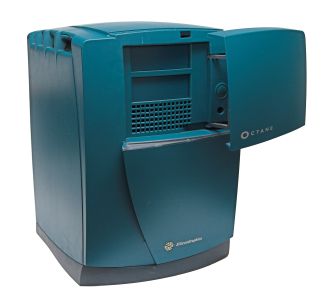 Bezel door open, showing the drive bays (afrank99, CC BY-SA 2.0)
 -
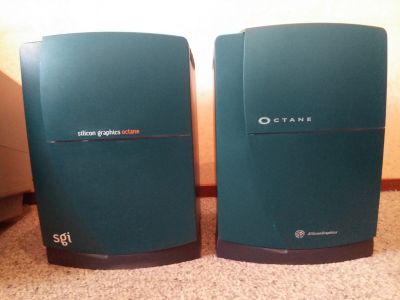 A later green Octane (left) beside an original (unicron1bot, CC BY 2.0)
 -
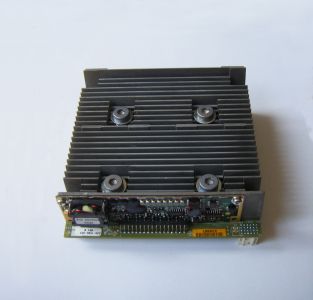 Single R12000 CPU module (Teewurzler, CC BY-SA 4.0)
 -
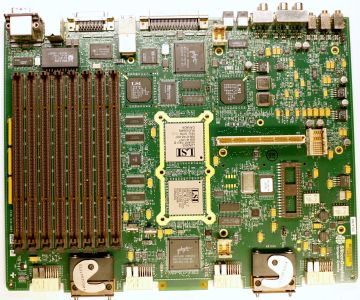 IP30 system board 030-0887-003 rev F (Mister rf, CC BY-SA 4.0)


Related pages
[edit | edit source]- SGI Octane General Maintenance
- SGI Octane Troubleshooting Guide
- SGI Octane Capacitor Replacement Guide
- SGI Octane Documentation
- SGI Octane2
References
[edit | edit source]- ↑ 1.0 1.1 1.2 1.3 1.4 1.5 1.6 1.7 "SGI Octane", Wikipedia, en.wikipedia.org/wiki/SGI_Octane. Release year, code names, IRIX support, case colours. The article carries no inline citations.
- ↑ 2.0 2.1 SGI, 007-3435-004, pp. 48-53. Single and dual CPU modules, four and six captive screws.
- ↑ 3.0 3.1 3.2 3.3 3.4 3.5 3.6 3.7 "Octane", TechPubs Wiki (IRIXNet community), tech-pubs.net/wiki/index.php/Octane, retrieved 21 October 2026. Xbow architecture, processor list, system board revisions 030-0887-00x and 030-1467-001, Octane2 differences, interchangeable plastics. Community source.
- ↑ 4.0 4.1 SGI, 007-3435-004, pp. 54-58. DIMM banks, population rules, colour-coded labels, 64 MB to 2 GB.
- ↑ 5.0 5.1 SGI, 007-3435-004, pp. 217-218. Internal drives, 3.5-inch form factor, SCSI IDs 0-1 to 0-3.
- ↑ 6.0 6.1 6.2 Silicon Graphics, Octane Workstation Owner's Guide, 007-3435-004, 2002, pp. 3-8, Figures 1-1 and 1-2 (File:SGI Octane Workstation Owner's Guide (007-3435-004).pdf). Front and back views, modules and ports, two-person lift.
- ↑ 7.0 7.1 7.2 7.3 7.4 7.5 7.6 SGI, 007-3435-004, appendix C, pp. 293-314, Table C-17. Ports and physical environment specifications.
- ↑ 8.0 8.1 Silicon Graphics, OCTANE Graphics Board Hardware and Software Designations, 007-3852-001, 1998 (File:SGI Octane Graphics Board Hardware and Software Designations (007-3852-001).pdf). Board names and hinv designations.
- ↑ 9.0 9.1 Silicon Graphics, Octane/Octane2 Workstation VPro Graphics Upgrade Kit Installation Guide, 007-4210-003, 2003, pp. 1-6 (File:SGI Octane and Octane2 VPro Graphics Upgrade Kit Installation Guide (007-4210-003).pdf). Xbow 1.4 for V10 and V12, power supply, IRIX 6.5.10 and PROM revisions.
- ↑ 10.0 10.1 SGI, 007-3435-004, pp. 131-134. XIO module slots A to D, board placement, overheating warning.
- ↑ 11.0 11.1 SGI, 007-3435-004, pp. 84-86 and 314. PCI module, board combinations, 45 W limit.
- ↑ 12.0 12.1 12.2 12.3 12.4 12.5 Silicon Graphics, Site Preparation for SGI 2000-Series, Origin Family, Onyx2, Octane, and O2, 007-3452-004, pp. 37-38, Tables 4-1 and 4-2 (File:SGI Site Preparation for SGI 2000-Series, Origin, Onyx2, Octane and O2 (007-3452-004).pdf). Weight, power factor, inrush current, cooling and airflow.
- ↑ 13.0 13.1 13.2 Silicon Graphics, Octane_ide Reference Guide, 108-0217-002, pp. 3-1 to 3-3 (File:SGI Octane ide Reference Guide (108-0217-002).pdf). Number-in-a-Can chips on the CPU module, system board, frontplane and power supply; sample output.
- ↑ SGI, 007-3435-004, appendix A, pp. 281-284. Graphics boards and the texture memory option.
- ↑ 15.0 15.1 15.2 Silicon Graphics, Octane Workstation VPro Graphics Power Supply Upgrade Instructions, 007-4208-001, 2000, pp. 1 and 14 (File:SGI Octane VPro Graphics Power Supply Upgrade Instructions (007-4208-001).pdf). VPro needs a new supply; PWR.SPPLY.ER 060-0035-001 or later.
- ↑ Silicon Graphics, OCTANE Frontplane Upgrade Information, 007-3718-001, 1998 (File:SGI Octane Frontplane Upgrade Information (007-3718-001).pdf). Xbow revision 1.2 frontplanes.
- ↑ SGI, 007-3435-004, pp. 71-80. Removing and installing the power supply.
- ↑ SGI, 007-3435-004, appendix B, pp. 287-290. Compression connectors.
- ↑ SGI, 007-3435-004, pp. 237-249. Frontplane module, system identification module, system fan.
- ↑ SGI, 007-3435-004, pp. 235-237. Light module.
- ↑ SGI, 007-3435-004, p. 184. Two wide Ultra SCSI buses, one internal and one external.
- ↑ 22.0 22.1 22.2 "Octane Power Supply", IRIXNet forum thread 788, posts by 23jodys, callahan, Zerolapse and soviet, December 2018 to November 2020, forums.irixnet.org/thread-788.html. Relay click with no start; Lucent black handle and Cherokee silver handle; cracked solder joints on the supply's coils.
- ↑ megaimg, "Octane PSU Repair - Click of Dead", IRIXNet forum thread 3255, 24 November 2021, forums.irixnet.org/thread-3255.html. Lucent 060-0028-003 623 W supply.
- ↑ Podboy and weblacky, "What is it, Octane?", IRIXNet forum thread 4549, June and July 2025, forums.irixnet.org/thread-4549.html. Lucent 623 W 060-0038-001 supply; ESSI board failure.
- ↑ 25.0 25.1 25.2 Erik Baigar (ebaigar) and others, "Octane PSU repair / Cherokee...", IRIXNet forum thread 4349, July 2024 to January 2025, forums.irixnet.org/thread-4349.html. Cherokee SP360 2A 747 W supply, standby supply and DS1687 power-on, C1053 fault.
- ↑ weblacky, Raion, kshuff and jwhat, "Need a fact check for Octane old vs new parts mixing", IRIXNet forum thread 4213, February 2024, forums.irixnet.org/thread-4213.html. Cherokee supply needed only for VPro; board and DIMM compatibility.
- ↑ bnoji and weblacky, "Octane - PSU Shuts Off / Short Circuit", IRIXNet forum thread 4531, May 2025, forums.irixnet.org/thread-4531.html. Click of death; most failures are the supply.
- ↑ evanretro and soviet, "Damaged Lucent Octane power supply", IRIXNet forum thread 4473, February to April 2025, forums.irixnet.org/thread-4473.html. Cold joint on a coil causing random power-offs and XIO errors.
- ↑ JannieVanZyl and CB_HK, "Octane2 (R14000/600, Odyssey): bad DIMM errors over serial, then completely dead", IRIXNet forum thread 5048, October 2026, forums.irixnet.org/thread-5048.html. PROM DIMM error messages, dusty DIMMs.
- ↑ weblacky, "I'll rebuild your Octane Lightbar with OEM-like Incandescent bulbs", IRIXNet forum thread 2640, December 2020 to April 2026, forums.irixnet.org/thread-2640.html. Lightbar bulbs.
- ↑ Silicon Graphics, OCTANE Air Intake Vent Maintenance Instructions, 007-3583-001, 1998 (File:SGI Octane Air Intake Vent Maintenance (007-3583-001).pdf).