

SGI O2+
 | |
| An O2+ in its purple case (Ajerimez, public domain) | |
| Specifications | |
|---|---|
| Manufacturer | Silicon Graphics, Inc. |
| Type | Workstation |
| CPU | RM7000-class or R12000-class CPU module[1] |
| Memory | 256 MB minimum (two 128 MB DIMMs) in eight DIMM sockets[2] |
| Storage | System disk; second internal drive on RM7000-class machines; CD-ROM drive[1][3] |
| Display | Monitor port (15-pin D-sub); optional stereo view port and Presenter 1280 flat panel adapter[4] |
| Sound | Side panel: stereo line in and out (RCA), stereo headphone out, mono microphone in; rear: stereo line out[5] |
| Ports / interface | SCSI, parallel, two serial, 10/100 Ethernet, keyboard, mouse, monitor, stereo audio; side-panel audio and video on some models[1] |
| Power | 100-132 V AC at 2.4-1.8 A or 200-264 V AC at 1.2-0.9 A, 47-63 Hz[6] |
| Dimensions | 32.3 × 22.9 × 29.2 cm (H × W × L), O2 chassis[7] |
| Weight | 9.1 kg (O2 chassis)[7] |
| OS / Firmware | IRIX 6.5[8] |
| Predecessor | SGI O2 |
The SGI O2+ is a version of Silicon Graphics' SGI O2 desktop workstation. SGI's note to buyers, dated 2001, describes it as an O2 with twice the system memory, twice the system disk capacity, a new high-performance processor and a purple case, and refers owners to the O2's own owner's guide and hardware reference guide.[9] SGI followed this in January 2002 with an O2+ hardware reference guide revised from the O2's.[10] The O2+ was made in small numbers, according to the IRIXNet community's TechPubs Wiki.[11]
The O2+ shares the O2's chassis, modules and procedures, so its maintenance and fault-finding follow the O2 pages; the O2+ pages cover what SGI documented for this model.
Models
[edit | edit source]SGI's guide covers two classes of O2+, named after their CPU modules: RM7000-class and R12000-class. The RM7000-class machine has a bay for an optional second internal drive beside the system disk; the R12000-class machine has room only for the system disk.[1][3] The R12000-class CPU module sits under a metal heat sink with its own fan, and changing it means removing the plastic faceplate from the system module; the RM7000-class module is held by two Phillips screws under the PCI tray.[12]
Hardware
[edit | edit source].png)
The system module slides out of the left side of the back, released by a lever on its left edge. It carries the CPU module, the eight DIMM sockets and a PCI tray for a PCI option board, and has a slot for a display adapter option.[1][13] The circuit board under the PCI tray holds a chip with the workstation's serial number, so SGI's instructions for changing the system module move the PCI tray, with any board in it, to the new module.[14] The system disk and the optional drive are in their own modules, and an audio-visual module on the side of the case carries the analogue audio and, on some models, S-video and composite video connectors.[1][15]
The power supply slides out of the back above the drive modules, behind a bezel. SGI's glossary notes that it also holds the power switch, the reset button and the fan.[16][17] SGI's buyer's note lists no change to the supply from the O2.[9] The motherboard carries a lithium battery; SGI's safety section says to replace it only with the same or an equivalent type.[18]
Memory goes in pairs in four banks of two sockets. Sockets 1 and 2 must always be filled, the highest-density DIMMs go in the lowest sockets, and the two DIMMs in a bank must be the same capacity. The minimum is 256 MB, two 128 MB DIMMs.[2]
Specifications
[edit | edit source]| Item | SGI figure |
|---|---|
| Input | 100-132 V AC, 2.4-1.8 A, or 200-264 V AC, 1.2-0.9 A; 47-63 Hz; earthed three-pin plug[6] |
| Heat | 245 W[6] |
| Temperature | 10 to 35 °C operating; −40 to 65 °C not operating[6] |
| Relative humidity | 10% to 80% operating; 5% to 90% not operating; non-condensing[6] |
| Altitude | 3,048 m (10,000 ft) operating; 12,192 m (40,000 ft) not operating[6] |
| Noise | 35 dB(A) in a typical operating position[6] |
| O2 chassis, site preparation guide | 32.3 cm high, 22.9 cm wide, 29.2 cm long; 9.1 kg; power factor 0.96 minimum; 40 A maximum inrush[7] |
The O2+ guide gives the workstation's dimensions as 12 inches high, 9 inches deep and 5 inches wide. That width does not match the O2 chassis dimensions in SGI's site preparation guide, which are given above.[6][7]
Known faults
[edit | edit source]The O2+ shares the O2's known faults. Those reported for the O2 family include:
- Memory contacts. The TechPubs Wiki reports that O2 DIMMs are easily upset by dirt and shocks in transit, giving random memory errors or no boot with a solid red or blinking amber LED; cleaning and reseating usually cures it.[11]
- The CD-ROM drive tray. The TechPubs Wiki describes a nylon pinion on the tray motor of the Toshiba drives fitted to O2s that splits with age, so the tray will not open or will not stay shut.[11]
- Machines that will not power on. One owner on IRIXNet finds this common among O2s, and notes that the O2 board has a jumper beside the NVRAM clock chip that forces the machine on when shorted.[19]
SGI's LED flow charts for the O2+ are on SGI O2+ Troubleshooting Guide. See also SGI O2+ General Maintenance and SGI O2+ Capacitor Replacement Guide.
Documentation
[edit | edit source]- Silicon Graphics O2+ Workstation Hardware Reference Guide, 007-4486-001: File:SGI O2+ Workstation Hardware Reference Guide (007-4486-001).pdf
- Important Note: Silicon Graphics O2+ Hardware Documentation, 007-4473-001: File:SGI O2+ Hardware Documentation Important Note (007-4473-001).pdf
- Site Preparation for SGI 2000-Series, Origin Family, Onyx2, Octane, and O2, 007-3452-004: File:SGI Site Preparation for SGI 2000-Series, Origin, Onyx2, Octane and O2 (007-3452-004).pdf
Contents and coverage are on SGI O2+ Documentation.
Gallery
[edit | edit source]-
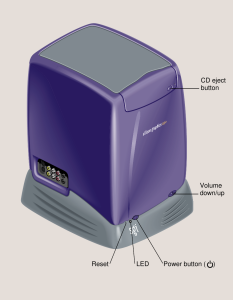 Front controls (SGI, Figure 1-1)
 -
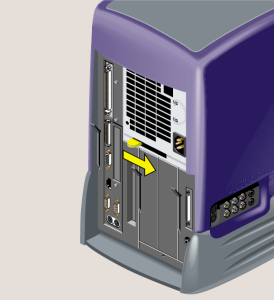 Releasing the power supply (SGI, Figure 5-38)
.png)
.png)
Related pages
[edit | edit source]- SGI O2+ General Maintenance
- SGI O2+ Troubleshooting Guide
- SGI O2+ Capacitor Replacement Guide
- SGI O2+ Documentation
- SGI O2
References
[edit | edit source]- ↑ 1.0 1.1 1.2 1.3 1.4 1.5 SGI, 007-4486-001, pp. 2-5, Figures 1-1 to 1-4. Front, rear (RM7000-class and R12000-class) and side views.
- ↑ 2.0 2.1 SGI, 007-4486-001, pp. 33-35. DIMM banks and population rules.
- ↑ 3.0 3.1 SGI, 007-4486-001, pp. 75-90. Second internal hard drive, RM7000-class workstations only.
- ↑ SGI, 007-4486-001, pp. 198-200, Tables A-8 to A-10. Monitor, stereo view and Presenter 1280 ports.
- ↑ SGI, 007-4486-001, pp. 100-101. Audio ports.
- ↑ 6.0 6.1 6.2 6.3 6.4 6.5 6.6 6.7 SGI, 007-4486-001, appendix A, Table A-19, p. 208. Physical environment specifications.
- ↑ 7.0 7.1 7.2 7.3 Silicon Graphics, Site Preparation for SGI 2000-Series, Origin Family, Onyx2, Octane, and O2, 007-3452-004, pp. 30-32, Tables 3-1 and 3-2 (File:SGI Site Preparation for SGI 2000-Series, Origin, Onyx2, Octane and O2 (007-3452-004).pdf). O2 chassis dimensions, weight, power and cooling.
- ↑ SGI, 007-4486-001, p. 13. The O2+ IRIX operating system CD, labelled IRIX 6.5.
- ↑ 9.0 9.1 Silicon Graphics, Important Note: Silicon Graphics O2+ Hardware Documentation, 007-4473-001, 2001 (File:SGI O2+ Hardware Documentation Important Note (007-4473-001).pdf). Differences from the O2; refers owners to the O2 guides.
- ↑ Silicon Graphics, Silicon Graphics O2+ Workstation Hardware Reference Guide, 007-4486-001, January 2002, record of revision, p. iii (File:SGI O2+ Workstation Hardware Reference Guide (007-4486-001).pdf).
- ↑ 11.0 11.1 11.2 "O2", TechPubs Wiki (IRIXNet community), tech-pubs.net/wiki/index.php/O2, retrieved 21 October 2026. O2+ production, memory and CD-ROM faults. Community source.
- ↑ SGI, 007-4486-001, pp. 120-136. Replacing the RM7000-class and R12000-class CPU modules.
- ↑ SGI, 007-4486-001, pp. 27-31 and 69-71. Removing and reinstalling the system module.
- ↑ SGI, 007-4486-001, p. 119. Replacing the system module; the serial number chip under the PCI tray.
- ↑ SGI, 007-4486-001, pp. 142-148. Replacing the audio-visual module.
- ↑ SGI, 007-4486-001, pp. 149-157. Replacing the power supply.
- ↑ SGI, 007-4486-001, glossary, "power supply".
- ↑ SGI, 007-4486-001, pp. 183-184. Lithium battery statement and safety instructions.
- ↑ stormy and weblacky, "Octane PSU repair / Cherokee...", IRIXNet forum thread 4349, 13-14 October 2024, forums.irixnet.org/thread-4349.html. O2s that will not power on; the jump-start jumper beside the NVRAM; the O2 and Octane use the same Dallas clock module.