

SGI Origin 200
 | |
| Front of a rack-mounted Origin 200 with its door closed (Dave Fischer, CC BY-SA 3.0) | |
| Specifications | |
|---|---|
| Manufacturer | Silicon Graphics |
| Type | Server |
| Released | October 1996[1] |
| Discontinued | 30 June 2002[1] |
| CPU | One or two MIPS R10000 per module, up to four in a two-module system;[2] later R12000[1] |
| Memory | 32 MB to 2 GB per module, eight DIMM sockets[2] |
| Storage | Six 3.5-inch drive sleds and one 5.25-inch bay per module[2] |
| Display | — |
| Sound | — |
| Expansion | Three 32- or 64-bit PCI slots per module[2] |
| Power | 480 W supply per module, 100-120 or 200-240 V AC autoranging[2] |
| Dimensions | Tower 58.4 × 67.3 × 22.8 cm (H × D × W); rack 17.3 × 63.5 × 44.2 cm[2] |
| Weight | 18 to 34 kg per module[2] |
| OS / Firmware | IRIX 6.4, later IRIX 6.5[1] |
| Codename | Speedo |
The SGI Origin 200 is the entry-level server of Silicon Graphics' Origin family, introduced in October 1996 alongside the larger SGI Origin 2000.[1] It uses the same architecture as the Origin 2000 in a different hardware design.[1] A system is one or two chassis, which SGI calls modules; two modules are joined by a CrayLink cable and run as one machine with up to four processors.[2][3] Each module was sold either as a free-standing tower with plastic side panels, top cap and feet, or as a rackmount chassis for 19-inch or 21-inch racks.[2] The Origin 200 has no graphics option: the system console is an ASCII terminal, or another computer running a terminal emulator, on serial port 1.[3]
History
[edit | edit source]SGI's code name for the Origin 200 was Speedo. It shipped with IRIX 6.4 and was later supported by IRIX 6.5.[1] A processor module with 225 MHz R10000s followed in August 1998, and 270 MHz R12000 modules came later.[1] The Origin 200 GIGAchannel adds a second cabinet holding five XIO slots and four more PCI slots, connected to the server by two XIO cables.[1][4] SGI discontinued the Origin 200 on 30 June 2002.[1] The sgistuff.net hardware pages give June 2007 as the end of service.[5]
Configurations
[edit | edit source]| Feature | One module | Two modules |
|---|---|---|
| Processors | 1 or 2 R10000 | 2 to 4 |
| Secondary cache | 1 MB or 2 MB per processor | 1 MB or 2 MB per processor |
| Memory | 32 MB to 2 GB | 64 MB to 4 GB |
| Internal SCSI | One Ultra SCSI (wide), one Fast SCSI (narrow) | Two of each |
| 3.5-inch drives | Six | Twelve |
| Serial ports | Two RS-232 | Four |
| Ethernet | One 10Base-T/100Base-TX | Two |
| PCI slots | Three | Six |
| Power supplies | One, 480 W | Two, 480 W each |
The sgistuff.net and Wikipedia pages list 4 MB secondary-cache processor modules; SGI's 1998 owner's guide gives 1 MB or 2 MB per processor.[5][1][2]
Hardware
[edit | edit source]Logic carrier
[edit | edit source]The logic carrier is a sheet-metal tray holding the main system board, the CPU daughter card and the PCI backplane. SGI treats the whole assembly as one field-replaceable unit.[2] The main board carries the two SCSI controllers for the internal drives, the Ethernet controller, two serial UARTs, the parallel port, the three PCI slots, eight DIMM sockets and the CrayLink connector.[2] The processors sit on the daughter card. The PCI backplane takes full-size 32-bit or 64-bit boards in slots with PCI IDs 5, 6 and 7, and supplies up to 30 W at 3.3 V as well as 5 V.[2]
Module system controller
[edit | edit source]The module system controller (MSC) sits behind the front panel. It holds the system serial number in a "number in a can" (NIC) chip, turns the main power on and off, resets the machine and drives the three-colour status LED.[2] The supply feeds it 5 V whenever the rear master power switch is on, even with the system off, and it answers commands from a terminal on the DIN-8 AUX port.[6] In a two-module system a DIP switch on each MSC sets which module is master; only the master's console, AUX port and front power switch are active.[3]
Memory and drives
[edit | edit source]Memory is fitted as pairs of identical DIMMs in four banks of two sockets, and bank 0 must be filled in every module.[2][7] The 3.5-inch drives are on SCSI channel 0 (Fast-20, 16-bit wide, 40 MB per second); each sits on a sled that plugs into the SCSI backplane, and its ID is set by its position, from ID 1 at the bottom to ID 6 at the top. The 5.25-inch bay takes one full-height or two half-height drives on channel 1 (Fast SCSI, 8-bit, 10 MB per second), with IDs set by jumpers on the drives.[2]
Ports
[edit | edit source]Each module has two DB9 serial ports with an IBM-compatible pinout, which differs from earlier SGI DB9 ports; the DIN-8 AUX port for the MSC; a 36-pin IEEE 1284 parallel port; an RJ-45 10Base-T/100Base-TX Ethernet port with two status LEDs; two 3.5 mm jacks for SGI's external interrupt interface; and the CrayLink connector.[2]
Power and cooling
[edit | edit source]| Specification | Value |
|---|---|
| Input | 100-120 V or 200-240 V AC, autoranging, 47-63 Hz |
| Input current | 8 A at 100 V, 4 A at 240 V |
| Input power | 805 W, fully configured |
| Inrush current | 140 A maximum |
| Outputs | +5 V, +12 V, −12 V, +3.45 V |
| Output power | 483 W, fully configured |
| Power factor | 0.98, corrected |
| Efficiency | 60% |
Three DC fans behind the drive bays draw air from front to rear, up to 100 cubic feet per minute. The MSC runs them at normal speed below 28.5 °C intake air and at high speed from 28.5 to 40 °C. If one fan fails the status LED turns solid amber and the other two run at high speed; above 28.5 °C with a failed fan, the system shuts down.[2] A redundant power supply was offered; it needs MSC firmware 3.3S or later.[4]
Known faults and hazards
[edit | edit source]- A failed fan shows as a solid amber status LED. See SGI Origin 200 General Maintenance for replacement.[8]
- Power supply faults show as a blinking or solid red LED during power-up or power-down. See SGI Origin 200 Troubleshooting Guide.[8]
- SGI warns that the two modules of a two-module system must share the same grounded power source. Modules earthed at different points can be at different ground potentials, which damages the main system board.[2][3]
- Each module can draw up to 140 A of inrush current at switch-on. SGI warns that some UPS units cannot supply it and may be damaged or catch fire.[2]
- After switching the master power switch off, wait at least 7 seconds before switching it on again, or the MSC may not initialise.[6]
Documentation
[edit | edit source]- Origin200 Owner's Guide, 007-3415-003: File:SGI Origin200 Owner's Guide (007-3415-003).pdf
- Origin 200 and Origin 200 GIGAchannel Maintenance Guide, 007-3709-002: File:SGI Origin200 and Origin200 GIGAchannel Maintenance Guide (007-3709-002).pdf
Contents and coverage are on SGI Origin 200 Documentation.
Gallery
[edit | edit source]-
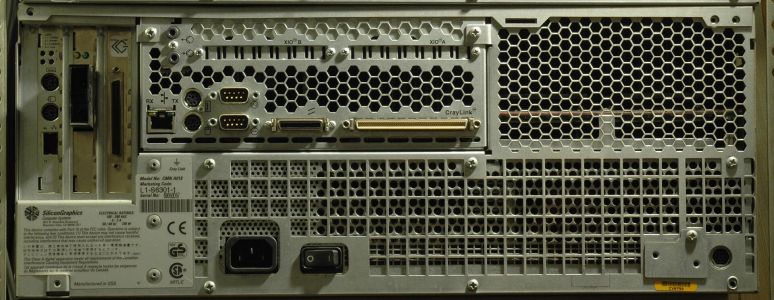 Rear of a rack-mounted Origin 200: PCI slots, XIO and CrayLink connectors, I/O ports, mains inlet and master power switch (Dave Fischer, CC BY-SA 3.0)
 -
 Front panel controls, from SGI's owner's guide
 -
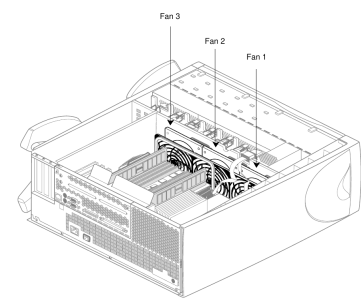 The three fans, from SGI's owner's guide


Related pages
[edit | edit source]- SGI Origin 200 General Maintenance
- SGI Origin 200 Troubleshooting Guide
- SGI Origin 200 Capacitor Replacement Guide
- SGI Origin 200 Documentation
- SGI Origin 2000
References
[edit | edit source]- ↑ 1.00 1.01 1.02 1.03 1.04 1.05 1.06 1.07 1.08 1.09 1.10 "SGI Origin 200", Wikipedia, en.wikipedia.org/wiki/SGI_Origin_200 (retrieved 21 October 2026). Introduction date, code name, IRIX releases, later processor modules, GIGAchannel, discontinuation date.
- ↑ 2.00 2.01 2.02 2.03 2.04 2.05 2.06 2.07 2.08 2.09 2.10 2.11 2.12 2.13 2.14 2.15 2.16 2.17 2.18 2.19 2.20 2.21 Silicon Graphics, Origin200 Owner's Guide, 007-3415-003, 1998, chapter 1, pp. 4-26 (File:SGI Origin200 Owner's Guide (007-3415-003).pdf). Table 1-1 features, logic carrier, MSC, PCI, memory, SCSI channels, ports, Table 1-4 power supply, fans and Tables 1-5 and 1-6, Table 1-7 specifications, grounding caution.
- ↑ 3.0 3.1 3.2 3.3 SGI, 007-3415-003, pp. 30-32 and 51-52. Grounding of two-module systems, weight, system console on serial port 1, master and slave modules.
- ↑ 4.0 4.1 Silicon Graphics, Origin 200 and Origin 200 GIGAchannel Maintenance Guide, 007-3709-002, 1999, pp. 58-59 and 90-92 (File:SGI Origin200 and Origin200 GIGAchannel Maintenance Guide (007-3709-002).pdf). Status LEDs, redundant power supply and MSC firmware 3.3S, GIGAchannel cabinet.
- ↑ 5.0 5.1 Gerhard Lenerz, "Origin 200", sgistuff.net, sgistuff.net/hardware/systems/origin200.html (retrieved 21 October 2026). Community hardware page: production and service dates, processor module list.
- ↑ 6.0 6.1 SGI, 007-3415-003, chapter 4, pp. 76-106. Front panel, master and front power switches, 7-second wait, AUX port and MSC commands.
- ↑ SGI, 007-3415-003, chapter 6, pp. 128-131. DIMM rules and bank order.
- ↑ 8.0 8.1 SGI, 007-3415-003, chapter 9, pp. 191-192, Table 9-1. Status LED messages.