

SGI Visual Workstation 330
.png) | |
| Front of the Silicon Graphics 330, from SGI's User's Guide (Figure 1-1) | |
| Specifications | |
|---|---|
| Manufacturer | Silicon Graphics, Inc. (SGI) |
| Type | Workstation |
| Released | 2000[1] |
| CPU | One or two Intel Pentium III (FC-PGA), 133 MHz system bus[2] |
| Memory | Up to 1.5 GB ECC registered SDRAM in three DIMM sockets[2] |
| Storage | On-board dual-channel Ultra160 SCSI (Adaptec AIC-7899) and two IDE channels[2] |
| Display | From the AGP graphics card[2] |
| Sound | On-board: line out, audio in, microphone in[2] |
| Graphics | AGP graphics card[2][3] |
| Expansion | One AGP slot, five PCI slots[2] |
| Dimensions | 48.9 × 20.95 × 49.16 cm (H × W × D, with bezel)[4] |
| Weight | 32 lb (dual-processor configuration)[4] |
| OS / Firmware | Windows NT 4.0, Windows 2000 or Linux[2] |
The SGI Visual Workstation 330 (sold as the Silicon Graphics 330 visual workstation) is a dual-processor Pentium III workstation that SGI introduced in 2000; its User's Guide was first published in June 2000.[1] Like the single-processor SGI Visual Workstation 230, it is a conventional PC with a VIA Apollo Pro 133A chipset, an AGP graphics card and a standard BIOS, and shares none of the Cobalt hardware of the SGI Visual Workstation 320.[2][3] SGI's guide credits the system board and BIOS chapters to Acer Incorporated and the SCSI chapter to Adaptec.[1] SGI supported Linux, Windows NT 4.0 and Windows 2000 on it.[2]
Hardware
[edit | edit source]The M25D system board is an extended ATX board with two FC-PGA sockets: CPU socket 1 is U20 and CPU socket 2 is U3.[2] The VIA Apollo Pro 133A chipset is the VT82C694X north bridge (U15) and the VT82C686A south bridge (U37). The board also carries an Intel 82559 10/100 Ethernet controller (U30) and an Adaptec AIC-7899 dual-channel Ultra160 SCSI controller (U46) with a 68-pin connector for each channel.[2] SGI's guide gives the processor options as 733 to 800 MHz in its overview and as 733, 800 or 866 MHz in the installation section, all on a 133 MHz system bus.[2][5]
The three DIMM sockets take 3.3 V ECC registered SDRAM at 100 or 133 MHz, up to 1.5 GB with three 512 MB modules; the two speeds must not be mixed, and SGI supports only memory it has tested.[2][6] There is one AGP slot and five PCI slots.[2] The board takes power through two ATX power connectors, PWR1 and PWR2.[2]
Board connectors and jumpers
[edit | edit source]| Item | Description |
|---|---|
| U20, U3 | CPU sockets 1 and 2 |
| JP2, JP1 | CPU socket 1 and 2 fan connectors |
| CN1, CN12 | CPU socket 1 and 2 thermal sensor connectors |
| PWR1, PWR2 | ATX power supply connectors |
| CN25, CN22 | SCSI channel A and B (68-pin, Ultra160) |
| JP3X | SCSI channel A terminator: 1-2 on (default), 2-3 off |
| JP4 | 1-2 on-board buzzer (default), 2-3 external speaker |
| CN17, CN20 | IDE 1 and IDE 2 |
| CN18 | AGP slot |
| BT1 | Battery |
Chassis and cooling
[edit | edit source]The chassis is the same as the 230's: three 5.25-inch bays with the CD-ROM drive at the top, four 3.5-inch bays (two at the front), a front fan drawing air in, and a rear panel fan and the power supply fan pushing it out. The supply is switch-selectable for 110 V or 220 V and sits above the system board at the rear.[7] SGI gives the system's power requirements only on the label at the back.[4]
Known faults
[edit | edit source]SGI's guide lists the BIOS error messages and what to do about each. "CMOS battery bad" calls for a new lithium battery, and repeated "Run Setup" messages mean the battery may be bad and the CMOS settings are not being kept.[8] See SGI Visual Workstation 330 Troubleshooting Guide and SGI Visual Workstation 330 General Maintenance.
Documentation
[edit | edit source]- Silicon Graphics 330 Visual Workstation User's Guide, 007-4278-001, June 2000: File:SGI Visual Workstation 330 User's Guide (007-4278-001).pdf
- Installing an AGP Card in the Silicon Graphics 230, 330, and 550 Visual Workstations, 007-4299-001: File:SGI Visual Workstation 230, 330 and 550 AGP Card Installation (007-4299-001).pdf
Gallery
[edit | edit source]-
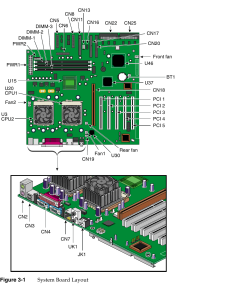 M25D system board layout (SGI User's Guide, Figure 3-1)
.png)
Related pages
[edit | edit source]- SGI Visual Workstation 330 General Maintenance
- SGI Visual Workstation 330 Troubleshooting Guide
- SGI Visual Workstation 330 Capacitor Replacement Guide
- SGI Visual Workstation 230
- SGI Visual Workstation 320
References
[edit | edit source]- ↑ 1.0 1.1 1.2 Silicon Graphics, Inc., Silicon Graphics 330 Visual Workstation User's Guide, 007-4278-001, front matter (File:SGI Visual Workstation 330 User's Guide (007-4278-001).pdf). Revision 001, June 2000; chapters 3 and 4 by Acer Incorporated, chapter 5 by Adaptec.
- ↑ 2.00 2.01 2.02 2.03 2.04 2.05 2.06 2.07 2.08 2.09 2.10 2.11 2.12 2.13 2.14 2.15 2.16 SGI, 007-4278-001, pp. 55-62, Figure 3-1 and Table 3-1. M25D board, supported operating systems, chipset, memory, components and jumpers.
- ↑ 3.0 3.1 "SGI Visual Workstation", Wikipedia, en.wikipedia.org. The 230, 330 and 550 as standard PCs with NVIDIA Quadro2-based AGP cards.
- ↑ 4.0 4.1 4.2 SGI, 007-4278-001, p. 137, Table B-1. Dimensions, weight; power requirements on the rear label.
- ↑ SGI, 007-4278-001, pp. 63-64. Processor speeds and installation.
- ↑ SGI, 007-4278-001, p. 65. DIMM sizes and the warning against mixing 100 MHz and 133 MHz SDRAM.
- ↑ SGI, 007-4278-001, pp. 1-8. External and internal structure, drive bays, fans, power supply.
- ↑ SGI, 007-4278-001, pp. 67-71, Table 3-2. System error messages and corrective measures.