

SGI Origin 2000 Capacitor Replacement Guide
.jpg)
Capacitor notes for the SGI Origin 2000 power supply, which the SGI Onyx2 deskside and rack modules also use. SGI documents the supply only as a unit to be changed by its own engineers and lists no components for it, the node boards or the midplane.[1][2] No capacitor list for it has been published. The repair below was posted by an owner in December 2024.[3] Owners on the same forum call it the Cherokee supply.[3][4]
Warning: SGI states that the system uses hazardous electrical power internally, and each module can draw 140 A at switch-on.[5][6] The supply runs from mains and its input capacitors can hold a charge after the cord is pulled. Disconnect the module, wait, and confirm with a meter that the capacitors have discharged before touching anything inside.
What SGI documents
[edit | edit source]- The supply is autoranging, 110-120 V or 220-240 V, and produces +12 V, +5 V and +3.45 V. The MSC's DC OK LED shows that these and the remote 3.3 V, 2.4 V and 1.6 V supplies are present, but not that they are accurate.[1][7]
- It has three LEDs on its front face: amber for AC present, green for outputs within specification (blinking when overloaded), and red for a fault shutdown (blinking for undervoltage on +3.45 V, +5 V or +12 V).[2]
- The MSC can move the 3.45 V and 5 V outputs 5% up or down from its diagnostic port for margin testing.[7]
- The redundant supply option is a different unit: an enclosure of four modules (module 060-0055-00x, enclosure 013-2469-00x) that needs 220 V and draws up to 2,300 W.[5]
Signs of a failing supply
[edit | edit source]PS FAILorPFW FAILon the MSC display, or a shutdown with the red LED on the supply lit or blinking.[7][2]- Shutdowns at random intervals, from seconds to an hour after power-on, cleared by cycling the key switch. One owner saw this with
PS FAILand later withFAN FAIL, so check the fan tray too.[4] - A supply that is completely dead after a power fault, with the MSC showing a power failure.[3]
See also Capacitor Failure Symptoms.
An owner's repair
[edit | edit source]Pentium, posting on the IRIX Network forum, found his Origin 2000 silent with a power fault on the MSC; after the breaker was cycled the supply was completely dead.[3] His findings:
- Q113, one of a pair of IRFPG40 MOSFETs on the primary board, had failed explosively, and the 7 A 250 V fast-blow fuse had vaporised.
- The Nichicon electrolytic capacitors near the MOSFETs had all started to leak. The electrolyte had eaten through the single trace carrying the MOSFET's gate drive, so the gate signal went open and the MOSFET failed. The arc fed back into the gate-drive circuit and blew a 10 Ω 1/2 W resistor; he found that the damage stopped there, at that resistor and a zener diode.
- There was carbon tracking between the gate and drain pads. The break in the trace was right at the pad and could be seen only under a microscope.
- He counted over 70 capacitors in the supply and concluded that it needs a complete recap down to the control boards. He had no capacitor list.
-
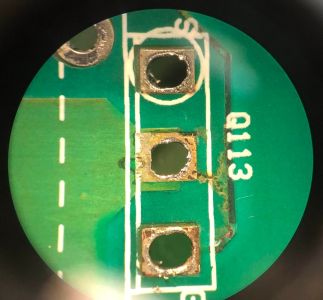 The Q113 position after the MOSFET was removed: the trace at the pad eaten through by electrolyte (Pentium, IRIX Network forum)
 -
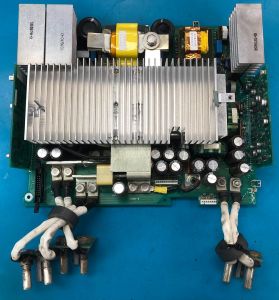 The DC secondary board, marked 105550-B (Pentium, IRIX Network forum)
.jpg)
.jpg)
Taking the supply apart
[edit | edit source]Pentium's notes on the disassembly:[3]
- Remove all the flush screws and the two handle screws. The shell comes apart in three panels.
- Unscrew the DC output lugs from the inside, then remove a few more screws to separate the DC secondary board. All screws up to this point are of two sizes.
- Mark each harness before unplugging it from the bulkhead, and note the black plastic baffle.
- The lower board is the primary AC to DC board. It comes out with similar screws, three very tall standoffs and a few more cables.
- The boards use leaded solder; a chisel-tip iron and a solder sucker remove the MOSFET pair and heat sink.
He replaced the IRFPG40s as a pair, moving the ferrite bead across to the new part, and repaired the broken trace with a wire laid over the break and covered in conformal coating.[3]
Beyond the supply
[edit | edit source]On an Onyx2 deskside, which uses the same deskside chassis, CB_HK found an exploded tantalum capacitor on the midplane when he took it out during a restoration; jan-jaap identified the part from photographs of his own midplane as 33 µF, 25 V.[8] Inspect the midplane and node boards for burnt or cracked tantalums whenever they are out.
Recording and replacing the capacitors
[edit | edit source]With no published list, record each electrolytic before removing it: board, designator, capacitance, voltage, temperature rating, maker and series, diameter and height, and polarity. Photograph both boards first.
| Board | Designator | Capacitance | Voltage | Temperature | Series | Size (D × H) | Condition |
|---|---|---|---|---|---|---|---|
| Primary (AC to DC) | |||||||
| Secondary (DC), 105550-B | |||||||
| Control boards |
Fit the same capacitance with at least the same voltage rating and a 105 °C, low-ESR series where the original was one. Clean away all old electrolyte and inspect every trace near a leaking part under magnification before fitting new parts; in Pentium's supply the break was visible only under a microscope.[3]
After the repair
[edit | edit source]- Refit the supply and turn on the rear breaker. The amber LED on the supply and the AC OK LED on the MSC should light.[7][2]
- Turn the key to On. DC OK should light about 3.5 seconds later, and the green Power Good LED on the supply should stay on.[7][2]
- The MSC should show
SYS OK.[1] - Measure +12 V, +5 V and +3.45 V. SGI publishes the nominal values only.[7]
Related pages
[edit | edit source]- SGI Origin 2000
- SGI Origin 2000 General Maintenance
- SGI Origin 2000 Troubleshooting Guide
- SGI Onyx2
- Capacitor Failure Symptoms
- Recommended Tools
References
[edit | edit source]- ↑ 1.0 1.1 1.2 Silicon Graphics, Origin2000 Deskside Owner's Guide, 007-3453-002, 1997, chapter 3, pp. 29-38 (File:SGI Origin2000 Deskside Owner's Guide (007-3453-002).pdf). Power supply among parts for SGI engineers, autoranging supply, SYS OK at power-on.
- ↑ 2.0 2.1 2.2 2.3 2.4 SGI, 007-3453-002, chapter 7, pp. 71-72. Power supply problems and the amber, green and red LEDs.
- ↑ 3.0 3.1 3.2 3.3 3.4 3.5 3.6 3.7 Pentium, "Onyx2/Origin 2000 Power Supplies and Capacitors - It's time, folks", IRIX Network forum, 27 December 2024, forums.irixnet.org/thread-4427.html. Owner's repair: disassembly, failed Q113 IRFPG40 and fuse, leaking Nichicon capacitors, eaten gate trace, over 70 capacitors.
- ↑ 4.0 4.1 "O2000 / onyx2 PSU fail (?)", IRIX Network forum, posts by coldbug (12 June 2021) and jgunnoe (7 November 2023), forums.irixnet.org/thread-2958.html. Intermittent PS FAIL shutdowns; the supply called the Cherokee supply.
- ↑ 5.0 5.1 Silicon Graphics, Origin 2000 Redundant Power Supply Option Owner's Guide, 007-3654-001, 1999, pp. xi, 2, 6 and 8 (File:SGI Origin 2000 Redundant Power Supply Option Owner's Guide (007-3654-001).pdf). Hazard warning, four-module supply, part numbers Table 1-2, specifications Table 1-3.
- ↑ Silicon Graphics, Site Preparation for SGI 2000-Series, Origin Family, Onyx2, Octane and O2, 007-3452-004, p. 64, Table 6-5 (File:SGI Site Preparation for SGI 2000-Series, Origin, Onyx2, Octane and O2 (007-3452-004).pdf). Inrush current.
- ↑ 7.0 7.1 7.2 7.3 7.4 7.5 SGI, 007-3453-002, chapter 6, pp. 64-66. AC OK and DC OK LEDs, supply and remote voltages, voltage margining.
- ↑ "Onyx2 Restoration (WIP)", IRIX Network forum, posts by CB_HK and jan-jaap, 19 March 2019, forums.irixnet.org/thread-1050.html. Exploded midplane tantalum, 33 µF 25 V.