National FS-5500 Troubleshooting Guide

No service manual or circuit diagram for the National FS-5500 has been found. Several of its functions are set by switches, and its RGB socket is not SCART, so check those before opening the case.[1]
Switches and settings
[edit | edit source]| Symptom | Check |
|---|---|
| Keys type the wrong characters | The keyboard layout switch at the back, which selects JIS or the Japanese syllabary layout.[1] |
| Trackball does nothing | The trackball switch on the front control panel, which assigns it to port 1, port 2 or neither.[1] |
| Joystick in one port does nothing | The same switch; the trackball may be assigned to that port.[1] |
| CALL SROMON or CALL SYSCON gives an error | The built-in firmware switch at the back must be on.[2] |
| AVC key functions do not work | The firmware switch, as above.[2] |
| Supplied disk will not start MSX-DOS | A known limit of the disk. Copy MSXDOS.SYS and COMMAND.COM to a newly formatted disk with the BASIC COPY command and boot from that.[1] |
| Drive B missing on an F1 | The F1 was sold with one drive; the second bay is blanked.[1] |
Video
[edit | edit source]| Symptom | Check |
|---|---|
| No picture from the 21-pin RGB socket on a European set | The socket is the Japanese RGB21 type, not SCART, so a SCART lead will not work.[3] |
| No picture on the RF output | The RF channel switch on the rear panel and the tuning of the set.[3] |
| Computer picture shows, video input missing, or the reverse | The superimpose buttons on the control panel select computer, computer plus video, or video alone.[4] |
| Garbled screen | The V9938 and its four VRAM chips on the main board.[4] Check that the heat sink on the V9938 is still seated. |
| Dull, noisy or unstable picture on all outputs | The electrolytic capacitors on the video board; failing capacitors in the video circuits show in the picture.[5][6] See the National FS-5500 Capacitor Replacement Guide. |
No power
[edit | edit source]- Check that the supply is 100 V. A machine that has been plugged into 230 V mains may have a blown fuse or a damaged supply.[3]
- Check the fuse on the rear panel, rated 125 V 3 A. If it has blown, look for the cause before fitting another.[4]
- Check the power switch and the lead into the power supply unit.
- Measure the rails at a front cartridge slot, with pin 41 as ground: +5 V on pins 45 and 47, +12 V on pin 48, −12 V on pin 50.[7]
- If a rail is low only with cartridges or expansion boards fitted, remove them and add them back one at a time.
Other faults
[edit | edit source]| Symptom | Check |
|---|---|
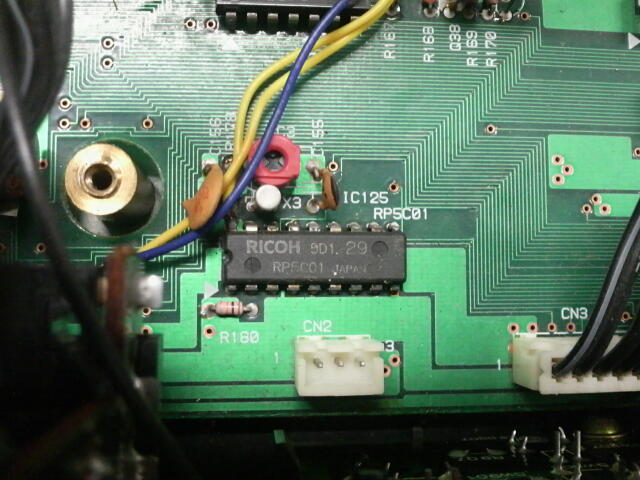
| Date, time or start-up settings lost | The clock chip, a Ricoh RP5C01 at IC125 on the main board, keeps them only while it has battery power.[8][9] Check the cell on the main board. |
| Second drive fitted to an F1 not seen | The drive's power connector and jumper; see National FS-5500 General Maintenance. |
| A drive does not read | The ribbon cables from the expansion slot board (CN909 and CN910), then the drive; see Floppy Drive Repair.[10] |
| Machine stops when a joystick or mouse is plugged in | The device. Pin 5 of each port gives +5 V at 50 mA, and an Amiga mouse or Atari or Commodore paddles can short it.[11] |
Related pages
[edit | edit source]- National FS-5500
- National FS-5500 General Maintenance
- National FS-5500 Capacitor Replacement Guide
- Floppy Drive Repair
- Capacitor Failure Symptoms
References
[edit | edit source]- ↑ 1.0 1.1 1.2 1.3 1.4 1.5 National FS-5500F1, MSX Resource Center wiki, 3 July 2026—link(accessed 2026-10-21) Two rear switches select JP50on or JIS keyboard layout (JIS stickers provided) and enable or disable the built-in firmware; a front switch assigns the trackball and its two mouse buttons to joystick port 1, port 2 or neither; the FS-5500F1 has one floppy drive; the firmware adds three instructions to MSX-BASIC; the supplied disk holds MSX-DOS 1 and Video Graphics, and MSX-DOS cannot be launched from it, as CTRL+STOP at boot freezes the screen; inserting the disk after booting and entering POKE &HF346,1: CALL SYSTEM starts the graphic tool; the remaining option is to copy MSXDOS.SYS and COMMAND.COM to a newly formatted disk with the BASIC COPY command.
- ↑ 2.0 2.1 FS-5500 ビデオ (video board), USB Secret Base (up-c), 2010—link(accessed 2026-10-21) The video board carries the alarm output and system terminals, the keyboard layout switch (JIS or 50-on) and the built-in software switch; turning that switch on starts nothing at power-on, but enables the AVC key functions (superimpose and digitise screens) and the FS-5500 BASIC extensions CALL SROMON, CALL SROMOFF and CALL SYSCON(0,0), whose details are unknown.
- ↑ 3.0 3.1 3.2 National FS-5500F2, MSX Resource Center wiki, 3 July 2026—link(accessed 2026-10-21) Connections: RF output with channel selector switch; RCA analog audio and composite video input; RCA analog audio and composite video output; RGB21 output (not SCART); two general ports with a switch to select the trackball; mains plug AC 100 V ±10%, 50/60 Hz; two AC 100 V outlets for a monitor.
- ↑ 4.0 4.1 4.2 National FS-5500, USB Secret Base (up-c), 2010 to 2017—link(accessed 2026-10-21) Front control panel: superimpose buttons and lamps (computer screen, computer plus video, video), input buttons (RGB, video), mode buttons (halftone, computer cut, video audio cut, fade), audio balance, fade level and digitise level sliders, trackball assignment switch and lamps, volume knob, headphone socket. Rear: fuse (125 V 3 A), switched and unswitched AC 100 V outlets, power cable. Inside: power supply unit, expansion slot board, memory board, video board. The V9938 has a heat sink; four 64K × 4 DRAMs make 128 KB of VRAM.
- ↑ File:National FS-5500 video board.jpg, uploaded to the MSX Resource Center wiki by Rderooy on 27 September 2016: video board with many small radial electrolytic capacitors and one large one.
- ↑ Recap recommendations, June 2018—link(accessed 2026-10-21) RetroTechie, 23 June 2018: in an MSX, capacitors in the analogue audio and video circuits show their condition in the picture or sound; the main power supply capacitors are worth replacing whatever their condition.
- ↑ MSX Cartridge slot, MSX Resource Center wiki, 6 July 2026—link(accessed 2026-10-21) Standard MSX cartridge slot: 41 and 43 GND, 45 and 47 +5 V, 48 +12 V, 50 −12 V.
- ↑ Real Time Clock Programming, MSX Resource Center wiki, 17 March 2023—link(accessed 2026-10-21) MSX2 computers use the Ricoh RP-5C01 or compatible for the time and date and to store system parameters restored at switch-on; the registers are kept as long as the chip is powered by the battery.
- ↑ USB Secret Base, photograph of the FS-5500 real time clock area: Ricoh RP5C01 at IC125, crystal X3 and a trimmer capacitor beside it.
- ↑ FS-5500 専用拡張スロット (expansion slots), USB Secret Base (up-c), 2010—link(accessed 2026-10-21) Three 50-pin connectors give three expansion slots, with the same signals as the MSX standard slot; the 20-pin CN905 is reported to be a dedicated RAM expansion connector; the 34-pin connectors CN909 and CN910, with flat cables, go to the floppy drives.
- ↑ General Purpose port, MSX Resource Center wiki, 13 December 2025—link(accessed 2026-10-21) Pin 5 +5 V (50 mA). Devices that can cause damage: Amiga mouse; Atari and Commodore paddles; FM Towns Marty pad and Sega Master System pads (pin 8).